Who is this guide for?

Handwritten PDF annotator

You want to add comments and sketches beside passages, while switching between writing and typing. Check that the stylus, PDF app and any accessories are compatible with the exact model. Lenovo describes the Yoga 7 2-in-1 Gen 9 as having both tablet and laptop modes; Microsoft says the Slim Pen for the Surface Pro 12-inch (1st Edition) is sold separately.

Mobile café reader

You often take your laptop with you, work at a small table and don’t want to rely entirely on a power socket. Compare the weight of the complete setup and check which activity was tested for the battery figures. Apple publishes separate battery figures for video streaming and wireless internet on the MacBook Air.

Researcher with specific software

You want to keep using your existing research and PDF software, so it’s best to check the operating system, file sharing and any peripherals. Microsoft notes that software and peripheral compatibility on Surface devices with an Arm processor needs to be checked for each app or device.

What should you look for?

Windows convertible

A good fit if: you do a lot of typing and want to write directly on the screen with a compatible stylus. Lenovo describes the Yoga 7 2-in-1 Gen 9 as having both laptop and tablet modes.

Keep in mind: a folding screen doesn’t automatically make a device lightweight. Check the weight of the model you’re considering and test your PDF app with one of your own files.

Surface Pro with detachable keyboard

A good fit if: you regularly want to use the screen as a writing tablet and only attach a keyboard for longer pieces of text.

Keep in mind: Microsoft says the Slim Pen and compatible keyboard for the Surface Pro 12-inch (1st Edition) are sold separately. Also check that your software and peripherals work with a Snapdragon model.

Standard laptop

A good fit if: you mainly highlight passages and add typed comments, without needing to write directly on the screen. Apple describes how to annotate PDFs in Preview.

Keep in mind: the MacBook Air battery figures quoted are based on separate test activities and don’t measure how long your own annotation session will last.

Consideration What should you check? Who is this important for?
Writing by hand Check stylus support for the exact model, the PDF app and whether a stylus is included. If I want to write comments directly beside passages, I need to know whether the stylus works with this model; around 33% of consumers say handwritten annotations are their main purchasing need.
Portability and battery life Compare the weight of the complete setup and check which activity was tested for the battery figures. If I often take my laptop to a café and don’t want to rely on a power socket, accessories matter too; around 27% of consumers give mobile café working their highest priority.
Space for papers View one of your own papers, including figures and annotations, at the screen size and scaling setting you plan to use. If I want to see text, figures and notes on one screen, I want to assess the layout in advance; around 20% of consumers prioritise room to read and view content.
Existing software Check the apps, extensions and peripherals you need; if you’re considering an Arm model, test the components you rely on individually. If I want to keep my existing research workflow, my software needs to work with the device I choose; around 20% of consumers make compatibility their most important selection criterion.

Common purchasing mistakes

  • Assuming a touchscreen confirms stylus support

    A touchscreen alone doesn’t tell you whether a particular stylus is compatible with the model. Before ordering a stylus, check support for the full model number and what’s included with the version you’ve chosen.

    Buying a stylus before checking compatibility could leave you with an accessory that doesn’t work with your laptop.

  • Comparing only the Surface Pro screen

    Microsoft says the Slim Pen and compatible keyboard for the Surface Pro 12-inch (1st Edition) are sold separately. The 13-inch keyboards mentioned aren’t compatible with this model.

    Compare the complete setup, and check the keyboard generation and the charger you’ll need before making a decision.

    You may need to carry or buy a pen, keyboard and possibly a charger separately.

  • Treating the stated battery life as café working time

    Apple gives separate battery figures for video streaming and wireless internet on the MacBook Air. These activities aren’t a measure of how long your annotation work will take.

    Check which test activity the figure relates to, and take your own usage into account if you’ll be working away from a power socket.

  • Assuming a separate warranty replaces your statutory rights

    According to the Government of the Netherlands, statutory guarantee in the Netherlands has no fixed time limit; if a product is faulty, the retailer is your point of contact. A commercial warranty plan doesn’t replace these rights.

    Before choosing a paid plan, compare the additional cover it provides.

    A paid plan could mean extra costs, so consider what it actually adds.

Relevant brands to consider

Lenovo

The Yoga 7 2-in-1 Gen 9 (14-inch, AMD) is a convertible worth comparing if you want to switch between typing and writing.

  • Lenovo describes laptop and tablet modes with a digital pen.
  • This doesn’t confirm how the pen feels to use, the actual battery life or what’s included with every configuration.

Microsoft Surface

The Surface Pro 12-inch (1st Edition) is worth considering if you want to use a standalone screen as a writing tablet and attach a keyboard when needed.

  • Microsoft describes a compatible keyboard for this model.
  • The Slim Pen and keyboard are sold separately. For the Snapdragon model, check that the software and peripherals you need work with it.

Apple

The 13-inch MacBook Air with M5 is a standard laptop option if you mainly highlight PDFs digitally and type comments.

  • Apple describes PDF annotation in Preview; annotations can be saved.
  • This doesn’t establish that you can write with a stylus on the laptop screen, and the stated battery figures don’t measure an annotation session.

HP

The HP OmniBook X Flip 14-kb0606ndx is a convertible worth comparing for screen space and laptop and tablet modes.

  • HP lists a 2K touchscreen for this model.
  • If you want to use a stylus, check that one works with this exact model and is included; an HP stylus listed for other product lines won’t necessarily be compatible.

Joybuy laptop options for papers

This selection includes HP touchscreen convertibles and Ruzava laptops for reading and annotating papers. A touchscreen alone doesn’t confirm stylus support; if you want to write by hand, check compatibility with the exact model.

HP OmniBook 5 Flip 14-fp0075nd C5VM5EA#ABH

HP OmniBook 5 Flip 14-fp0075nd C5VM5EA#ABH

This 14-inch convertible may suit you if you want to view papers in laptop or tablet mode; check stylus support for this exact model before relying on handwritten input.

14-inch 2K OLED touchscreen; 16 GB memory; stated weight 1.62 kg. Stylus and charger not included.

Joybuy

HP OmniBook 5 Flip 14-fp0250ndx, Intel Core 5 120U, 8 GB RAM, 512 GB SSD

HP OmniBook 5 Flip 14-fp0250ndx

This 14-inch convertible offers different modes for reading and typing; check stylus support for this model if you want to write directly on the screen.

Intel Core 5 120U; 8 GB RAM; 512 GB SSD; 14-inch touchscreen with 1920 × 1200 resolution and a 16:10 aspect ratio; stated weight approx. 1.60 kg. Stylus and charger not included; the listed charger is a compatible 45–100 W USB-C PD charger.

Joybuy

Ruzava 14-inch laptop, 8 GB RAM, 256 GB SSD

Ruzava 14-inch laptop, 8 GB RAM, 256 GB SSD

A standard laptop option to compare if you mainly read and highlight papers, then add typed comments.

14-inch FHD IPS screen; N5095 processor; 8 GB RAM; 256 GB SSD, expandable to 1 TB; stated weight 1.39 kg; 180° hinge.

Joybuy
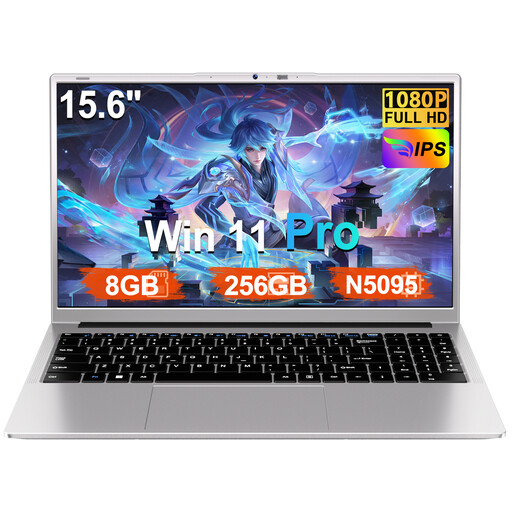
Ruzava 15.6-inch laptop, 8 GB RAM, 256 GB SSD, Windows 11 Pro

Ruzava 15.6-inch laptop, 8 GB RAM, 256 GB SSD

The larger stated screen size may be useful if you want to view papers and annotations on one screen; bear in mind how much space it will take up on a small table.

15.6-inch FHD screen; N5095 processor; 8 GB RAM; 256 GB SSD, expandable to 1 TB; Windows 11 Pro.

Joybuy

HP OmniBook 5 Flip 14-fp0251ndx, Intel Core 5 120U, 8 GB RAM, 512 GB SSD

HP OmniBook 5 Flip 14-fp0251ndx

This convertible offers laptop and tablet modes for switching between typing and reading; if you want to annotate by hand, check stylus support for this exact model.

Intel Core 5 120U; 8 GB RAM; 512 GB SSD; 14-inch touchscreen with 1920 × 1200 resolution and a 16:10 aspect ratio. Stylus and charger not included; the listed charger is a compatible 45–100 W USB-C PD charger.

Joybuy

Frequently asked questions

Can I annotate papers without a laptop that supports a stylus?

Yes, if highlighting and typed comments are enough for your workflow. Apple describes these features in Preview, while Microsoft Edge describes highlighting, annotating and saving. Test the file format and steps you use yourself.

How can I make sure I don’t lose my PDF notes?

Add notes to a sample PDF, save the file and reopen it to check that they’re still there. Apple describes how to save annotations in Preview so they can be edited later, and distinguishes this from printing to a PDF with annotations embedded.

Which accessories should I check for the Surface Pro 12-inch (1st Edition)?

Check whether the Slim Pen, compatible 12-inch keyboard and suitable USB-C PD charger are included with the setup you’ve chosen or need to be bought separately. Microsoft says the pen and keyboard are sold separately, and that the 13-inch keyboards mentioned aren’t compatible.

Should I check for software differences with a Snapdragon Surface?

Yes, if you need specific research software, an extension or peripherals. Microsoft describes potential differences with software and with peripherals that require drivers, so check each essential programme and device individually.

What warranty rules and cancellation period apply to a purchase by a consumer in the Netherlands?

According to the Government of the Netherlands, statutory guarantee in the Netherlands has no fixed time limit: you’re entitled to a product that does what you can reasonably expect it to, and the retailer is your point of contact if it’s faulty. For applicable distance purchases, you usually have a 14-day cancellation period; check the terms and exceptions for the specific purchase.
