
Vandaag of morgen in huis

Kwaliteit gegarandeerd

Welkomstaanbiedingen ontgrendelen: GRATIS bezorging | Tot 80% korting | Gratis 30 dagen JoyPlus-proefperiode
Download de app
Buying a laptop seems simple until you have to compare processors, RAM, connections and accessories. A low price can be tempting, but the wrong screen size, a missing charger or an ill-fitting bag can quickly lead to extra costs.
With this guide from the Joybuy Product Recommendation Officer, you’ll know what to look for when choosing a laptop and laptop accessories. The focus is on verifiable specifications, compatibility and everyday use in the Netherlands.
Always check what’s included in the box. Some laptops don’t come with a charger as standard. According to the product information, this applies, for example, to the HP OmniBook 5 Flip 14-fp0251ndx and certain Acer configurations. The Acer Aspire Go 15 AG15-72P-599F, on the other hand, lists a 65 W AC adapter and power cable in the package.
The Apple MacBook Air 15-inch also doesn’t include a power adapter. It does come with a USB-C-to-MagSafe cable, however. You’ll therefore need to buy a suitable USB-C adapter rated at least 35 W separately.
A laptop with a 512 GB SSD offers enough space for documents, programmes and photos for many everyday users. However, the amount of RAM also affects how smoothly you can work with multiple tabs and programmes.
A laptop backpack or laptop sleeve must be suitable for the exact screen size. A bag for a 15.6-inch laptop isn’t automatically suitable for a 14-inch model, and a privacy filter for a Dell Latitude 7350 won’t fit just any 15.6-inch model.
Also consider the difference between:
A 15.6-inch screen provides more workspace for documents and spreadsheets, but it also takes up more room in your bag. A 14-inch 2-in-1 laptop is more compact and, thanks to its touchscreen and 360-degree hinge, can also be used as a tablet.
Also check the keyboard layout. A QWERTY laptop with an International English layout may differ from a Dutch layout. Pay particular attention to the position of symbols such as @, €, “ and ?. A numeric keypad is useful for administration and working with figures; the Acer Aspire Go 15 with 16 GB has one, while the MacBook Air does not.
Don’t just look at the number of USB ports; check their type and function too:
For the Acer models, USB-C charging has not been definitively confirmed according to the available channel information. It’s therefore best to use the supplied 65 W adapter unless Acer or the product specifications explicitly state that a suitable USB Power Delivery configuration is supported.
A USB-C car charger is only suitable for a laptop if the charging protocol, power output and laptop connection are compatible. According to the product information, the ATSHARK K006S has a total output of up to 160 W, two USB-C ports, one USB-B port, two built-in retractable cables and a supplied 100 W E-Marker cable.
The actual power output may be limited by the vehicle’s fuse capacity. The manufacturer also states that the charger may become warm under heavy load. You should therefore check your car and laptop manuals. A fast laptop charger isn’t a universal solution: the laptop’s maximum charging capacity remains the deciding factor.
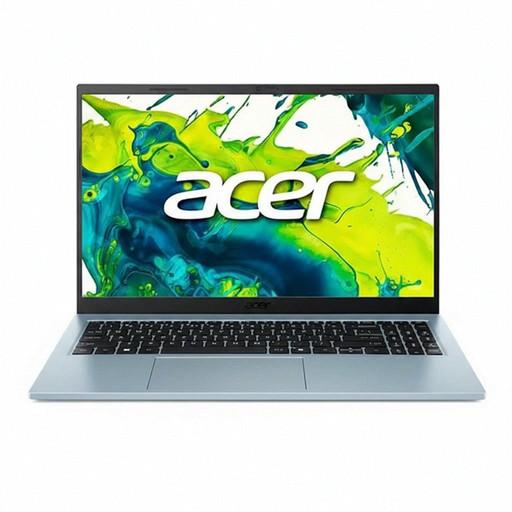
Why it suits this profile: This 15.6-inch QWERTY laptop combines an Intel Core 5 120U processor with 8 GB RAM and a 512 GB SSD for studying, office work and everyday internet use.
The product information lists a 65 W adapter and power cable. However, check the current package contents when ordering.
Full HD IPS display, matte finish, Wi-Fi 6, two USB-C ports and HDMI.
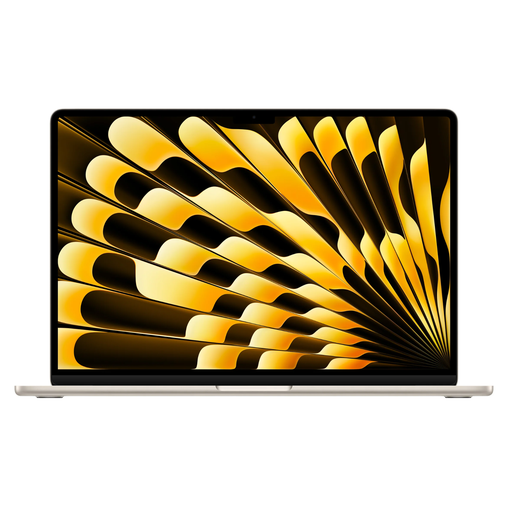
Why it suits this profile: The 15.3-inch MacBook Air offers 16 GB of memory, 512 GB of storage, macOS and an aluminium body for users who value a lightweight system and a large screen.
The storage and RAM specifications are clearly stated in advance. Bear in mind that a USB-C power adapter is required separately.
15.3-inch Liquid Retina display, two Thunderbolt 4 ports and up to 18 hours of stated battery life according to Apple.
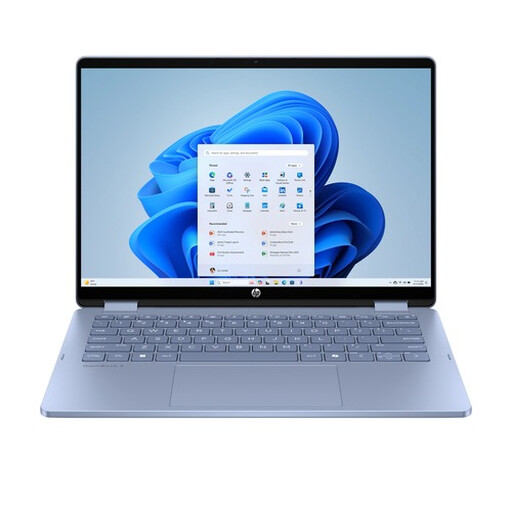
Why it suits this profile: The 360-degree hinge, touchscreen and 16:10 aspect ratio are ideal for students, presentations and users who switch between typing, viewing and tablet mode.
The specifications clearly state that a stylus and USB-C charger are not included. The onboard memory cannot be upgraded.
14-inch touchscreen, 2-in-1 design, HDMI 2.1 and USB-C with Power Delivery 3.1 according to the product specifications.
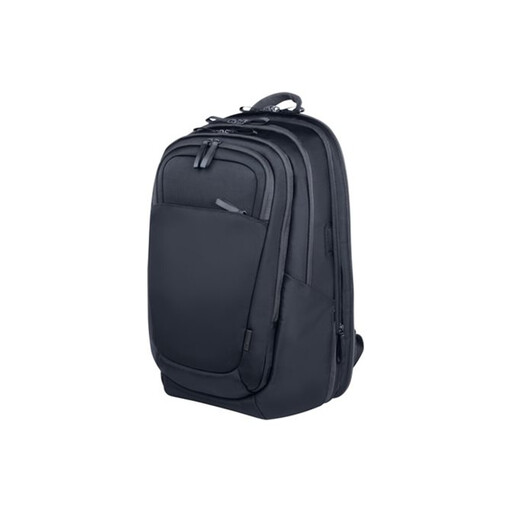
Why it suits this profile: This 15.6-inch laptop backpack is designed for commuting and travelling, with room for equipment, clothing and accessories.
The maximum laptop size and capacity are specified. The bag is not a guarantee against theft; use the lockable zips as an additional practical measure.
25-litre capacity, expandable to 30 litres, chest straps and an RFID-blocking compartment according to the product description.
We’ve put together a complete, up-to-date list of products that fully meet these strict selection criteria and the applicable European safety regulations.
A laptop privacy filter narrows the viewing angle and can be useful on a train or in a shared workspace. Kensington lists a 30-degree viewing-angle restriction and up to 52% blue-light reduction for some filters. These are brand claims, so don’t treat them as medical effects. According to Kensington’s own information, certain filters reduce reflections or blue light, but the effect depends on the screen, ambient light and installation.
Before buying, check:
The Kensington filter for 14-inch laptops is not intended for a 15.6-inch laptop. The filters for the Dell Latitude 7350 and Microsoft Surface Go are model-specific.
For documents, online lessons, video calls and browsing, a laptop with 8 GB RAM and an SSD is generally sufficient. If you often use several programmes at the same time, 16 GB is a better choice. Also pay attention to the keyboard layout, screen size and weight.
Not always. Ideally, use the supplied adapter or a USB-C charger whose power output and Power Delivery profile are supported by the manufacturer. A USB-C car charger is particularly useful when travelling, but check the vehicle fuse and maximum charging capacity.
Use a laptop sleeve inside a backpack, or choose a laptop backpack with a separate laptop compartment. Don’t place heavy items on top of the laptop and protect the device from moisture. A laptop bag with an RFID compartment or tracker pocket can provide additional organisation, but it won’t prevent theft.
