Who is this buying guide for?

Interviewer in a noisy rehearsal room

You want to record the storyteller clearly despite the room noise, so you test the microphone position and make a real recording on location. RØDE notes that positioning a microphone close to the sound source and further away from unwanted noise can help reduce background noise.

Maker who wants to capture both voices

You want to be able to listen back to or transcribe both the questions and answers, so you’re looking for a practical setup with two microphones. Sprekende Geschiedenis recommends using two microphones for this, while IK Multimedia says the iRig Mic Lav can be connected to a second microphone.

Mobile story collector

You move between recording locations or devices, weighing up the connection, freedom of movement and ability to record a long conversation without interruption. The right choice depends on the input and recording setup of the device you’re using.

What should you look for when buying?

Wired, one storyteller

Suitable when: the storyteller will mostly be sitting still and your device supports the specific microphone connection.

Trade-off: the cable limits where you can position the microphone, and a single microphone on the storyteller won’t necessarily capture the questions as clearly.

Wired, both people in the conversation

Suitable when: both voices matter and cables are practical; according to IK Multimedia, you can connect a second iRig Mic Lav to the first using a compatible CTIA/AHJ-TRRS connection.

Trade-off: check that your device and recording app support a two-microphone setup, and make a test recording beforehand.

Wireless, more freedom to move

Suitable when: cables get in the way of the interview setup or both speakers need their own transmitter.

Trade-off: check the number of transmitters, receiver, power supply and any internal recording for each set. Features listed by DJI are manufacturer specifications, not independent measurements in this room.

What to consider What should you check? Who is this important for?
Clarity in the room Position the microphone close to the speaker and listen back to a test recording in the rehearsal room. Also check for clothing rubbing against the cable. In a reverberant or noisy room, I want to hear whether the voice stays clear and close; around 33% of consumers prioritise clarity.
Recording two voices Check the number of microphones or transmitters and make a test recording to assess both speakers. If I’ll need both questions and answers later, I want to be able to record both voices separately; around 27% of consumers prioritise this.
Connecting to your device Check the exact input, any adapter you may need and the recording app. USB-C, TRS and CTIA/AHJ-TRRS are different connection types. When using a device I already own, I want to make sure it uses the lapel microphone rather than its built-in mic; around 20% of consumers prioritise connection and recording compatibility.
Recording a long conversation Check the battery charge, storage space and recording time. Test any internal recording function and listen back to the saved file. If it won’t be easy to repeat a conversation, I want to know beforehand that the recording will last long enough and save properly; around 20% of consumers prioritise uninterrupted recording.

What to watch out for when buying

  • Mistaking a standalone lavalier microphone for a complete wireless set

    The RØDE Lavalier GO is a standalone microphone with a 3.5 mm TRS connection, not a complete wireless set. A setup for two speakers may also require a second microphone or transmitter.

    Check the exact version to see which microphones, transmitters, receiver and connections are included.

  • Expecting noise reduction to fix a reverberant room

    Background noise and reflections in a rehearsal room can still affect your recording, even when the microphone is close to the speaker.

    Choose the quietest spot you can, position the microphone close to the speaker and listen to a short test recording in the room where the interview will take place.

  • Assuming all 3.5 mm connections are the same

    TRS and CTIA/AHJ-TRRS refer to different recording setups. Even a plug that fits doesn’t prove that your device and recording app will use the microphone.

    Check the input, power requirements and any adapter needed for your device, then test the external microphone with your chosen app.

Brands and models to consider

IK Multimedia

The iRig Mic Lav is a wired option with a CTIA/AHJ-TRRS connection for a compatible mobile device.

  • IK Multimedia says you can monitor audio through the combination port and connect a second iRig Mic Lav.
  • The manufacturer says one microphone is included. Check the adapter and compatibility with your device.

BOYA

According to BOYA, the BY-M1 is a wired lapel microphone with a 6 m cable.

  • BOYA says the BY-M1 has a switchable camera and smartphone mode.
  • According to BOYA, the BY-M1 uses an LR44 battery; don’t confuse this model with the battery-free BY-M1S. Check the connection for your phone.

RØDE

The Lavalier GO is a standalone 3.5 mm TRS microphone for a compatible Wireless GO transmitter or recording device with a suitable microphone input.

  • RØDE lists an omnidirectional capsule and mounting clip.
  • It isn’t a complete wireless set. Check that your recording setup provides the required plug-in power.

Sennheiser

The XS Lav USB-C is a wired option for a suitable USB-C device; Sennheiser lists a 2 m cable.

  • Sennheiser lists a clip, foam windshield and pouch.
  • The cable length may limit where you can position your recording device. A USB-C plug alone doesn’t guarantee compatibility with every device or app.

DJI

The Mic 2 is a wireless option for setups where freedom of movement or internal recording on the transmitters is useful.

  • DJI lists internal 32-bit float recording and several receiver outputs.
  • Check the version of the set you’re buying, the number of transmitters, power supply and recording settings. DJI’s statements about noise reduction and audio quality are manufacturer claims.

Joybuy product picks

This selection includes wireless lapel microphones for interviews. For each version, check the number of transmitters, device connection and recording features you need.

DJI Mic Mini 2S with 2 TX, 1 RX and charging case

DJI Mic Mini 2S (2 TX + 1 RX + Charging Case)

This set may suit you if both the interviewer and storyteller need their own transmitter.

The set includes 2 TX, 1 RX and a charging case. The product description lists internal 32-bit float recording and 28 hours of storage; check the recording settings for your interview.

View at Joybuy

SYNCO P2XT wireless USB-C microphone

SYNCO P2XT wireless USB-C microphone

This version may suit an interview using a compatible USB-C recording setup.

The product description lists a USB-C receiver, monitoring, charging while in use and up to 6 hours of battery life. For Android, it lists devices with OTG enabled.

View at Joybuy
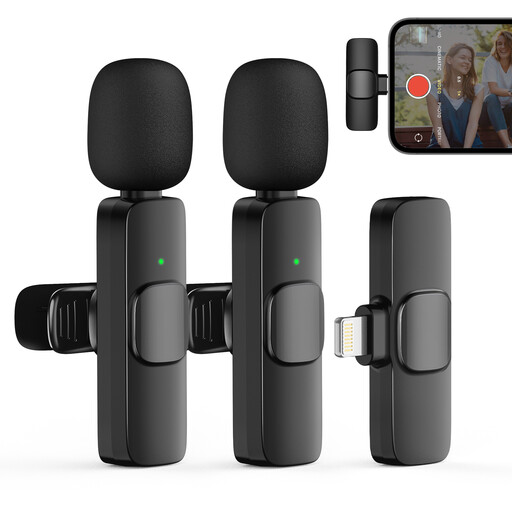
Moman CP1XA wireless lapel microphone for iPhone with 2TX and 1RX

Moman CP1XA wireless lapel microphone for iPhone (2TX&1RX)

This set may suit you if both people in the conversation need their own transmitter and the connection is compatible with your recording device.

The product name lists 2 transmitters and 1 receiver; the product description mentions interviews and wireless use.

View at Joybuy

Moman MB1C clip-on microphone for iPhone 18, 17 and 16, with 1TX, 1RX and USB-C

Moman MB1C clip-on microphone for iPhone 18/17/16, 1TX+1RX, USB-C

This version may suit you if you’re recording one speaker using a compatible iPhone with USB-C.

The set lists 1 transmitter and 1 receiver; the product description says battery life is up to 8 hours. You’ll need a second transmitter to use separate microphones for both the interviewer and storyteller.

View at Joybuy
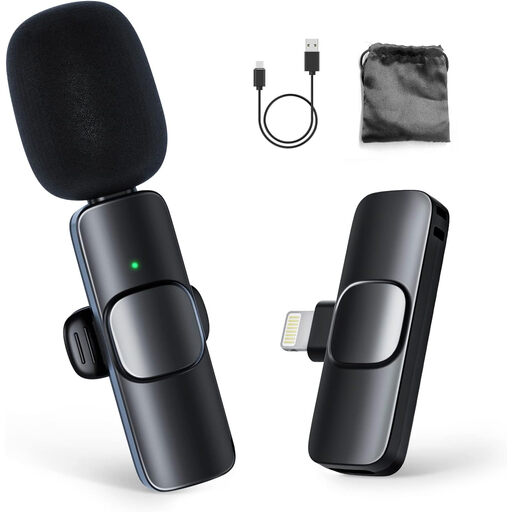
Moman CP1A wireless lapel microphone for iPhone with 1TX and 1RX

Moman CP1A wireless lapel microphone for iPhone (1TX&1RX)

This set may suit you if you’re recording one speaker with a compatible device and wireless recording is practical.

The product description lists 1 transmitter, 1 receiver and up to 8 hours of battery life. To use separate microphones for both people in the conversation, you’ll need a setup with a second transmitter.

View at Joybuy

Frequently asked questions

How should you attach and test the microphone before the interview?

Attach the microphone close to the speaker and make sure clothing doesn’t rub against the capsule or cable. Make a short recording in the actual room, check that the device is using the external microphone and listen to the voices. A test recording can’t guarantee that echo will disappear.

Should you choose a wireless microphone for a long oral history interview?

No. A compatible wired microphone may also suit a fixed setup. Wireless is most useful when cables get in the way. With either option, check the recording device’s power and storage; with a wireless set, also check the number of transmitters and whether it has internal recording.

What can you do if the microphone doesn’t work properly after you buy it?

If the product is faulty, contact the seller. According to the Dutch government, there is no fixed statutory guarantee period in the Netherlands; what you could reasonably expect from the product and the nature of the fault are both taken into account.

Can you record, keep and publish an identifiable oral history interview online?

According to the Dutch Data Protection Authority, processing personal data requires a valid legal basis under the GDPR; consent is one possible basis. The Authority says consent is required in most cases to publish personal data online. Agree in advance and separately on how the recording will be used, stored and possibly shared; a form from Sprekende Geschiedenis distinguishes between these purposes.
