
Solo presenter with a fixed setup
Records news bulletins at a desk or in front of a camera and mainly needs a connection that suits their recording equipment, such as the connections described by Sennheiser and RØDE.


If you record news bulletins from a fixed position, choose a wired lapel microphone with a connection that suits your computer, phone or camera. For more freedom to move around, or to record two speakers, a wireless set may be a better fit, provided its receiver and number of transmitters suit your recording equipment. Always test the clip and make a test recording. These recommendations are based on connections and use cases, not on a measured ranking of sound quality.
Records news bulletins at a desk or in front of a camera and mainly needs a connection that suits their recording equipment, such as the connections described by Sennheiser and RØDE.
Wants to move around while recording, so looks for a wireless transmitter with a receiver that connects to their recording equipment.
Also records a conversation or co-presenter, and checks in advance how many transmitters the set includes and how the voices are output. DJI describes the Mic Mini receiver as supporting use with two transmitters.
For a home studio, the key considerations are the connection, secure and quiet placement on clothing, freedom to move and the number of speakers.
| What to consider | What should you check? | Who is this important for? |
|---|---|---|
| Connection | Check the type of microphone input, the required plug and whether your recording equipment recognises the microphone as an input. | If you record with a fixed setup, you’ll want to make sure the USB-C, 3.5mm TRRS or camera input connections are compatible. Around 36% of consumers put compatibility first. |
| Speech and clothing noise | Check the clip and keep the capsule and cable clear of rubbing fabric; listen back to a test recording. | If you want to record a clear bulletin, make sure clothing or a moving cable won’t disrupt the recording. Around 29% of consumers give clean speech recording top priority. |
| Freedom to move | Check the receiver, battery level and signal in the room where you’ll be presenting. | If you move around while presenting a bulletin, you won’t want a cable to restrict you. However, you’ll also need to consider charging and possible radio interference. Around 21% of consumers prioritise freedom to move. |
| Two voices | Check the number of transmitters and whether the receiver can output the voices separately or together. | If you record with a co-presenter, you’ll need enough transmitters and an output that suits your recorder. Around 14% of consumers put recording two speakers at the same time above their other purchasing concerns. |
A TRRS microphone for a compatible smartphone won’t necessarily work with a transmitter that requires a TRS connection.
Before buying, compare the connection required by the microphone with the input on your recording equipment. RØDE specifies a suitable adapter for using the smartLav+ with a Wireless GO II transmitter that has a TRS input.
You may need a suitable adapter or a different microphone.
According to RØDE, the standard Wireless Micro set for mobile use doesn’t automatically include the receiver for a camera with a 3.5mm audio input.
Check the exact contents of the set and the connection on your camera or computer.
You may need a separate receiver for a camera.
DJI gives the Mic Mini’s maximum range under open, unobstructed conditions with no interference. The Dutch Authority for Digital Infrastructure warns that shared frequencies can cause interference.
Test the signal and recording where you’ll actually be presenting your bulletin.
Clothing and a moving cable can disrupt the sound during recording.
Make a short test recording in the clothes you usually wear, then listen back while moving as you normally would. RØDE describes a cable loop as a way to reduce strain on the cable and handling noise.
The XS Lav USB-C is a wired option for a fixed setup with a compatible mobile device or computer.
RØDE offers both the wired smartLav+ for compatible mobile TRRS connections and a separate range of wireless products.
The MVL is a wired lapel microphone for mobile devices with a compatible connection.
The V.Lav is designed for use with a range of compatible recording devices with a 3.5mm microphone input.
The Mic Mini is a wireless clip-on range for recording on the move and, in a compatible configuration, with two voices.
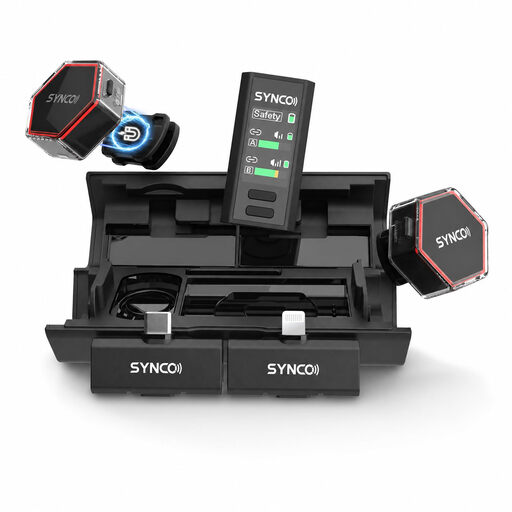
These Joybuy products are wireless clip-on sets for home recording, with options for solo presentations, mobile setups and conversations. Check that the receiver included with each set is compatible with your recording equipment.
 No image available
A configuration with two transmitters may suit a bulletin with two speakers; check that the receiver connects to your recording equipment.
The product name specifies 2 TX, 1 RX and a Charging Case.
 No image available
This configuration may suit conversations with two speakers, provided the receiver is compatible with your recording equipment.
The product name specifies two microphones, a camera receiver, a smartphone receiver, a Charging Case and USB-C.
 No image available
A wireless configuration with USB-C may suit a mobile recording setup with a compatible USB-C connection.
According to the product information, OTG must be enabled on Android devices with USB-C.
 No image available
This set may be suitable if you record with a phone or camera; check which receiver is intended for your chosen device.
The product name mentions iPhone 7–17, Android and camera.
 No image available
The single-transmitter configuration suits a solo presentation; you’ll need a version with an additional transmitter for a second speaker.
The product name specifies 1 TX and 1 RX.
No, the connection must be compatible with your device. RØDE and Shure describe TRRS microphones for compatible mobile connections. For using the RØDE smartLav+ with a Wireless GO II transmitter that has a TRS input, RØDE specifies a TRRS-to-TRS adapter. Check the input and make a test recording.
Clip the microphone to the edge of a garment and make sure the fabric and cable don’t rub audibly. RØDE describes a cable loop as a way to relieve strain and reduce handling noise. Listen back to a test recording while moving as you normally would.
DJI specifies around 11.5 hours for one transmitter and 10.5 hours for the receiver under specific test conditions: noise cancellation off, short range and no interference. Actual recording time depends on the configuration and conditions.
According to ACM ConsuWijzer, in addition to any manufacturer’s guarantee, you have a statutory guarantee if a product doesn’t do what you could reasonably expect when used normally. Online purchases generally come with a cooling-off period of up to 14 days after delivery. Check the exceptions listed by ACM ConsuWijzer and the seller’s information too.
It depends on the frequency and configuration. The Dutch Authority for Digital Infrastructure says that a licence usually isn’t needed for wireless microphones, although some frequency bands do require one. Check the frequency and applicable conditions for the set you’re considering; the product name alone doesn’t mean you have general permission to use it.