
Seated home recorder
You record study summaries from a fixed spot and want a microphone with a connection that suits your recording device. For example, RØDE offers the smartLav+ with a TRRS connection and the Lavalier GO with a TRS connection.


If you’ll be recording mostly while seated, choose a wired lapel microphone that’s confirmed to work with your phone, computer or recorder. A wireless set is more practical if you’ll be moving around while recording or don’t want a cable. For example, RØDE distinguishes between TRRS and TRS connections on its smartLav+ and Lavalier GO, so check the full connection specification and whether you’ll need an adapter. With wireless models, you’ll also need to charge the equipment and check which frequencies are permitted in the Netherlands.
You record study summaries from a fixed spot and want a microphone with a connection that suits your recording device. For example, RØDE offers the smartLav+ with a TRRS connection and the Lavalier GO with a TRS connection.
You walk around while explaining things or use a whiteboard, and are weighing up the freedom of going cable-free against charging and maintaining a wireless connection. DJI offers Mic Mini versions with different numbers of transmitters and receivers.
You make longer recordings and want to check in advance how the cable, power supply and any battery life might affect your session. SYNCO lists an 8-metre cable for the S8; the stated battery life of wireless sets applies under the manufacturer’s specified conditions.
Start by checking the connection on your recording device. Then choose between a standard cable, extra cable length or a wireless setup, depending on how much you move while recording.
Choose this if: you usually speak in one place and your device has a compatible microphone input.
Trade-off: the cable limits how freely you can move; TRRS and TRS are not automatically interchangeable.
Choose this if: you want some distance between yourself and the recorder or camera at a fixed recording spot.
Trade-off: a longer cable needs managing and must be placed safely; SYNCO lists an 8-metre cable for the S8.
Choose this if: you walk around while summarising or find cables inconvenient, and the receiver is compatible with your recording device.
Trade-off: you’ll need to charge the components and check that the exact set uses frequencies permitted in the Netherlands; interference can affect the connection.
| What to consider | What to look for when buying | Who is this important for? |
|---|---|---|
| Connection | Make a note of your device model and input; check the full plug or receiver specification and whether you need an adapter. RØDE specifies TRRS for the smartLav+ and TRS for the Lavalier GO. | I want to know first whether the microphone will work with my phone, computer or recorder; around 36% of consumers prioritise the connection. |
| Clear speech | Clip the microphone on so that clothing doesn’t rub against it, make a short test recording and play it back. | I want to listen back to my voice and make sure it sounds clear before recording a whole summary; around 29% of consumers put clear speech first. |
| Freedom to move | Decide whether you’ll really be walking around; for wireless models, check what’s included and test the connection where you usually record. | I want to move around while explaining things without a cable getting in the way; around 21% of consumers make freedom to move their top priority. |
| Longer recordings | Check how the exact model and recorder are powered, and which components of a wireless set need charging. | I want to finish a longer recording without stopping to charge components; around 14% of consumers focus mainly on session length and power. |
TRRS and TRS are designed for different uses. RØDE recommends a TRRS-to-TRS adapter when using the smartLav+ with the Wireless GO II transmitter.
Compare the plug with your device’s full input specification; checking the diameter alone isn’t enough.
An incompatible combination may mean you need a suitable adapter or a microphone with a different connection.
Wireless can get rid of cable hassle when you’re moving around, but it also means charging and the possibility of signal interference.
First decide how much you actually move while recording, then compare wired and wireless options.
You’ll need to charge and manage the extra components.
DJI measures the stated operating time of the Mic Mini under specific conditions, including recording over a short distance, with noise cancellation off and no interference.
Check the test conditions, charge the set in advance and try it during a session similar to the way you’ll use it.
A compatible receiver doesn’t tell you whether the radio frequency used is permitted under Dutch regulations. Some frequency bands require a licence.
Check the current frequency information from the Dutch Authority for Digital Infrastructure (RDI) for the exact set.
Worth considering if you’re looking for wired models with different connections: the smartLav+ for compatible TRRS devices and the Lavalier GO for a compatible TRS microphone input.
The wired S8 is an option if you want some distance between yourself and your recording device.
The wired BY-M1 is designed for voice recording, provided its connection and any power requirements are compatible with your device.
Mic Mini sets are worth considering if recording without a cable matters more to you than charging and managing extra components.
This selection includes wired lapel microphones and wireless sets for recording at home; check that each model’s connection is compatible with your recording device.
 Image unavailable
A wireless option for recording without a cable, with a compatible USB-C device.
The product description lists two transmitters, one receiver and up to 6 hours of use per full charge. Check which frequencies the exact set uses before using it in the Netherlands.
 Image unavailable
A wired option if you want some distance between yourself and your recorder or camera at a fixed recording spot.
SYNCO lists an 8-metre cable and a 3.5mm connection. Check that your device’s microphone input is compatible, and make sure the cable is safely out of the way.
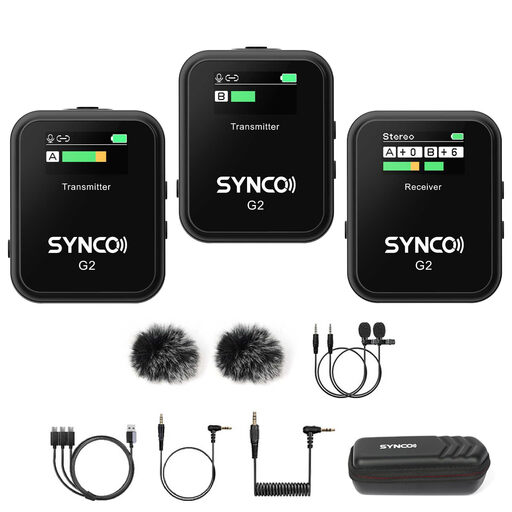 Image unavailable
A wireless set that lets you move around while recording; the product description lists two transmitters and one receiver.
SYNCO states up to 8 hours of use per charge and a 3.5mm headphone socket on the receiver. Check the connection on your recording device and which frequencies the exact set uses.
 Image unavailable
A wireless set with a USB-C connection and two transmitters for a compatible device.
The product title lists two transmitters and one receiver. Check your recording device’s connection and which frequencies the exact set uses before using it in the Netherlands.
 Image unavailable
A wireless set for hands-free recording; the product title lists two microphones.
The product name lists iOS and Type-C connection options; check which connection comes with the version you choose. The product description states a battery life of 3–6 hours. Also check which frequencies the exact set uses.
No. Check both the microphone input and the plug type. RØDE specifies TRRS for the smartLav+ and TRS for the Lavalier GO; for use with a Wireless GO II transmitter, RØDE recommends a TRRS-to-TRS adapter for the smartLav+.
Make a short test recording first and play it back to check that the microphone is selected as the input. For a wireless set, also check that the transmitter, receiver and any charging case are charged; DJI offers Mic Mini versions with different components included.
For consumer purchases made online, ACM ConsuWijzer says you’ll generally have a statutory 14-day cooling-off period after delivery, with some exceptions. If the product develops a fault, the Dutch government says the seller must provide a solution. Before buying, check the returns policy and any associated costs too.
Not always. The Dutch Authority for Digital Infrastructure says a licence usually isn’t needed, but you must use the correct frequencies; some bands do require a licence. Before using the set, check its exact frequencies against the latest RDI information.