Who is this buying guide for?

Voice-over creator dealing with noisy neighbours

You record spoken presentations and want to stop persistent background noise from making your voice harder to understand. Placement and the type of noise matter more than a noise-cancelling claim alone.

Presenter who moves around

You move while speaking, so a suitable wireless transmitter and receiver may work better for you than a cable running to your recording device.

Creator with a fixed recording spot

You record in one place and want a simple connection without a wireless kit. First, check that your computer or phone supports the microphone you’ve chosen.

What should you look for when buying?

Wired lapel microphone

Choose this option if: you record in one place and your device can receive audio through the relevant connection.

Bear in mind: the cable limits how far you can move; according to the manufacturer, the Sennheiser XS Lav USB-C has a 2 m cable.

Wireless clip-on system

Choose this option if: you want to move around during your presentation or don’t want a cable running to your recording device.

Bear in mind: the receiver, adapter, transmitter, charging and kit variant all matter; noise reduction doesn’t guarantee that sudden sounds will disappear.

What to consider What to check before buying Who should consider this?
Clear speech despite background noise Check the settings for the exact model and make a short test recording where you’ll be recording. RØDE says the Wireless Micro is designed for continuous background noise, not sudden loud sounds. If your main concern is persistent noise drowning out your presentation, pay attention to the recording and microphone placement in your own space. Around 36% of consumers say speech clarity in noisy conditions is their top priority.
Connection to your recording device Check the device, port, recording app, receiver and any adapter for the exact model; having the same type of port doesn’t prove compatibility. If you want to use the microphone with a specific phone, computer or camera, you’ll need a working connection before you can record. Around 29% of consumers put device compatibility first.
Freedom to move Decide whether you’ll move around while speaking, then check how many transmitters and which receiver are included in your chosen kit. If you move around the room during your presentation, you won’t want to be tethered to your recording device by a cable. Around 21% of consumers say freedom to move is their top priority.
Charging and what’s included For wireless models, check which components are included and whether they need to be charged before recording. If you want to keep loose parts and charging steps to a minimum, a wired microphone may be more practical in a fixed recording spot. Around 14% of consumers put ease of recording first.

Common buying mistakes

  • Assuming noise reduction guarantees silence

    RØDE says the Wireless Micro’s noise reduction is designed for continuous sounds and isn’t intended to immediately remove sudden, sharp noises.

    Make a test recording with the sounds you actually hear at home. If necessary, plan to record at a quieter time; an audible interruption may mean you have to record a section again.

  • Assuming every kit contains the same items

    DJI offers a Mic Mini kit with one transmitter and one receiver, as well as a kit with two transmitters and a charging case.

    Compare the full name and contents of the specific kit with your recording device and the number of speakers. Don’t assume it includes accessories supplied with a different variant.

  • Assuming plugs and receivers are interchangeable

    The Shure MVL uses a 3.5 mm TRRS connection; the RØDE Wireless Micro is available with separate USB-C and Lightning receivers.

    Check the type of microphone input and the exact receiver model. If you need a suitable adapter, check whether it’s included with your chosen kit.

Brands to consider

Sennheiser

The wired XS Lav USB-C is designed for a fixed voice-over spot with a suitable USB-C recording device.

  • The product specifications say the XS Lav USB-C has an omnidirectional capsule and a 2 m cable.
  • The cable and connection determine where and with which devices you can use this model.

DJI

The Mic Mini is a wireless option if you want to move around or switch between compatible recording devices.

  • DJI lists two adjustable noise-cancelling levels and kits with one or two transmitters.
  • The product description doesn’t show how the microphone performs with noisy neighbours; also check the adapter and the contents of your chosen kit.

RØDE

The Wireless Micro is a wireless option for phones with a suitable connection.

  • RØDE describes noise reduction for continuous background noise and offers separate USB-C and Lightning models.
  • According to RØDE, the feature isn’t designed to immediately remove sudden loud sounds; this description applies to the Wireless Micro.

Hollyland

The LARK M2 is another wireless option, with a receiver model to suit your phone or camera.

  • Hollyland lists adjustable noise cancellation and different receiver versions.
  • The manufacturer’s description isn’t an independent measure of performance in a flat; check the exact model.

Shure

The wired MVL is an option if your recording device has a suitable 3.5 mm TRRS microphone input.

  • The MVL manual recommends positioning the microphone 15–25 cm from your mouth.
  • Don’t assume that every 3.5 mm connection or USB-C adapter will work with this model.

Wireless lapel microphones on Joybuy

These wireless lapel microphone options are designed for presentations and voice-overs. Models differ in connection type, number of transmitters and what’s included in the kit. For the specific model, check for the CE mark: the Dutch Authority for Digital Infrastructure states that only products with a CE mark may be sold in Europe.
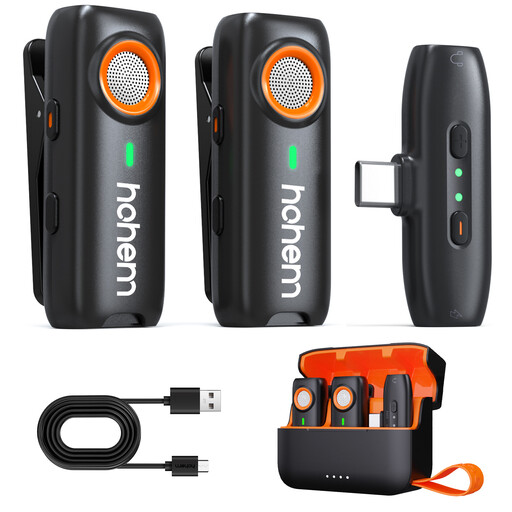
hohem wireless lapel microphone with three DSP noise-cancelling modes

hohem Wireless Lavalier Microphone, 3-Level DSP Noise Cancelling

A wireless model for anyone who wants to move around while speaking; the product description lists three adjustable DSP noise-cancelling modes.

The title gives a range of 100 m and a battery life of 20 hours. These are stated product specifications, not a measure of operating time or connection quality in your space.

Check that the Type-C connection and recording app work with your device; noise cancellation doesn’t guarantee silence when sudden sounds occur.

Joybuy

Hollyland LARK M2 wireless microphone with USB-C receiver and two transmitters

Hollyland LARK M2 Wireless USB-C Microphone

The product description lists two transmitters, a USB-C receiver and a charging case; check that the receiver is suitable for the device you’ll be recording on.

The description mentions noise cancellation. This isn’t an independent measure of the results in a noisy flat, so make a test recording first.

The title gives a battery life of 30 hours. Check which usage conditions and components this stated figure applies to.

Joybuy

Moman M1CT wireless lapel microphone kit with USB-C, one transmitter and one receiver

Moman M1CT Wireless Lavalier Microphone, USB-C, 1TX+1RX

This kit, with one transmitter and one receiver, is designed for a single speaker; check that the USB-C receiver is suitable for your recording device.

The product description mentions a noise-cancelling chip, but this isn’t an independent measure of performance where you’ll be recording.

The title gives a range of 150 m. Treat this as a stated product specification, not a guarantee of range indoors.

Joybuy

SYNCO P2ST wireless USB-C microphone with two microphones and charging case

SYNCO P2ST Wireless Lavalier Microphone, USB-C, Dual Mic

The title lists two microphones and 2.4 GHz; the product description mentions a charging case and real-time monitoring.

The description also mentions one-button noise cancellation. Check the sound with a test recording in your own space rather than treating the feature as a guarantee of results.

Check that the USB-C receiver and included kit components are suitable for your recording device and presentation.

Joybuy

Verbex ST5 wireless mini lapel microphone with one microphone and universal interface

Verbex ST5 Single-Mic Wireless Lavalier Microphone

The product title describes a wireless model with one microphone and a universal interface; check that the interface works with your recording device.

The product description mentions noise cancellation and wind protection. These are product claims, not independent measures of performance in a noisy flat.

The description gives a battery life of 3–6 hours. Bear in mind the stated range and check what’s included in the kit.

Joybuy

Frequently asked questions

Can noise cancellation remove a slamming door from your voice-over?

Don’t count on it. RØDE says the Wireless Micro’s feature is designed for continuous sounds, not to immediately silence sudden, sharp noises. Make a test recording in your own room.

Where should you clip on a lapel microphone?

Position the microphone so your clothing doesn’t rub against it, then check the sound with a short recording. Shure recommends placing the MVL 15–25 cm from your mouth; this guidance applies to that model and isn’t a universal mounting distance.

Who should you contact if a microphone you bought in the Netherlands develops a fault?

If the product is faulty, contact the seller. According to the Government of the Netherlands, there is no fixed statutory warranty period in the Netherlands; what you can expect depends, among other things, on the product and normal use. A manufacturer’s warranty doesn’t replace your statutory rights.

Can you use a wireless microphone in the Netherlands without a licence?

It depends on the frequency used and the relevant conditions. The Dutch Authority for Digital Infrastructure says a licence usually isn’t required, but you must use the correct frequency band; some bands do require a licence. Check the frequency of the specific kit.
