Who is this buying guide for?

Volunteer interviewing two people

You want to capture both your questions and the answers, and are looking for a set-up with a microphone close to each person. Sprekende Geschiedenis recommends using two microphones so that both the interviewer and interviewee can be heard clearly.

Custodian of stories that can’t be recorded again

You want to check that the recording is running during a long conversation and are considering a separate recording file as an extra backup. A short test recording that you listen back to can help you spot problems beforehand.

Interviewer with an existing phone or recorder

You want to connect a lapel microphone to your own device without choosing the wrong plug or a more complex wireless system than you need. Check both the connection and your device’s recording app or input.

What should you look for when buying?

Wireless set with two transmitters

A good fit when: both the interviewer and storyteller will wear a microphone and you don’t want cables running to the recording device.

Bear in mind: you’ll need two transmitters, a receiver and batteries; not every set has internal recording.

Compact set for a smartphone

A good fit when: you want to record using a compatible smartphone and prefer a straightforward set-up.

Bear in mind: according to RØDE, the standard RØDE Wireless Micro does not record on the transmitters, so check that your phone is actually recording.

Wired lapel microphone

A good fit when: the speaker will mainly be seated, your device has a suitable microphone input and you don’t mind using a cable.

Bear in mind: the cable can restrict movement and rub against clothing; one microphone won’t necessarily be enough to capture two separate voices.

Lapel microphone with a portable recorder

A good fit when: recording on the person is more important than having a live wireless connection to the main recorder.

Bear in mind: check the storage and power supply beforehand; if you make two separate recordings, you’ll need to manage the files afterwards.

What to consider What to check before buying Who is this important for?
Clear speech in the room Check how the microphone is attached, then listen to a test recording from the venue through headphones. Keep the microphone clear of clothing that might rub against it. If I want to know whether voices will be clear in the room, I listen to a test recording beforehand. Around 33% of consumers say clear speech is their top priority.
Recording two voices separately Check that the set really includes two transmitters and that both voices are captured by your recording device. If you want both the interviewer and storyteller close to a microphone, check each voice separately. Around 27% of consumers put capturing two voices first.
A backup recording Check whether the exact model records internally, and test the battery, available storage and file playback before the conversation. When a story can’t be recorded again, I want to check in advance that there’s a usable file. Around 20% of consumers make recording reliability their top priority.
Connection to your device Check the exact USB-C, Lightning or 3.5mm version, any adapter you may need, and whether it works with your recording app or microphone input. If I want to use my existing phone, camera or recorder, I first check which connection it has. For around 20% of consumers, compatibility with their own device is their main concern.

Common buying mistakes

  • Mistaking a set with one transmitter for a two-person set

    A set with one transmitter won’t automatically provide a separate microphone for both people in the conversation.

    Read the full list of included items and test whether both people can be heard in the recording.

  • Assuming every wireless clip-on microphone makes a backup recording

    According to RØDE, the standard RØDE Wireless Micro doesn’t save audio on the transmitters. If your phone isn’t recording, there won’t be a transmitter recording to fall back on.

    Check the recording function on the exact model and play back a test file before the interview.

  • Assuming the stated wireless range guarantees a good connection in the room

    DJI gives the Mic 2 a maximum CE range of 160 metres, measured outdoors without obstacles or interference. Those conditions don’t tell you how it will work in a community centre.

    Test the connection from the seats you plan to use, rather than choosing based only on the maximum range.

Brands to consider

DJI

DJI offers the Mic 2 in sets for one or two people; check which version you’re looking at.

  • DJI lists internal 32-bit float recording for the Mic 2.
  • According to DJI, the maximum CE range of 160 metres was measured outdoors without obstacles or interference, so it doesn’t predict how the microphone will work in a community centre.

RØDE

According to the manufacturer, the RØDE Wireless Micro is a compact set with two transmitters and a receiver for smartphones. It’s available in USB-C and Lightning versions.

  • RØDE describes it as easy to pair, with automatic level adjustment.
  • According to RØDE, the standard Wireless Micro doesn’t record on the transmitters; check that your phone and recording app are capturing the conversation.

Zoom

According to Zoom, the Zoom F2 combines a lapel microphone with a small recorder for local recording.

  • Zoom lists 32-bit float recording and a locking microphone connector.
  • The F2 isn’t a complete wireless set for two people; check how you’ll manage the files and power the device.

Deity

The Deity V.Lav is a wired lapel microphone for a device with a suitable 3.5mm microphone input.

  • Deity lists a 5-metre cable and a plug that adapts to many 3.5mm microphone inputs.
  • It won’t work with every device; a cable can restrict movement and needs to be positioned carefully.

Saramonic

According to Saramonic, the Blink500 ProX range includes two-channel wireless systems with lapel microphones.

  • Saramonic lists internal storage for the B2R transmitter.
  • The manufacturer distinguishes between the B2 and B2R, so check the full model name before relying on internal recording.

Joybuy products for two voices

These products are wireless lapel microphone sets with two transmitters and one receiver, for recordings where both the interviewer and storyteller can wear a microphone. Before buying, check that the connection is compatible with your recording device.

DJI Mic Mini 2S with two transmitters, one receiver and charging case

DJI Mic Mini 2S, 2 TX + 1 RX + Charging Case

The two transmitters are designed for recording conversations with two people.

The product description mentions clip or magnetic attachment. The plug-and-play set-up is designed for USB-C-compatible devices.

Joybuy

Moman M1CXT wireless lapel microphone set with USB-C and two transmitters

Moman M1CXT, USB-C, 2TX + 1RX

The set with two transmitters is suited to a conversation where both people wear a microphone.

The product name specifies USB-C. The description mentions a port on the receiver for real-time audio monitoring; the plug-and-play set-up is designed for USB-C-compatible devices.

Joybuy

Moman MS1X(C) wireless lapel microphone set with USB-C, two transmitters and one receiver

Moman MS1X(C), 2TX + 1RX, USB-C Android Phones

The set includes two transmitters for conversations with two speakers.

The product name specifies USB-C Android phones as the intended devices; check that your phone and recording app are compatible.

Joybuy
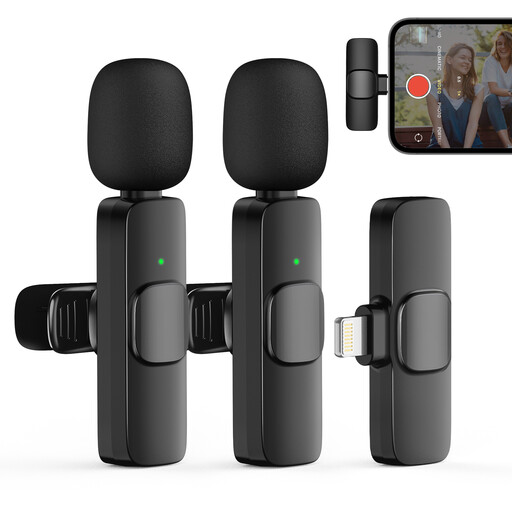
Moman CP1XA wireless lapel microphone set for iPhone with two transmitters and one receiver

Moman CP1XA for iPhone, 2TX + 1RX

The set is designed for interviews where two people each use a transmitter.

The product description mentions iPhones and iPads as intended devices; check compatibility with your device.

Joybuy

DJI Mic 3 with two transmitters, one receiver and charging case

DJI Mic 3, 2 TX + 1 RX + Charging Case

The set with two transmitters is designed for recordings where both people wear a microphone.

Check that the receiver is compatible with your recording device.

Joybuy

Frequently asked questions

Where should you attach the lapel microphone, and what should you test beforehand?

As a general guideline, RØDE recommends attaching it to the chest, around 20–30 cm from the mouth, and avoiding contact with clothing that might rub against it. Record a short clip at the community centre and listen back through headphones to check clarity and for possible interference.

Do you need a licence for a wireless microphone in the Netherlands?

According to the Dutch Authority for Digital Infrastructure, a licence is usually not needed for wireless microphones, but you must use the correct frequency band. Some frequency bands require a licence, so if you’re using a UHF system, check the exact frequency range and which frequencies are available at the venue.

Can you keep an interview about local history or publish it online?

If an organisation processes personal data, the Dutch Data Protection Authority says it needs a lawful basis under the GDPR; consent is one possible basis. In most cases, consent is needed to publish personal data online, although exceptions depend on how it’s used. Talk to the storyteller beforehand about how you’ll record and store the interview, and whether you may publish it.

How can you check whether a set is suitable for two people talking?

Check that the set actually includes two transmitters and that both voices are captured separately in the recording. Also test the connection to your recording device and listen back to a test recording before the interview starts.
