Which buying concerns matter most?
Start by focusing on what most often affects your recordings: clarity, connectivity, freedom of movement or a simple fixed set-up. The percentages below relate to consumers considering a lapel microphone for recording a travel diary in a noisy flat.
Wired microphone
Choose this if: You usually speak from one place and your device has a compatible connection. Shure specifies a 3.5 mm TRRS input or a suitable CTIA adapter for the MVL.
Worth considering: You won’t need to charge a wireless transmitter, but the cable will restrict your movement.
Wireless set
Choose this if: You move around while speaking or want to switch between a phone and a camera; choose a version with a receiver that’s compatible with your device.
Worth considering: You’ll need to manage the transmitter, receiver and possibly a charging case; also check how many transmitters are included.
| What to consider |
What should you check? |
Who is this important for? |
| Clear speech |
Make a test recording with the microphone close to your mouth. Compare the available noise settings and listen for clothing rustle. |
If I want my voice to remain clear over a fan or traffic noise, I prioritise mic placement and a listening test. Around 40% of consumers put clear speech first. |
| Connection and app |
Check the port, receiver and recording app as a combination; make a short test recording to see whether the app is using the external microphone. |
I want to avoid finding that my microphone doesn’t work with my phone, camera or recording app. Around 23% of consumers say device compatibility is their main reason for buying. |
| Freedom of movement |
Check how many transmitters and which receiver are included with the version you’ve chosen, and whether the recording time suits your needs. |
If I want to move around while speaking or record with a second person, the number of transmitters and managing the wireless set-up matter to me. Around 23% of consumers prioritise freedom of movement. |
| Fixed set-up |
Check that the plug and cable are compatible with your device and that you can attach the microphone securely to your clothing. |
I usually record in one place and am happy to use a cable if the connection is right. Around 14% of consumers prefer a simple fixed set-up. |
Joybuy products for wireless recording
The products below are wireless lapel microphones. For each version, check the receiver, connection to your device and whether your recording app accepts external audio.
 No image available
Hollyland LARK M2, USB-C
This wireless USB-C version is an option if you record with a device that has a compatible USB-C connection. Check that your recording app uses the external microphone.
View at Joybuy
 No image available
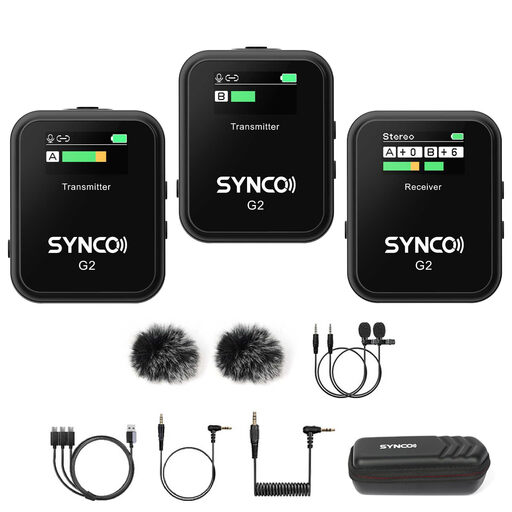
SYNCO G2(A2), 2.4G Dual Channel
This wireless dual-channel version is one to compare if you’re looking for a microphone system for vlogging. Before buying, check that the receiver is compatible with your phone or camera.
View at Joybuy
 No image available
Moman M1CXT, USB-C, 2TX + 1RX
The listed USB-C version with 2TX + 1RX is an option if you want to record two people using a compatible USB-C device. Check that your recording app supports an external microphone.
View at Joybuy
 No image available
DJI Mic 3, 1 TX + 1 RX
The version with one transmitter and one receiver is an option for solo recordings. Check which connection your device needs and whether the receiver is compatible.
View at Joybuy
 No image available
DJI Mic 3, 2 TX + 1 RX + charging case
This bundle with two transmitters, one receiver and a charging case is worth considering if two people each need a transmitter. Check that the receiver connects to your recording device.
View at Joybuy
Frequently asked questions
Does noise reduction help with all the sounds in a flat?
No. According to RØDE, the Wireless Micro’s function is mainly aimed at constant sounds, such as a fan or traffic noise, rather than making a sudden door slam disappear instantly. Test the setting with the sounds you hear in your flat.
How should you attach a lapel microphone for a spoken travel diary?
Attach the microphone to your clothing close to your mouth and make a short test recording. RØDE describes proximity to the speaker as important for balancing speech with background noise. With a wired model, also pay attention to cable routing and clothing rustle.
Will a phone receiver work automatically with every recording app?
No, having a compatible connection alone doesn’t guarantee it. RØDE says the Wireless Micro works with video or audio apps that accept USB audio. Make a test recording in your app and check which microphone is actually being used.
What rights do you have when buying a microphone online?
According to ACM ConsuWijzer, online consumer purchases generally come with a 14-day cooling-off period after delivery, subject to legal exceptions. The product must also meet the terms of the agreement; according to the Dutch government, the seller must provide a solution if a product is faulty. The Netherlands has no single fixed statutory guarantee period for all products.
Can you share a travel diary publicly if your flatmates can be recognised?
This depends, among other things, on what can be recognised in the recording and how you share it. The Dutch Data Protection Authority explains the distinction between private use and wider publication for images; this guidance is not a general statement about audio alone. Talk to your flatmates before sharing identifiable voices publicly, and check which rules apply to your situation.


