If you’ll be sitting at a shared desk while recording, a wired lapel microphone is a sensible first choice, provided its TRRS connection or adapter is compatible with your recording device. RØDE and Shure both describe wired options. Choose wireless if a cable restricts your movement, but check the receiver and connection for the model you’re considering. Shure stresses that microphone placement matters: make a test recording at your workspace, as a clip-on microphone or noise cancellation won’t guarantee that other people’s conversations stay out of your recording. Before recording anyone else, also check the privacy rules and house rules that apply.
Who is this choice relevant to?
Recording at a busy shared desk
You’re recording short spoken cards while other people work nearby. Clear speech, microphone placement and reducing unwanted background noise matter more to you than extra features. Shure stresses the importance of positioning a lapel microphone correctly.
Recording on a phone and checking connections
You’re recording directly on your phone or tablet and want to check in advance that the TRRS plug, adapter or receiver will work with your device and recording app. RØDE and Shure describe wired models with a TRRS connection, but the connection alone doesn’t confirm compatibility with every device.
Recording in different locations
You move around while recording or switch workspaces often. A wireless microphone with a compatible receiver may be more practical than a long cable; for example, RØDE offers the Wireless Micro with USB-C and Lightning receivers.
What should you look for?
| What to consider |
What should you check? |
Who is this for? |
| Clear speech |
Check the clip and positioning. Make a test recording at your intended workspace and listen for clothing noise or voices. |
When I record at a shared desk, I want my voice to be clear without rustling clothes or nearby conversations. Around 31% of consumers prioritise clear speech in this kind of workspace. |
| Connection |
Check your device model, port and recording app, and make sure the complete microphone model or any required adapter is compatible. |
I want to know in advance whether the microphone will work with my phone, port and recording app, so I can start recording straight away. Around 31% of consumers put compatibility first. |
| Simple set-up |
Check the cable length, power supply and clip, and how many components you need to connect for a single recording. |
For short recordings from one fixed spot, I want to get started quickly without setting up a wireless connection. Around 25% of consumers prioritise a simple, fixed set-up. |
| Freedom to move |
Check that the receiver is compatible, and look at the transmitter and receiver battery life separately. |
When I move between workspaces, I don’t want a cable to get in the way. Around 13% of consumers prioritise freedom of movement. |
Common buying mistakes
-
Assuming noise cancellation will block conversations at nearby desks
A feature designed to reduce ambient noise doesn’t prove that nearby voices will disappear from your recording. Positioning also affects clothing noise and what the microphone picks up; Shure stresses the importance of microphone placement.
Make a test recording where you plan to record your cards and listen back to it. If necessary, choose a quieter time or a different room.
-
Treating TRRS, TRS, USB-C and Lightning as interchangeable
A plug that fits won’t necessarily have the right connection for your phone, camera or transmitter. For example, RØDE distinguishes between the TRRS connection on the smartLav+ and the TRS input on a Wireless GO II transmitter.
Check the full model name, the port on your recording device and whether you need a suitable adapter.
-
Choosing a long cable or wireless set without considering how you record
BOYA specifies a 6 m cable and an LR44 button cell for the BY-M1. A long cable needs managing, while a wireless set adds components that need charging.
If you usually record sitting down, compare suitable wired options first. Choose wireless if being able to move freely without a cable would genuinely help the way you work.
Brands to compare
RØDE
Offers both the wired smartLav+ with a TRRS plug and the wireless Wireless Micro, with separate USB-C and Lightning versions.
- RØDE specifies a 1.2 m cable and a pop filter for the smartLav+; its fixed set-up may suit you if your device has a compatible input.
- TRRS won’t automatically fit a TRS transmitter. The wireless version requires a compatible receiver and needs charging. These are product specifications, not an independent comparison of sound quality.
BOYA
The BY-M1 is a wired option with switchable phone and camera modes.
- BOYA specifies a 6 m cable and an LR44 button cell for the BY-M1.
- The long cable may be awkward at a small shared desk. According to BOYA, the BY-M1S uses a different power source, so check the full model name.
Shure
The MVL is a wired omnidirectional lapel microphone for portable recording devices with a compatible TRRS connection or CTIA-compliant adapter.
- Shure lists a clip and windscreen, and stresses that placement matters when recording speech.
- The connection type doesn’t prove compatibility with every phone, and won’t automatically exclude conversations at the same desk. Check your device and listen to a test recording.
DJI
The Mic Mini is a wireless option for anyone who values freedom of movement or adjustable noise cancellation.
- DJI describes two levels of noise cancellation and lists battery life for the transmitter and receiver separately, under the stated test conditions.
- Check which set and receiver you’re choosing. A noise-cancellation feature doesn’t prove that nearby voices will disappear from a recording.
Joybuy products
This selection includes wireless clip-on and lapel microphones. For each version, check that the receiver is compatible with your recording device and that you need the extra freedom of movement.
 No image available
RØDE Wireless Micro Camera Kit, Two Microphones, Camera Receiver, USB-C Smartphone Receiver and Charging Case, Black
A wireless option if you want to move around without a cable between the microphone and recording device; check that the USB-C receiver is compatible with your device.
The product name lists two microphones, a camera receiver, a USB-C smartphone receiver and a charging case.
Joybuy
 No image available
DJI Mic 3, 2 TX + 1 RX + Charging Case
A wireless system to consider if you need a set with two transmitters; check in advance how the receiver connects to your recording device.
The product name lists two transmitters, one receiver and a charging case.
Joybuy
 No image available
Verbex K9-Black Wireless Mini Microphone, Type-C Interface
This clip-on model may suit you if you want to record wirelessly and your device has a compatible Type-C connection; also check that it works with your recording app.
The product name describes a wireless lapel microphone with a Type-C interface.
Joybuy
 No image available
Verbex K9-Black Wireless Mini Microphone, Single Mic, iOS Interface
A wireless version to compare if you record with an iOS device; check that the connection and recording app are compatible with your device.
The product name lists one microphone and an iOS interface.
Joybuy
 No image available
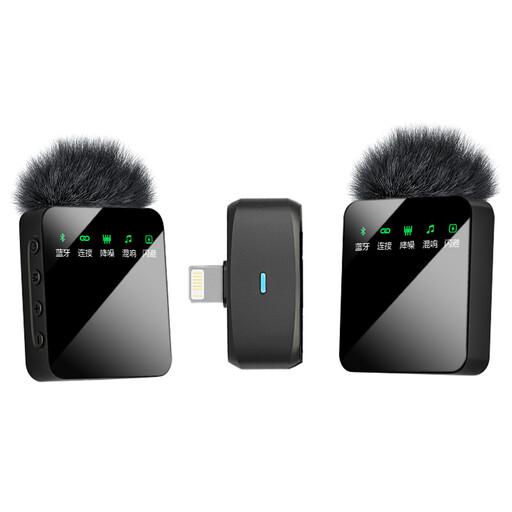
Verbex ST5 Wireless Microphone, Dual Mic, iOS Interface
This wireless version may suit you if you need two microphones and record with an iOS device; check the connection and what’s included in the set.
The product name lists two microphones and an iOS interface.
Joybuy
Frequently asked questions
Why won’t a microphone with a 3.5 mm plug automatically work with every device?
The connection may serve a different purpose: the RØDE smartLav+ has a TRRS connection, while RØDE describes a TRS connection for a Wireless GO II transmitter and mentions a TRRS-to-TRS adapter if needed. Check your device’s input, any required adapter and recording app before you buy.
How do I make a quick test recording for audio flashcards?
Attach the clip so that clothing doesn’t rub against the capsule or cable, record a representative card where you usually work, then listen back to it. Shure stresses that placement affects clothing and background noise.
Is a charging case’s battery life the same as the continuous recording time?
No. DJI lists separate battery life figures for the Mic Mini transmitter and receiver, measured at close range, without interference and with noise cancellation off. For a recording session, check the battery life of the components you need, not just the case.
What can I do if a microphone I bought online doesn’t fit or quickly develops a fault?
For online consumer purchases in the Netherlands, you generally have a cooling-off period of up to 14 days after delivery, although exceptions may apply. ACM ConsuWijzer explains how this period works. If a product doesn’t perform as you could reasonably expect during normal use, you can contact the seller about your statutory guarantee rights.


