
Solo intro creator
You’re recording a spoken intro on your own and want to find out which wired microphone will work with your existing phone or recorder.


If you’re recording one voice and staying close to your phone or recorder, choose a wired lapel microphone that matches your device’s input. If you need more freedom to move or want to record a second voice, a compatible wireless set makes more sense. If you want to record without a wireless connection, consider a body-worn recorder. None of these options will automatically remove echo or musicians’ noise from your recording, so test the microphone placement in the room.
You’re recording a spoken intro on your own and want to find out which wired microphone will work with your existing phone or recorder.
You want to move around while speaking, or sometimes record a second voice. Check how many transmitters are included with the set and which receiver it comes with.
You want to record clear speech despite echo or noise in the rehearsal room. Microphone placement and a test recording are important.
Suitable for: one speaker who stays close to their phone and has a compatible microphone input or adapter. RØDE specifies the smartLav+ as a TRRS microphone for phones.
Trade-off: the cable limits your freedom to move. Check that the input and any adapter support microphone input.
Suitable for: anyone already using a recorder or transmitter with a compatible microphone input. RØDE specifies the Lavalier GO with a 3.5mm TRS connector for compatible devices.
Trade-off: check the connector type, power requirements and cable length. A 3.5mm plug on its own does not guarantee compatibility.
Suitable for: when you want to move around during your intro or connect a second speaker. DJI says the Mic Mini receiver can pair with two transmitters.
Trade-off: the receiver, batteries and included accessories need extra consideration. Check that the version you choose actually includes two transmitters.
Suitable for: if you want to record on the wearer without a wireless connection and can transfer the files afterwards. Zoom supplies a lavalier with the F2 and specifies mono WAV recording in 32-bit float.
Trade-off: you’ll need to transfer the files afterwards. This recording method won’t automatically remove echo or clothing noise.
| Concern | What to check before buying | Who this matters to |
|---|---|---|
| Clear speech | Check the clip and windscreen. Test the microphone at the recording location using your normal speaking voice, with the background noise you’d expect. | If I’m recording in an echoing rehearsal room, I want to know whether my voice will remain clear and how to position the microphone. Around 33% of consumers prioritise clear speech. |
| Connection to your equipment | Note the type of microphone input and the power required. Check that any adapter passes through microphone input. | I want the microphone to work directly with my phone, camera, recorder or transmitter, without finding out too late that the connection is unsuitable. Around 27% of consumers give device compatibility top priority. |
| Moving around or recording multiple voices | Check what’s included in the set, how the receiver connects and how the voices will reach the recording device. | If I want to move around while speaking or record a second speaker, I check how many transmitters are included. Around 27% of consumers prioritise freedom of movement or a second voice. |
| Recording independently | Check that the lavalier, storage and required power are included with the version of the recorder you choose. | I want to record without a wireless audio link and don’t mind transferring the files later. Around 13% of consumers prioritise independent recording. |
Placing a microphone closer to the speaker can help reduce the distance from the voice, but it won’t fix the room’s acoustics. Shure explains that a microphone cannot effectively separate recorded direct speech from echo. So make a short test recording where you plan to record your intro.
TRS and TRRS are used in different recording setups. A plug that physically fits doesn’t prove that the device will recognise the microphone.
Check the complete connection between the microphone, any adapter and the recording device. RØDE specifies a TRRS-to-TRS adapter for using the smartLav+ with a Wireless GO II.
Depending on your equipment, you may need a suitable adapter or a different version of the microphone.
A microphone can’t fix the room’s acoustics or record only the voice you want. Noise reduction is no guarantee of a quiet recording in a rehearsal room.
Make a short test recording with the actual background noise. If necessary, choose a quieter time or adjust your setup.
Getting a usable recording may require extra testing or a quieter time to record.
A receiver’s ability to pair with two transmitters doesn’t mean that both are included with every version.
Check exactly what’s included in the set, not just the name of the product range.
For two wearable microphones, you may need an additional compatible transmitter or a different set.
RØDE offers wired lavaliers for different types of connection: the smartLav+ has TRRS for compatible phones, while the Lavalier GO has TRS for compatible recorders or transmitters.
The MVL is a lavalier with a TRRS connection for compatible mobile devices.
The Mic Mini is a wireless clip-on microphone option with a receiver and one or more transmitters, depending on the version.
The ATR3350xiS is a wired lavalier with a battery compartment, long cable and dual-mono output for compatible recording inputs.
The F2 combines a portable recorder with a supplied lavalier for local recording.
This product selection includes wired lapel microphones and wireless clip-on sets for spoken recordings. For each model, check that the connection and what’s included are right for your phone, recorder or other recording equipment.
 No image available
The two microphones may suit a recording where you want to capture two voices. Check in advance how the receivers connect to your equipment.
The product title lists a camera and smartphone receiver, a charging case and USB-C. According to the product information, older iPhones with Lightning require a different configuration.
 No image available
This wired lavalier may suit you if you’ll be staying close to your recording device and the cable and input are right for your setup.
The product title lists a 6 m cable, a 3.5mm connection and omnidirectional recording. Check compatibility with your phone or recorder before choosing.
 No image available
This wireless set may suit one speaker using a USB-C iPhone. Check that it works with your device and recording app.
The product title lists one transmitter, one receiver and USB-C, with compatibility specified for iPhone 18, 17 and 16. The title confirms that the set includes one transmitter.
 No image available
This set may suit two speakers who want to record wirelessly on a device with a compatible Lightning connection.
The product title lists two transmitters, one receiver and Lightning. Check that the connection is suitable for your recording device.
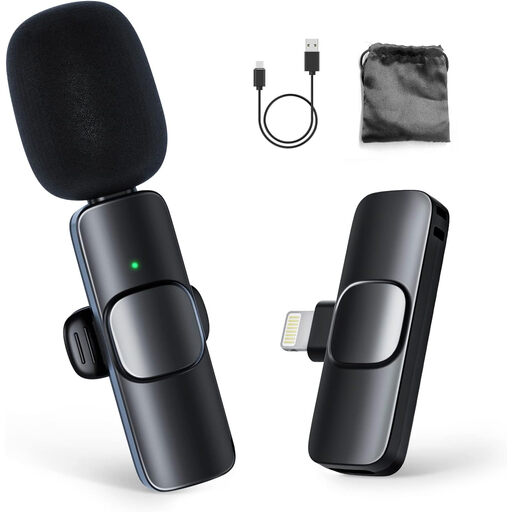 No image available
This wireless clip-on microphone set may suit a one-speaker iPhone setup. Check your device’s connection and compatibility.
The product title lists one transmitter and one receiver. The product information is aimed at iPhone users and also mentions iPad.
No. The plug and microphone input need to be compatible. RØDE specifies the smartLav+ with TRRS for phones and the Lavalier GO with TRS for compatible recording equipment. For using the smartLav+ with a Wireless GO II, RØDE specifies a separate TRRS-to-TRS adapter.
Attach the microphone close to the speaker, avoid contact with moving clothing and listen back to a test recording at the recording location. Shure explains that a microphone can’t improve the room’s acoustics or effectively separate recorded direct speech from echo.
Check whether you need a suitable adapter, batteries, a memory card or an extra transmitter. This depends on the microphone and the set you choose. For consumer purchases in the Netherlands, the statutory guarantee applies alongside any manufacturer’s warranty. According to ACM ConsuWijzer, the statutory guarantee depends on what you could reasonably expect from the product under normal use.
First consider who is involved and the purpose of the publication; don’t assume that you can publish without permission. The Dutch Data Protection Authority says that, in most cases, you need permission to publish other people’s personal data online, and that processing requires a legal basis under the GDPR. The exception for purely personal or household use has limited conditions and does not automatically apply to a public podcast.