
Presenter in a fixed position
You record short introductions using a fixed recorder and mainly want clear speech without unnecessary wireless equipment. Check that the input and cable length suit your setup.


Start with where you’ll be recording: a wired microphone suits a fixed position, a wireless set gives you freedom to move, and a microphone with its own recorder is an option if you don’t need a live connection. In every case, check that the connection and power supply are compatible with your recording device. Position the microphone close to the speaker and make a test recording; none of these options will automatically eliminate echo or background conversations.
You record short introductions using a fixed recorder and mainly want clear speech without unnecessary wireless equipment. Check that the input and cable length suit your setup.
You need room to move and can test the connection, power supply and recording position in advance. Bear in mind that a wireless connection may drop out in the hall.
You’re recording a conversation and want to know in advance how many microphones or transmitters are included and how the voices will be recorded.
For consumers recording a podcast intro in a community hall, the connection, speech clarity and freedom to move are key considerations.
| What to consider | What should you check? | Who is this important for? |
|---|---|---|
| Clear speech | Secure the microphone firmly and close to your mouth. Make a test recording in the intended location and listen back to it. | I want my introduction to remain clear, even if the hall is echoey or other people are talking. Consumers who prioritise speech clarity make up around 33% of this group. |
| Connection and power supply | Check the plug type, power requirements and any adapter needed for your recorder, camera, phone or computer. | I want to be sure the microphone works with my recording device, not just that both have a 3.5 mm connection. Consumers who prioritise the device connection make up around 27% of this group. |
| Freedom to move | Decide whether you really need to walk around. If you’re using a wireless set, test the connection, receiver and battery charge at the recording location. | I want to be able to walk around during the introduction without a cable connecting me to the recorder. Consumers who prioritise freedom to move make up around 20% of this group. |
| Two speakers | Check how many transmitters are included and whether your recorder can capture separate channels if you want to edit the voices individually. | I want both speakers to have a microphone close by and to know in advance how their voices will be recorded. Consumers who prioritise recording two speakers make up around 20% of this group. |
Wired microphones can differ in plug type and power requirements. The fact that a plug fits physically doesn’t prove that it will work with your device.
Compare the microphone plug, input and power requirements with the specifications for both devices, then test the setup using the recorder or recording app you plan to use.
Depending on the combination, you may need a suitable adapter or a different microphone.
A stated range applies under the manufacturer’s specified conditions. The Dutch Authority for Digital Infrastructure also warns that shared, licence-exempt frequencies are not guaranteed to be interference-free.
Test the set at the actual recording location and listen back to the recording before you record the final introduction.
If the introduction cuts out, you may need to record it again.
A lapel microphone positioned close to the speaker helps capture their voice up close, but an omnidirectional capsule also picks up sound from other directions. That means the microphone won’t eliminate echo or all background conversations.
Where possible, choose a quiet spot to record, attach the microphone so it doesn’t rub against clothing, and make a test recording using the settings you intend to use.
The ATR3350xiS is a wired option for a fixed setup with a suitable stereo input.
The Lavalier GO is a wired TRS lapel microphone for compatible recorders and wireless transmitters in the Wireless GO range.
The V.Lav is a wired option for compatible devices with a 3.5 mm microphone input.
According to Zoom, the F2 combines a portable recorder with an LMF-2 lapel microphone included in the box.
SYNCO describes the G4 as a portable wireless set with two transmitters and three receivers.
This selection includes wired lapel microphones and wireless sets for fixed recordings or greater freedom to move, including versions with two microphones. Check each product to make sure its connection and included accessories suit your recording device and the number of speakers.
 No image available
The two microphones may suit recordings with two speakers; check that the receiver included works with your camera or USB-C smartphone.
The product name lists a camera receiver, a smartphone receiver and a charging case. According to the product information, older iPhones with Lightning need a Lightning configuration.
 No image available
This wired lapel microphone may suit a fixed recording position; check that the connection works with the exact device you’ll be using.
The product description lists a 3.5 mm TRRS plug and a TRS-to-TRRS adapter included in the box.
 No image available
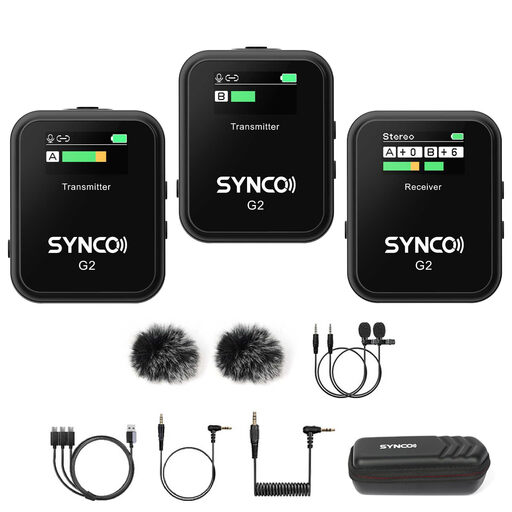
With two transmitters, this set may suit a conversation between two speakers; check that the receiver works with your recording device.
The product description lists a system with two transmitters and one receiver, mono, stereo and safety modes, and monitoring via a 3.5 mm connection.
 No image available
The two transmitters may suit an introduction with two speakers; check which connection works with your camera or smartphone.
The product description lists two transmitters and outputs for TRS, TRRS and USB-C.
 No image available
This wired microphone may suit a fixed recording position where you need extra cable length; check that the 3.5 mm connection works with your device.
The product name lists a 6 m cable, a 3.5 mm connection and an omnidirectional clip-on microphone.
RØDE generally recommends attaching the microphone to your chest, around 20–30 cm from your mouth, and keeping it clear of fabric that could rub against the capsule. Listen back to the recording in your hall; following this placement advice won’t automatically prevent echo.
Only if the plug, any adapter, microphone input and power supply are compatible with that phone. Audio-Technica lists an adapter for devices with a compatible 3.5 mm headset socket for the ATR3350xiS; RØDE specifies a powered TRS microphone input for the Lavalier GO. Check that the combination works with your phone before you buy.
That depends on the frequency band used and the conditions for the equipment. The Dutch Authority for Digital Infrastructure publishes licence-exempt frequency bands for wireless microphones and notes that some other bands require a licence. Check the frequency and transmission power of the specific version.
According to the Dutch Data Protection Authority, identifiable audio recordings can be personal data. If you process this data, you need an applicable legal basis under the GDPR; consent is one possible basis, but not automatically the only one. The obligations that apply depend on who is making the recording and how it will be used.
For distance purchases from a business, there is often a 14-day cooling-off period, subject to exceptions, according to the Government of the Netherlands. Separately, ACM ConsuWijzer explains that the seller must offer a suitable solution if a product doesn’t perform as you could reasonably expect under normal use.