
Recording on a phone
You want to record the greeting directly on a compatible smartphone. Check which microphone connection and any adapter will work with your device and recording app.


Start with a lapel microphone that’s confirmed to work with your phone, computer or recorder. For a short recording in one place, a wired connection is often the simplest option. Position the microphone the same way each time and make a test recording in a quiet room. Also check how your phone system handles greetings: being able to record an audio file doesn’t necessarily mean you can upload it.
You want to record the greeting directly on a compatible smartphone. Check which microphone connection and any adapter will work with your device and recording app.
You’re recording with a computer, audio interface or recorder and want to capture speech clearly. The input type and microphone placement both play a part.
You want to record a greeting for a business phone service. First check whether your system accepts an audio file or requires you to record the greeting over the phone.
Choose this when: your device and recording app support USB-C microphone input for the model you’ve chosen.
Bear in mind: the cable limits your movement; the Sennheiser XS Lav USB-C has a 2 m cable.
Choose this when: your recording device has a compatible TRRS headset input or you’re using the right adapter.
Bear in mind: TRRS won’t automatically fit a TRS microphone input; check the entire connection.
Choose this when: you already use a recorder or transmitter with a compatible TRS microphone input.
Bear in mind: a standalone TRS microphone isn’t a wireless system in its own right and won’t necessarily connect directly to a phone.
Choose this when: you need to move around while recording, or a cable to the recorder would be impractical.
Bear in mind: using a separate recorder means an extra step to transfer the file; with a wireless radio system, also check the frequency it uses.
| What to consider | What should you check? | Who is this important for? |
|---|---|---|
| Connection to the recording device | Check the exact device type and recording app, and whether USB-C microphone input or the chosen 3.5mm input is supported. Find out whether you need an adapter. | If I want to record with my phone or recorder, I need to know that the plug, input and any adapter are compatible. Around 36% of consumers focus mainly on finding a suitable connection. |
| Clear speech in the room | Make a test recording with the clip securely attached. Listen for clothing noise and noticeable echo in the room. | If I want to record a clear voice, I need to hear how the chosen microphone position and room sound together. Around 29% of consumers say clear speech at home is their main concern when buying. |
| Getting the greeting onto the phone system | Check with your provider and subscription whether you need to record the greeting, upload it or supply it in a particular file format. | If I’m recording a greeting for a phone system, I need to know how that service accepts it. Around 21% of consumers prioritise being able to deliver a recording to their phone system. |
| Simplicity and equipment needed | Check whether you need an adapter, battery, recorder or transmitter, and see what you already have. | If I only want to record a short greeting, I don’t want to need lots of extra parts or steps. Around 14% of consumers prioritise a simple set-up. |
The RØDE smartLav+ uses TRRS, while the RØDE Lavalier GO uses TRS. RØDE recommends a TRRS-to-TRS adapter when using the smartLav+ with a Wireless GO II transmitter.
Note the exact input type on your device and check the full signal path before choosing a microphone.
Phone systems can use different methods for setting up a greeting. KPN explains how to set a welcome message for KPN EEN MKB mobile voicemail by calling 1233.
Follow the instructions for your own phone system and check in advance whether you need to record the greeting, upload it or use a particular file format.
Depending on the service, the process may take extra time if you need to record the greeting again or convert an audio file.
A Joybuy product listing describes the Verbex K80 as a wireless clip-on microphone, while its specifications also say ‘Wireless none’. This conflicting description makes it unclear how that particular set works.
For each set, check which transmitter, receiver and connection are included, and how to make a recording.
The XS Lav USB-C is a wired option for recording devices that support the model via USB-C.
The smartLav+ and Lavalier GO are two wired models with different types of plug.
The BY-M1 is a wired lapel microphone with a switch for smartphone and camera use.
The MVL is a TRRS option for portable recording devices with a compatible connection.
The F2 is an option if you want to use a lapel microphone with a separate recorder.
This selection includes wireless lapel microphones and a model with a 3.5mm connection for recording set-ups. Before buying, check that the receiver, connection and app work with your recording device. Also make sure the way you submit the recording suits your phone system.
 No image available
Could suit you if you need room to move while recording; check that the receiver connects to your recording device.
The product name lists 48 kHz/24-bit, a 9 g transmitter and a 300 m range. If you’re using it wirelessly, check that the system’s frequency is permitted in the Netherlands.
 No image available
The USB-C version could suit a mobile or computer set-up that supports the receiver and microphone input.
The product name lists a 300 m range and 30-hour operating time. If you’re using it wirelessly, check that the system’s frequency is permitted in the Netherlands.
 No image available
A wired option to consider for a recording set-up; check the connection and whether it’s supported by the device you want to record with.
 No image available
Could suit a Type-C voice recording set-up if your device and recording app support the connection.
If you’re using it wirelessly, check that the system’s frequency is permitted in the Netherlands.
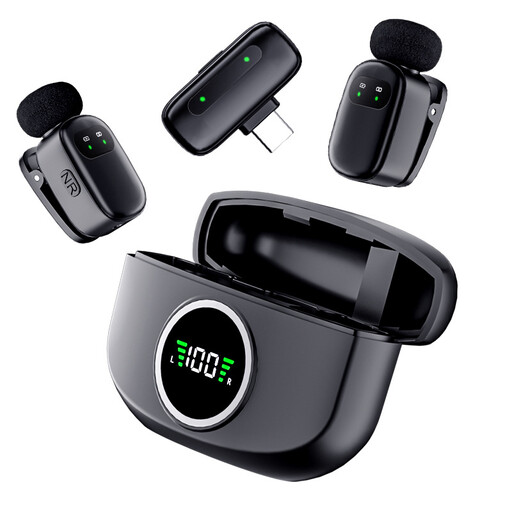 No image available
Could suit a Type-C voice recording set-up if your device and recording app support the connection.
If you’re using it wirelessly, check that the system’s frequency is permitted in the Netherlands.
Secure the clip firmly and make a test recording. Shure recommends a distance of 15–25 cm between the capsule and your mouth for the MVL; this distance doesn’t automatically apply to every model. Also listen for clothing noise and noticeable echo in the room.
Not until you’ve checked the requirements of your phone system. The Audacity manual explains how to export as a mono WAV file, while KPN explains how to set a welcome message for KPN EEN MKB mobile voicemail by calling 1233. Follow the instructions for your own service rather than assuming that one file format works for every system.
No. The Audacity manual explains how to reduce persistent background noise, not isolated sounds such as a door slamming. If possible, record again in a quieter room and listen to the greeting before using it.
Not for every wireless microphone, but the frequency used must be permitted. The Netherlands Authority for Digital Infrastructure says a licence is generally not needed when you use the correct frequency band. Check the frequency and applicable conditions for the wireless system you choose.