Who is this buying guide for?

Recording among colleagues

You want to record one voice clearly at a shared desk and can choose a quiet moment and position the microphone carefully. A microphone close to the speaker can pick up their voice more clearly, but it won’t automatically block out background conversations. RØDE highlights proximity and minimising cable movement as important considerations.

Recording on a phone and unsure about connections

You want to record the greeting directly on a smartphone. So check which microphone input your phone has and whether any adapter you need is compatible with both the phone and the microphone.

For occasional, quick recordings

You record a short message now and then and want to be able to play it back. The main question is whether a simple wired connection will do, or whether the freedom to move around with a wireless microphone matters more to you than charging and pairing.

What should you look for when buying?

Wired connection to a phone or recorder

Choose this if: you’re recording a short greeting in one place and have confirmed the connection is compatible.

Bear in mind: the cable length and the right type of plug; a 3.5mm plug alone doesn’t prove compatibility.

Wireless microphone with receiver

Choose this if: a cable would restrict your movement and the receiver connects to your recording device.

Bear in mind: charging, pairing and the right input; a noise-reduction feature doesn’t guarantee a quiet recording among colleagues.

Lavalier microphone with a separate recorder

Choose this if: you’d rather create a separate audio file than record directly on your phone.

Bear in mind: you’ll need an extra device and will have to transfer the file afterwards.

What to consider What to look for Who it matters to
Clear speech in the workplace Position the microphone close to the speaker and make sure the clip or cable doesn’t rub against clothing. Listen back to a test recording in your usual environment. If I want to record a greeting while colleagues are working, I need to know whether my voice will remain clear without assuming that background speech will disappear. Clear speech among colleagues is the top priority for around 36% of consumers.
Connection to the recording device Check the exact input, TRS or TRRS and, where necessary, the right adapter. Also check that the recording app is using the external microphone. If I want to record directly on my phone, the plug and adapter setup must actually be compatible with my device. A working connection is the main buying concern for around 29% of consumers.
Making it easy to repeat a short recording Compare the wired cable with the charging and pairing steps required for a wireless microphone. Set aside time to listen back to the recording, too. If I only record a short greeting now and then, I want to be able to set things up and check the recording without unnecessary steps. Easy recording and playback are the top priorities for around 21% of consumers.
Freedom to move and monitoring the recording Check that the receiver is compatible, whether it needs power and whether you can monitor the recording through headphones as you record. If a cable gets in my way or I want to monitor the recording as I make it, I weigh the practical benefits against the extra equipment. Freedom to move or monitoring is the main buying concern for around 14% of consumers.

Common buying mistakes

  • Assuming a 3.5mm plug means the microphone is compatible

    TRS and TRRS plugs are used for different purposes. A phone without a compatible input may also need an additional adapter.

    Before buying, check the plug type, phone port, adapter and whether the recording app uses the external audio signal.

    An extra adapter means more items to carry and connect before you start recording.

  • Treating a standalone bodypack microphone as a complete set

    The Shure WL185 and Sennheiser ME 2 are designed for compatible wireless bodypack setups, not for direct connection to a phone.

    Check the entire signal chain, including the transmitter and recording device, before choosing a standalone microphone.

    This setup may require a compatible transmitter and other recording equipment as well as the microphone.

  • Relying on noise reduction instead of choosing a quiet moment

    A feature described as noise reduction doesn’t prove that colleagues will be inaudible in your workspace.

    If possible, record at a quiet time, attach the microphone so it doesn’t rustle against your clothing, and listen back to a test recording.

Brands to consider

Shure

The MVL is designed for smartphone use; the WL185 is an alternative for use with a compatible wireless bodypack transmitter.

  • Shure describes the MVL as having a 3.5mm TRRS plug; if your device doesn’t have a compatible input, you’ll need a CTIA-compatible adapter.
  • The WL185 uses TA4F. Check which transmitter it works with rather than assuming the microphone can connect directly to a phone.

RØDE

The smartLav+ is designed for use with TRRS smartphones; the Lavalier GO is intended for a 3.5mm TRS microphone input, including those on the Wireless GO series.

  • RØDE lists a pop filter as included with the smartLav+.
  • RØDE describes additional adapters for using the Lavalier GO with a smartphone. The models don’t necessarily use the same connection setup.

BOYA

The BY-M1 offers a wired setup for a phone or camera; the mini 2 is a separate wireless clip-on microphone system.

  • According to BOYA, the BY-M1 has switchable phone and camera modes and an LR44 battery.
  • With the mini 2, check you have the right receiver version and that it’s charged. A noise-reduction claim doesn’t tell you how the sound will be at your desk.

Saramonic

The Blink500 B2+ is a wireless set for anyone looking for multiple outputs and headphone monitoring.

  • Saramonic lists, among other features, a 3.5mm monitoring output and an analogue TRS output.
  • Multiple connections mean more components and settings than a single wired microphone. Noise-reduction features are manufacturer claims.

Zoom

The F2 is an option for recording with an included lavalier microphone on a separate recorder.

  • Zoom specifies 32-bit float WAV and microSD storage.
  • You’ll create a separate audio file that you need to transfer later; this isn’t a microphone that plugs directly into a phone.

Joybuy products

This selection from Joybuy includes wired and wireless lapel microphones for recording on a compatible device. For wireless models, check that the included receiver is compatible with your phone or other recorder.
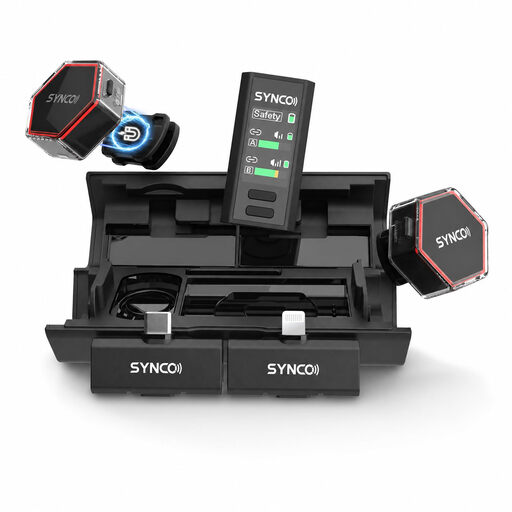
SYNCO G4 wireless lavalier microphone for iPhone, Android and camera

SYNCO G4 Wireless Lavalier Microphone for iPhone 7–17/Android/Camera

A wireless lavalier microphone for recording with a compatible receiver.

The listed receiver options include USB-C, Lightning and 3.5mm for cameras; check which version works with your recording device.

Joybuy

SYNCO S8 lavalier microphone for smartphone, PC and camera

SYNCO S8 Lavalier Microphone for Smartphone & PC Laptop Camera

A wired option if your recording device has a compatible 3.5mm connection.

Listed features include 3.5mm connectivity and an included windscreen. Check the connection on your phone, PC or camera before ordering.

Joybuy
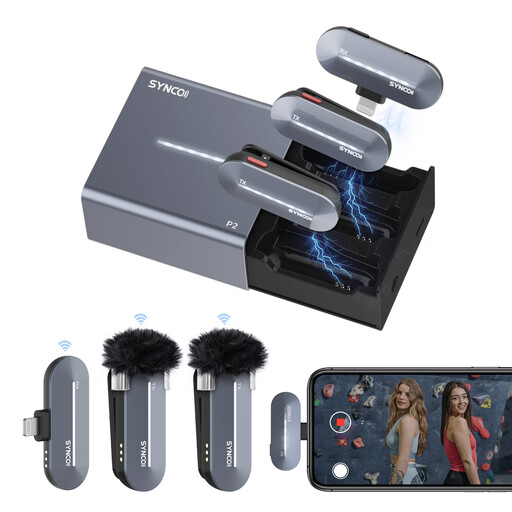
SYNCO P2SL wireless microphone with two lavalier microphones and Lightning receiver

SYNCO P2SL Wireless Microphone for iPhone, Dual Lapel Mic

A wireless set with two lavalier microphones for a compatible iPhone setup.

The listed receiver has a Lightning connection; the set offers mono and stereo modes. Check that your device has this connection.

Joybuy

Moman M1CT wireless lavalier microphone with USB-C receiver

Moman M1CT Wireless Lavalier Microphone, USB-C, 1TX+1RX

A wireless lavalier microphone for a compatible mobile device with USB-C.

This version includes one transmitter and one receiver, as well as an audio monitoring port. Check that the receiver works with your device and whether you need the monitoring port.

Joybuy
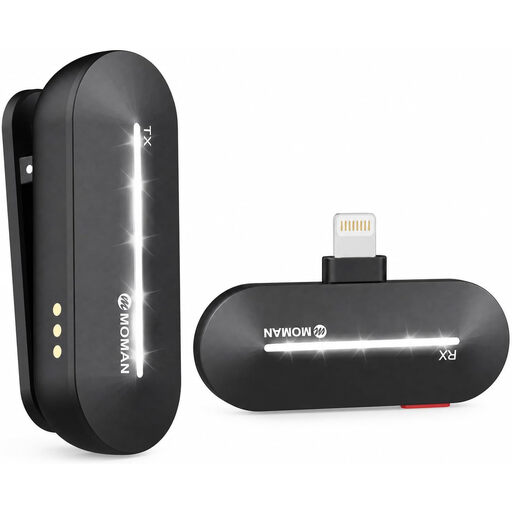
Moman M1CL wireless lavalier microphone for iPhone 14, 13, 12, 11 and X

Moman M1CL Wireless Lavalier Microphone, iPhone 14/13/12/11/X, 1TX+1RX

A wireless lavalier microphone for a compatible iPhone in the listed model range.

This version includes one transmitter and one receiver. Check that your device is one of the listed iPhone models.

Joybuy

Frequently asked questions

How do you attach and test a lapel microphone for a phone greeting?

Attach the microphone close to the speaker and make sure the clip or cable doesn’t rub against clothing. Record a short test message and listen back on the device you’ll use for the greeting; good positioning doesn’t guarantee that colleagues will be inaudible.

Will every 3.5mm lapel microphone work with a smartphone?

No, the plug type and phone port need to be compatible. Shure describes the MVL as a TRRS microphone for a compatible input or a suitable CTIA adapter. For smartphone use with the TRS connection on the RØDE Lavalier GO, RØDE specifies a TRS-to-TRRS adapter; a phone without a 3.5mm port may also need a port adapter.

What extra components should I check for my recording setup?

Check whether you need an adapter, compatible transmitter, batteries or a memory card; this depends on the microphone and recording method you choose. For consumer purchases in the Netherlands, statutory rights apply without a fixed statutory guarantee period; the seller is the point of contact if a product is faulty, according to the Dutch government. For online purchases from a business, you’ll often have 14 days to change your mind, subject to exceptions.

Can you record a phone greeting or conversation at a shared desk without permission?

A pre-recorded greeting is not the same as recording a phone conversation. If an organisation processes personal data, it must assess whether there is an appropriate legal basis under the GDPR. The Dutch Data Protection Authority also sets out conditions for monitoring or recording employees’ phone calls; these rules don’t automatically determine whether recording only your own greeting is permitted.

Are all wireless microphone frequencies licence-exempt in the Netherlands?

No, the fact that a microphone is wireless doesn’t necessarily mean it’s licence-exempt. The Dutch Radiocommunications Agency publishes frequency bands and conditions for licence-exempt use. Check the frequency and version of the set against the latest guidance.
