What to consider when choosing
For audio flashcards in a noisy home, your choice mainly comes down to clear speech, compatibility with your device and app, a repeatable setup or freedom of movement.
Wired lapel microphone
A good fit if: you make short recordings in one place and your device’s microphone input matches the plug.
Bear in mind: the cable restricts your movement, and a plug won’t automatically work with every phone or computer.
Wireless clip-on microphone
A good fit if: you want to move around while recording or don’t want a cable running along your clothing.
Bear in mind: you’ll need the right receiver, charging and a test of your recording app. Noise processing doesn’t guarantee that other voices will disappear.
| Consideration |
What should you check? |
Who is it for? |
| Clear speech with household noise |
How the microphone attaches and where it sits; listen to a test recording with the household noise you usually hear. |
I want to hear my voice clearly while there’s noise at home. Around 36% of consumers prioritise clear speech in a noisy home. |
| Connection and recording app |
Check the port, support for microphone input and whether the app uses the external microphone. |
I want to know in advance whether my device and app will work with the microphone. Around 29% of consumers give device and app compatibility top priority. |
| Repeatable short recordings |
Check the clip and cable or receiver; play back a test card before recording a batch. |
I record lots of short cards in one place and want to check each recording easily. Around 21% of consumers prioritise a simple, repeatable setup. |
| Freedom of movement |
Check the number of transmitters, the receiver for your device and which components need charging. |
I want to move around without a cable running along my clothing. Around 14% of consumers give freedom of movement top priority. |
Joybuy products for wireless recording
This selection features wireless lapel microphones for mobile recording. For each model, check that the connection, receiver and recording app work with your device.
 No image available
DJI Mic Mini 2S (2 TX + 1 RX + Charging Case)
The kit includes two transmitters; you may not need the second one for audio flashcards alone.
The bundle lists 2 TX, 1 RX and a Charging Case. Check that the receiver is compatible with your device.
Joybuy
 No image available
SYNCO SMIC AI wireless microphone for Android USB-C
The product title specifies a wireless microphone for Android devices with USB-C; check whether your recording app uses external audio.
Check the connection before use and make a test recording with the household noise you normally hear.
Joybuy
 No image available
Verbex K9-Black wireless mini microphone
This wireless microphone could suit short recordings if you don’t want a cable running along your clothing; check that the connection is compatible with your device.
The product name specifies a Type-C connection. Assess the noise cancellation with a test recording in your own space.
Joybuy
 No image available
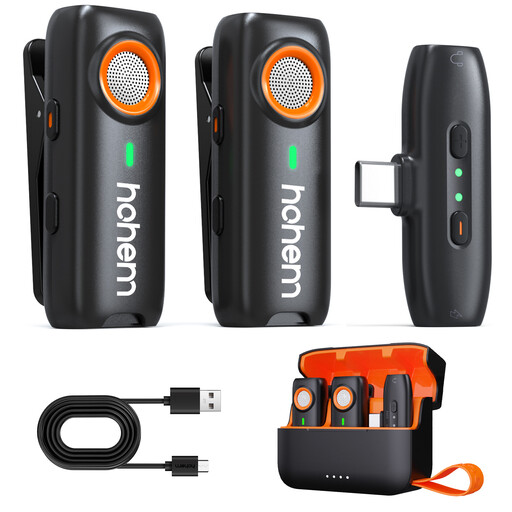
hohem wireless lavalier microphone, 3-Level DSP, TF backup recording
A wireless clip-on microphone could be a good fit if you want to move around while recording; first check the receiver and connection for your device.
The product name specifies 3-Level DSP Noise Cancelling. This doesn’t guarantee that other voices will disappear. A TF card for local backup isn’t included.
Joybuy
 No image available
Verbex ST5 single-mic wireless lavalier microphone
The single-microphone version could suit solo recordings; check which receiver and connection your recording device needs.
The product name specifies a single wireless microphone. Make a short test recording to check whether your recording app uses the external microphone.
Joybuy
Frequently asked questions
Can a lapel microphone help when other people at home are talking at the same time?
A microphone close to your mouth can help capture your voice directly, but it won’t make the room quieter. Shure explains that a microphone can’t completely separate direct speech from reverberation. Listen back to a test recording with your usual background noise, and don’t assume noise cancellation will make other voices disappear.
How should I attach a microphone for short spoken flashcards?
Follow the placement instructions for the specific model. Shure recommends keeping the MVL 15–25 cm from your mouth; BOYA recommends making a short test recording with the BY-M1. With a wired microphone, also make sure the cable and your clothing don’t rub against the capsule.
Can I use any lapel microphone directly with my phone or flashcard app?
No. The plug or receiver and the app must be compatible with your device. For example, the RØDE smartLav+ and Shure MVL have a 3.5 mm TRRS plug; wireless kits use a receiver that must be compatible with your phone. Make a test recording to check that the app uses external audio. Anki’s documentation describes recording through a computer’s microphone, but doesn’t confirm that every external microphone or mobile app will work.
Do I need a kit with two transmitters for solo flashcards?
Not if you’re only recording one speaker. DJI describes the Mic Mini version with 1 TX + 1 RX as suitable for solo recording, and the kit with two transmitters as designed for two people. Also check which receiver and accessories your device needs.
What are my rights in the Netherlands if I buy online or receive a faulty product?
For many distance purchases, the Dutch government says you have 14 days to change your mind, with some exceptions. This is separate from your rights if a product is faulty: you’re entitled to expect it to meet reasonable expectations. The Dutch government says there’s no fixed statutory warranty period in the Netherlands; contact the seller if there’s a fault.


