What should you look for?
Start by considering how much freedom of movement you need and how you want to record. Then check the connection, microphone placement and how you’ll play back your files.
Wired connection to a phone or recorder
Best when: you’ll mainly be speaking from one spot and can route the cable to the recording device without it getting in the way.
Bear in mind: the cable limits your movement, and the plug type and adapter must match the input.
Wireless set with receiver
Best when: you want to walk around while keeping the microphone connected to a receiver.
Bear in mind: the transmitter and receiver need charging and pairing, so check how many transmitters are included in the set.
Recorder worn by the speaker
Best when: you want to move around and record locally without a constant audio connection to a receiver.
Bear in mind: you’ll need to manage and transfer the files later. If you’re recording video at the same time, synchronisation needs extra attention.
| What to consider |
What should you check? |
Who is this important for? |
| Speech and placement |
Check the clip and any pop shield. Make a short recording with the clothes you’ll be wearing and in the room where you’ll be recording, then play it back. |
If I want spoken words to be easy to follow in the rehearsal room, I pay attention to placement and background noise. Around 33% of consumers prioritise clear speech. |
| Connection |
Check the exact recording device, its input, the plug type and whether you’ll need a suitable adapter. |
If you want to connect the microphone to an existing phone, camera or recorder, first check that the connections are compatible. Around 27% of consumers say compatibility is their top priority. |
| Freedom of movement |
Decide whether you’ll be standing still or walking around. For a wireless set, check how many transmitters are included and whether you need a receiver. |
If I want to walk around while recording, freedom of movement matters more than a wired connection. Around 20% of consumers put freedom of movement first. |
| Local recording |
Check that the specific transmitter or recorder you’ve chosen records locally. Make a test file and check that there’s enough storage available. |
If you can’t easily record the commentary again, you’ll want to check that a local file has been recorded and can be found. Around 20% of consumers prioritise the reassurance of having a recording saved. |
Joybuy product picks
This selection includes wireless microphone sets for speakers on the move and lapel microphones for recording with the devices specified. Check the connection and what’s included with each version.
 No image available
DJI Mic Mini 2S (2 TX + 1 RX + charging case)
This wireless set is an option if the speaker will be moving around while recording.
The product description lists internal 32-bit float recording and storage for up to 28 hours.
View at Joybuy
 No image available
SYNCO P2XT USB-C wireless microphone
This wireless version is designed for recording with a device that’s compatible with the USB-C receiver.
The product description lists monitoring and charging while in use. OTG must be enabled on Android phones.
View at Joybuy
 No image available
SYNCO S8 lapel microphone for smartphone, PC, laptop and camera
The product title describes a lapel microphone for recording with a smartphone, PC, laptop or camera.
View at Joybuy
 No image available
Moman MA6 lapel microphone, 6 m, 3.5 mm
According to the product title, this version is designed for a setup with a 3.5mm connection.
The title lists a 6 m cable and an omnidirectional clip-on microphone for smartphones.
View at Joybuy
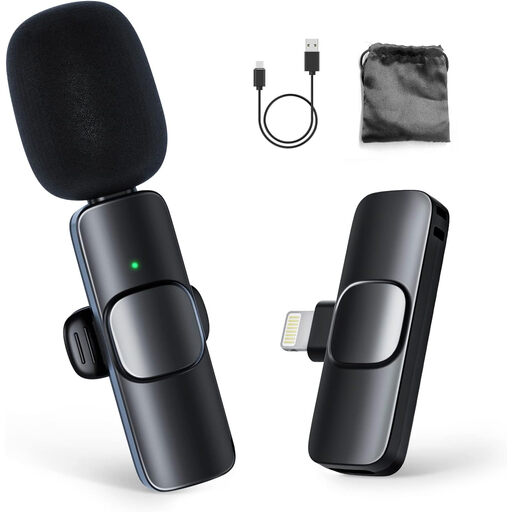 No image available
Moman CP1A wireless lapel microphone for iPhone (1 TX + 1 RX)
According to the product title, this wireless set is designed for recording with an iPhone.
The title lists one transmitter and one receiver.
View at Joybuy
Frequently asked questions
How can you check whether a lapel microphone will work with your phone?
Check your phone’s input and the microphone’s plug type. The RØDE smartLav+ and Shure MVL use 3.5mm TRRS; if your phone doesn’t have a compatible input, you’ll need a suitable adapter. After connecting it, make a test recording and check that the external microphone is being used.
How should you prepare to record in a rehearsal room?
Make a short recording wearing the clothes you’ll have on while recording, then play it back to check for rustling. Also check that the file has been saved and can be played. If you’re using a portable recorder, check the available storage and how to transfer files beforehand.
Do you need a licence to use a wireless lapel microphone in the Netherlands?
It depends on the frequency used. The Dutch Authority for Digital Infrastructure lists frequencies that can be used for wireless microphones without a licence, while some other bands require one. Check the frequency of the specific version you’re buying; the fact that it’s wireless doesn’t automatically mean it can always be used without a licence.
Can you record other people’s voices in the rehearsal room without asking?
There isn’t a simple yes or no: it depends, among other things, on who is being recorded and why. According to the Dutch Data Protection Authority, an organisation processing personal data needs a lawful basis under the GDPR; consent is one possible basis. Discuss the recording with everyone involved beforehand, and consider its specific purpose and how the recording will be handled.
Are you only entitled to a two-year guarantee on a microphone in the Netherlands?
No. According to the Dutch government, there is no fixed statutory guarantee period in the Netherlands. What you can expect from a product depends, among other things, on the product and the information provided when it was sold. If a consumer product is faulty, you can contact the seller.


