A wired lapel microphone may be all you need if you stay within range of a compatible phone or recorder. If you move around the rehearsal room, a complete wireless set gives you more freedom. Either way, check the connection, what’s included and how it attaches to your costume; a microphone on its own does not automatically give you a complete recording setup.
Who are these options for?
Performer who moves around
If you walk and turn around the rehearsal room, you’ll want to remain easy to hear without a cable running to the camera or recorder. Compare complete wireless sets and test the recording while running through the movements in your monologue.
Performer recording on a phone
If you mainly record in one place, a compact wired setup may suit you. Check in advance that the plug and any adapter are compatible with your phone.
Creator with a costume or existing bodypack
If you want the microphone to be less visible, or you already have a wireless system, consider contact with clothing and check the bodypack’s exact connection. A standalone lavalier won’t necessarily work with every set.
What should you look for when choosing?
Start with distance and movement: choose between a cable, a complete wireless set or a standalone lavalier for a bodypack you already own.
Wired lavalier
Choose this if: you can stay within the cable’s reach and your phone or recorder has a suitable input.
Bear in mind: a cable may restrict your movement or rub against your clothes.
Complete wireless set
Choose this if: you move around the room and can connect the receiver to your recording device.
Bear in mind: check what’s included, the power supply, the connection and any frequency requirements.
Standalone lavalier for a bodypack
Choose this if: you already have a compatible bodypack and receiver and need a different microphone position.
Bear in mind: a microphone on its own won’t record; check the bodypack’s plug and power requirements.
| What to consider |
What should you check? |
Who is this important for? |
| Freedom of movement and keeping the recording |
Check that the transmitter, receiver and any necessary cables are included, and whether the transmitter can record on its own. |
If I walk and turn during the monologue, I don’t want to be tethered to the recorder by a cable. That’s why around 31% of consumers prioritise freedom of movement. |
| Natural-sounding voice at different volumes |
Check where the recording is stored and listen to a test with both quiet and loud passages. |
I want to be able to judge whether my voice sounds natural in both whispered and powerful passages. Around 25% of consumers prioritise natural, usable voice recordings. |
| Connection and a complete recording chain |
Compare the plug standard and power requirements with your phone, recorder or bodypack; also check what’s in the box. |
If I want to use my current phone or wireless system, the microphone needs to connect to it properly. That’s why around 25% of consumers check the connection and what’s included first. |
| Positioning under a costume without clothing noise |
Check the clip, cable routing and available space; make a test recording while doing the movements in the monologue. |
When the microphone is under or attached to my costume, I want to stop fabric or a cable rubbing against it. Around 19% of consumers prioritise discreet positioning. |
Common buying pitfalls
-
Confusing a standalone lavalier with a complete recording set
A microphone for a bodypack and a mobile lavalier with a TRRS connection use different connection setups. A microphone on its own won’t record.
Make a note of which recording device you use and check the exact plug, power requirements and what’s included before ordering.
-
Assuming 32-bit float also applies to the camera recording
According to RØDE, 32-bit float on the Wireless PRO applies to recordings made internally on the transmitter. It doesn’t automatically apply to audio recorded directly to the camera.
Check which recording is saved and export a test file before recording a full monologue.
-
Choosing a UHF version without checking the frequencies
The Dutch Authority for Digital Infrastructure (RDI) states that permitted bands and available frequencies can vary by location.
Before using the wireless function, check the frequency version and settings for your rehearsal venue with the RDI.
-
Hiding the microphone without testing it with your costume
Fabric or a cable rubbing against the microphone can cause handling noise, even if the microphone isn’t visible.
Test the final attachment while doing the actual movements in the monologue, then listen back to the recording.
If contact with clothing affects the recording, you may need to record the passage again.
Brands to compare
RØDE
The Wireless PRO is a complete wireless set with two Lavalier II microphones, designed for recordings where the performer moves around.
- RØDE says the transmitters have internal 32-bit float recording and the lavaliers have locking 3.5 mm connections.
- RØDE states that 32-bit float applies only to internal transmitter recordings, not automatically to recordings made on the camera.
Deity
The V.Lav is a wired option for recording within range of a phone, camera or recorder with a suitable microphone input.
- Deity specifies a 5-metre cable and a self-adjusting 3.5 mm TRRS connection for many microphone inputs.
- It isn’t guaranteed to fit every device; if you move around, route the cable carefully.
IK Multimedia
The iRig Mic Lav is designed for mobile recording with a compatible phone or tablet.
- IK Multimedia specifies CTIA/AHJ-TRRS, a 150 cm cable, no battery requirement and a second connection for monitoring or a second iRig Mic Lav.
- A phone without a suitable input may need a compatible adapter.
Shure
The MVL is designed for a suitable mobile TRRS input, while the WL185m is a standalone microphone for a compatible wireless bodypack.
- Shure lists several plug options for the WL185m, including TA4F and LEMO.
- The MVL and WL185m use different connection setups. For theatre use, Shure recommends paying attention to positioning and contact with clothing.
DJI
The Mic 2 version with one transmitter and one receiver is a wireless option for one speaker.
- DJI specifies internal 32-bit float recording on the transmitter and a range of outputs.
- Check the exact bundle: one transmitter and one receiver is not the same version as a set with two transmitters and a charging case.
Products for recording monologues
This selection includes wired lavaliers and wireless clip-on sets for recording monologues, including models for phone setups and sets with a transmitter and receiver.
 No image available
DJI Mic Mini 2S (2 TX + 1 RX + Charging Case)
A wireless set with two transmitters and one receiver for a monologue where you move around the room.
The bundle name includes a charging case; check that the receiver’s connection is compatible with your recording device.
View at Joybuy
 No image available
Moman MA6 lavalier microphone, 6 m, 3.5 mm
A wired lavalier for recordings within the cable’s reach.
The product name specifies a 6-metre cable, a 3.5 mm connection and an omnidirectional clip-on microphone for smartphones; check your device’s connection.
View at Joybuy
 No image available
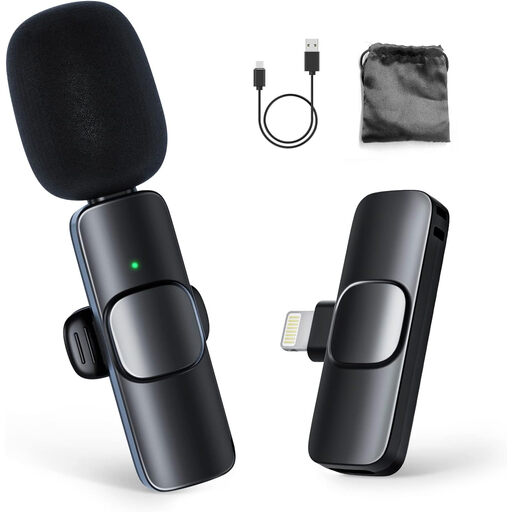
Moman MB1C, USB-C (1 TX + 1 RX)
A wireless clip-on set for anyone who wants to move around while recording without a cable running to the microphone.
The product name mentions USB-C and iPhone 18, 17 and 16; check that the connection is compatible with your phone.
View at Joybuy
 No image available
Moman CP1A, wireless lavalier (1 TX + 1 RX)
A wireless clip-on set for recordings where you want to move around during the monologue.
The product name specifies one transmitter, one receiver and use with iPhone; check your recording device’s connection.
View at Joybuy
 No image available
DJI Mic 3 (1 TX + 1 RX)
A wireless set with one transmitter and one receiver for a speaker who moves around.
The product name mentions use with iPhone, camera and Android; check which connection your recording device needs.
View at Joybuy
Frequently asked questions
Can I connect a standalone lavalier directly to my phone?
Only if the plug, wiring standard and input are compatible with your phone, possibly with a suitable adapter. The iRig Mic Lav uses CTIA/AHJ-compatible TRRS; a lavalier for a bodypack won’t automatically work with a phone.
How should I test the microphone position before a monologue?
Attach the microphone, route the cable without pulling it, then record a passage while making the actual costume movements. Listen back for clothing noise and changes in your voice. For theatre use, Shure warns against issues including rubbing clothing and positioning the microphone too close to the throat.
Can I use any UHF wireless microphone in the Netherlands without a licence?
No. Not every frequency or setting is licence-exempt. The Dutch Authority for Digital Infrastructure publishes the permitted bands and conditions. What’s available in shared UHF bands also varies by location. Check the version and settings before using the microphone at your rehearsal venue.
Can I record a performer who can be identified and publish the monologue?
A recognisable audio recording can be personal data. If the GDPR applies to the processing, you need a valid legal basis; consent is one possible basis, but not automatically the only one. Rights in protected works may also apply when making the recording public, as the Dutch Government explains. Consider the specific recording and how you plan to use it separately.
What can I do if a microphone I’ve bought doesn’t work properly?
According to the Dutch Government, in the Netherlands you’re entitled to a product that meets reasonable expectations. If a product is faulty, contact the seller to find a solution. There is no single fixed legal guarantee period that applies to every product.


