
Recording among colleagues
You record meditations while other people work at the same desk or nearby. Clear speech and a quiet recording matter more to you than extra features.


If you’ll be sitting still for most of your recording, start with a wired lapel microphone whose connector is confirmed to work with your recording device. A wireless option may suit you better if a cable gets in the way, but you’ll need to pay closer attention to the kit, power supply and file workflow. Positioning the microphone close to your voice and making a test recording in the place where you’ll be working will help you judge the sound. Noise reduction doesn’t guarantee that your colleagues’ conversations will disappear.
You record meditations while other people work at the same desk or nearby. Clear speech and a quiet recording matter more to you than extra features.
You record directly on a phone and want to check in advance that the microphone, plug and any adapter will work together. Shure and RØDE describe different connector types for their lavalier models.
You want to record without a cable getting in the way, or keep a backup recording. So check exactly what’s included in the kit, how it’s powered and how you’ll find your files afterwards.
First, check that the complete connection chain will work with your recording device. Then make a test recording to see whether the microphone picks up your quiet voice clearly enough where you plan to record.
| What to consider | What should you check? | Who is this important for? |
|---|---|---|
| Clear speech amid background noise | Check the microphone’s placement and polar pattern. Make a test recording at your desk, including quiet speech and pauses. | If colleagues are talking or keyboards are clicking, I want to know whether my voice stays clear during quieter passages. Around 29% of consumers give background noise the highest priority. |
| Connection to your device | Check your device model and the full connection, including TRS, TRRS, USB-C or Lightning, and any parts you may need. | I want to avoid finding that the microphone doesn’t work with my phone, computer or recorder. Around 23% of consumers put compatibility with their recording device first. |
| A calm-sounding voice in quieter passages | Compare test recordings of normal and quiet speech. Check the clip, windscreen and cable routing. | When I speak calmly and leave pauses, I want my voice to sound pleasant when I listen back. Around 18% of consumers put vocal sound quality first. |
| Recording workflow and freedom of movement | Check what’s included in the kit, the power supply, recording settings and how to find your files after a full test session. | If a cable gets in the way or I want to keep a separate recording, I consider how the complete kit works. Around 18% of consumers give recording workflow or freedom of movement the highest priority. |
| Complete set-up | For each option, work out whether you’ll also need a compatible adapter, receiver or bodypack transmitter. | I want to know which parts I’ll need before I have a working recording set-up. Around 12% of consumers prioritise the parts needed for a complete set-up. |
According to RØDE, the Lavalier GO has a TRS connection, while the Shure MVL uses TRRS. Checking the plug diameter alone isn’t enough to tell you whether a microphone will work with your device.
Check your exact recording device and every connection before you order.
You may need a compatible adapter or a different receiver to make the complete connection chain work.
A manufacturer’s feature description doesn’t prove that your colleagues will be inaudible in your recording. Other voices and background noise may still stand out during quieter passages.
Make a test recording with the sounds you expect to hear in your actual workplace. If necessary, choose a quieter time to record.
Sennheiser describes the ME 4 as being for use with a compatible evolution Wireless bodypack transmitter. It isn’t necessarily a microphone you can plug directly into any phone.
Check whether you already have a suitable transmitter and whether the complete set-up works with your recording device.
If you don’t already have a compatible bodypack transmitter, you may need to add one to your set-up separately.
The MOTIV MVL is a wired lavalier with a 3.5mm TRRS connection, designed for use with a compatible input.
RØDE offers wired lavaliers with different connections, including the TRS Lavalier GO and the TRRS smartLav+.
The ME 4 is a cardioid clip-on microphone for use with compatible evolution Wireless bodypack transmitters. The ME 2 is a separate omnidirectional option.
The Mic Mini 2S is a wireless clip-on option for anyone who also wants to consider the transmitter’s recording function.
BOYA describes the BY-M1 as a wired, omnidirectional clip-on microphone for use with devices including phones, cameras and recorders.
This selection includes wireless clip-on microphones and kits for anyone who would rather not use a microphone cable while recording. Check the connection and the parts included in the complete kit for each version.
 No image available
A wireless kit to consider if a cable gets in the way while you’re recording.
The product title lists two transmitters, one receiver and a charging case. DJI lists internal recording for the Mic Mini 2S; check that the exact kit version and file workflow suit your recording needs.
 No image available
This wireless kit may suit a set-up where you don’t want to use a cable while recording.
The product title lists two transmitters, one receiver and a charging case. Check that the receiver connects to the device you’ll be recording on.
 No image available
A wireless lavalier option to consider if you’re looking at a Type-C set-up for your meditation recording.
The product title lists a Type-C interface. Check that it’s compatible with your specific phone, computer or recorder.
 No image available
This wireless clip-on microphone is an option to compare if you use an iOS set-up.
The product title lists one microphone and an iOS interface. Check that it connects to your specific recording device.
 No image available
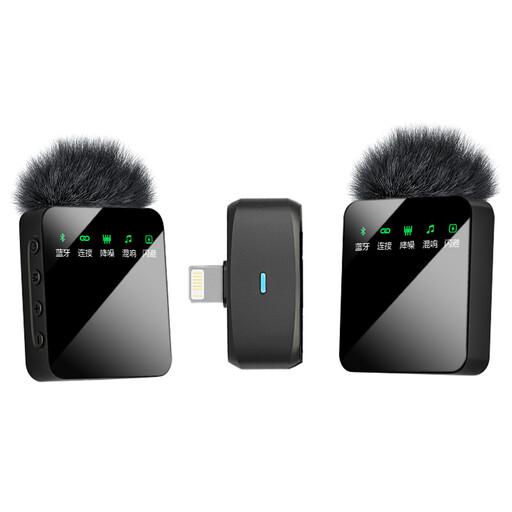
A wireless set-up to compare if you need two microphones rather than one.
The product title lists two microphones and an iOS interface. Check that this version works with your device and the way you want to record.
Start by checking the connection and making a test recording where you plan to speak. A cardioid microphone such as the Sennheiser ME 4 may be an option if sounds from other directions are an issue, but it needs a compatible bodypack transmitter and careful positioning. Neither polar pattern guarantees that your surroundings will sound quiet.
For the Shure MVL, Shure recommends positioning the microphone 15–25 cm from your mouth. Keep it clear of rustling fabric, minimise cable movement and listen back to a test recording with quiet passages and pauses before recording a full session.
Before buying, check whether you need an adapter, receiver or transmitter, and whether all the parts work together with your recording device. For online consumer purchases in the Netherlands, you generally have a cooling-off period of up to 14 days after delivery, with some exceptions. The seller is also responsible for the statutory guarantee if a product is faulty. The statutory guarantee period isn’t automatically limited to two years, according to ACM ConsuWijzer and the Netherlands Authority for Consumers and Markets.
It depends on the circumstances and how identifiable recordings are used. If an organisation collects or uses personal data, the Dutch Data Protection Authority says it needs a legal basis under the GDPR; consent is one possible legal basis. Check the applicable rules and legal basis before recording identifiable colleagues or sharing a recording.