
Recording in a noisy room
You want quiet speech to remain intelligible despite a constant hum or other room noise. Positioning the microphone and making a test recording in your own space will help you work out what suits your situation.


Choose a lapel microphone that can sit close to your mouth and works with your device’s input and recording app. A wired mic avoids the need for a wireless connection; a wireless one gives you more freedom to move, but needs charging and a compatible receiver. RØDE recommends placing the microphone close to the sound source and away from sources of interference. However, no microphone can silence a room with echo or sudden noises on its own.
You want quiet speech to remain intelligible despite a constant hum or other room noise. Positioning the microphone and making a test recording in your own space will help you work out what suits your situation.
Your choice depends on whether you have a USB-C or 3.5 mm TRRS input, or on the receiver included with a wireless set. Also check that your device and recording app use the external microphone.
You want to move around while recording without being tethered by a microphone cable. A wireless set could be right for you, provided its receiver works with your device and you’re prepared to charge it and test the connection.
When to choose it: if you record while seated and have a suitable TRRS microphone input.
The trade-off: you won’t need a wireless connection, but the cable will limit how much you can move. Check that the input supports TRRS.
When to choose it: if your device supports an external USB-C microphone and you stay in one place while recording.
The trade-off: you won’t need a wireless connection or transmitter battery, but you’ll still be tethered by a cable.
When to choose it: if you want to move around and the receiver, connection and recording app are compatible with your device.
The trade-off: you’ll have more freedom to move, but you’ll need to charge it and test the connection where you plan to record.
| What to consider | What to check before buying | Who is this important for? |
|---|---|---|
| Clarity in background noise | Check how the microphone attaches and its polar pattern. Make a test recording using your normal speaking voice and typical background noise. | If I’m speaking softly in a noisy room, I want my voice to remain clear without expecting the microphone to silence the room. Around 36% of consumers prioritise clarity in background noise. |
| Compatibility with your device | Check the exact port and connector type. Test whether your device and recording app use the external microphone. | I want to be sure my phone or computer recognises the microphone before I record a full meditation. Around 29% of consumers prioritise compatibility with their own device. |
| Freedom to move | Check what’s included in the set, the receiver and the connection you’ll need. Test the connection where you’ll record and for the length of a typical session. | If I want to move around while recording, I don’t want a cable getting in the way, and the wireless set needs to work with my recording device. Around 21% of consumers prioritise freedom to move. |
| Natural-sounding quiet speech | If your chosen model has a noise-reduction feature, compare a short recording with and without it, including during pauses and quiet passages. | I want quiet passages to sound natural, so I need to assess the processing in my own room. Around 14% of consumers prioritise the sound of quiet speech. |
A microphone positioned close to the speaker or a noise-reduction feature can help, but background noise and sudden sounds may still be audible.
Record a quiet passage and a moment of silence in your own room. First, try adjusting the microphone position and when you record.
Allow time for test recordings and, if unexpected sounds remain distracting, a possible re-recording.
A plug fitting physically doesn’t prove that the input and microphone are electrically compatible. RØDE distinguishes the smartLav+’s TRRS plug from the TRS input on a wireless transmitter.
Check both the input and the plug type. Find out whether you need a suitable adapter.
You may need a suitable adapter or a different microphone if the connections don’t match.
A model’s stated operating time applies under the specified test conditions. The Dutch Authority for Digital Infrastructure also warns that licence-exempt shared frequencies can experience interference.
Test the connection where you plan to record and check the frequency conditions for the version you’ve chosen.
Allow for charging time and a possible re-recording if the connection drops during a session.
The wired MOTIV MVL is designed for use with a suitable 3.5 mm TRRS recording input.
The wired smartLav+ and wireless Wireless Micro cater to different connection and mobility needs.
The wired XS Lav USB-C is an option for recording with a device that supports external USB-C microphones.
The Mic Mini is a wireless clip-on option for anyone who wants more freedom to move while recording.
The LARK M2 is a wireless option for anyone looking for a portable microphone with noise processing.
These Joybuy products are wireless clip-on microphones for anyone who wants to record without a microphone cable. Check each model’s receiver and connection to make sure they’re compatible with your device.
 Image unavailable
This wireless set could suit you if you want to move around while recording. Check that the receiver is compatible with your recording device.
The product description lists clip-on or magnetic attachment, a charging case and two levels of AI noise reduction. Test the effect in your own room; noise processing doesn’t guarantee a silent recording.
 Image unavailable
This wireless set is an option if you want to record with a USB-C device and need freedom to move. Check that your recording app supports the receiver.
The product description lists two transmitters and a USB-C receiver. Hollyland says the LARK M2 has Environmental Noise Cancellation (ENC); assess the sound of your voice for yourself with a test recording.
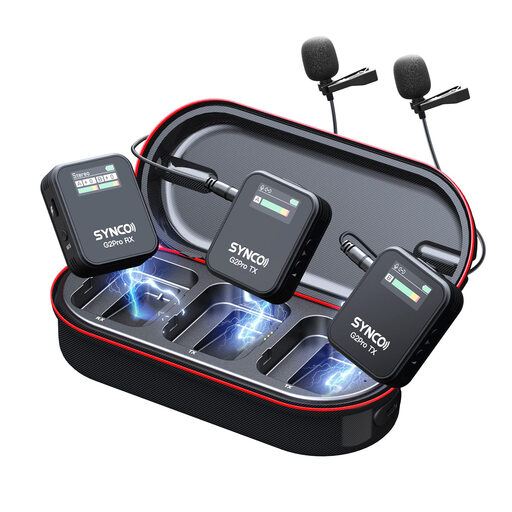 Image unavailable
This wireless lavalier microphone could suit you if you want to record without a cable. Check the receiver’s connection and whether your device supports it.
The product description lists three recording modes, mute and real-time monitoring via the receiver. The stated DSP noise reduction is a product claim; test the processing with quiet speech in your own space.
 Image unavailable
This wireless USB-C set could suit you if you want to move around while recording. Check that your device and recording app support the receiver.
The product description lists two transmitters, one receiver and a monitoring port. The stated DSP noise reduction is a product claim; make a test recording to assess the sound of your voice.
 Image unavailable
This wireless microphone system could suit you if you want to record without a cable. Check that the receiver connects to your device.
The product title lists two transmitters, one receiver and a charging case. The product description mentions built-in microphones in the transmitters, but that alone doesn’t confirm that noise processing is included.
Attach the microphone close to your mouth and make a test recording while moving as you would when speaking. For the Shure MVL, the manual recommends a distance of 15–25 cm; RØDE describes making a loop in the cable as one possible way to reduce handling noise.
A noise-reduction feature can help reduce continuous background noise, but it won’t make every sound inaudible. RØDE says the Wireless Micro’s feature isn’t designed to instantly silence sudden noises, such as a car horn or a slamming door. Test a quiet passage and a moment of silence where you plan to record.
According to the Dutch Authority for Digital Infrastructure, wireless microphones usually don’t require a licence, but you must use the correct frequency band. Different conditions may apply to certain bands, or a licence may be required; UHF rules can also vary by location. Check the conditions for the version you’ve chosen.
If you buy as a consumer in the Netherlands, you’re entitled to a product that conforms to the contract; according to the Dutch government, the Netherlands has no fixed statutory warranty period. If a product is faulty, contact the seller. A manufacturer’s warranty doesn’t replace this right.
Check before publishing your recording. The Dutch Data Protection Authority says that publishing other people’s personal data generally requires a legal basis, often consent; there is a limited exception for purely personal or household use. According to the Dutch government, you can’t distribute or make copyright-protected music available to the public without permission. Whether a background voice is identifiable and whether a music licence covers your use depend on the recording and the rights involved.