Who is this guide for?

Practising at home with background noise

You want to listen back to your voice while sounds such as ventilation, traffic or other people in your home can be heard. Start by positioning the microphone close to your mouth. Shure explains that microphone placement affects the balance between direct speech and sound from the room.

Practising a language with your phone

You record directly on your phone and want to avoid finding that a plug, adapter or wireless receiver isn’t compatible with your device. Check the exact connection type and make a test recording.

Practising while you move around

You walk around while speaking and are weighing up fewer cable restrictions against charging and receiver compatibility. Think about where you’ll be recording and which components you want to carry with you.

What should you look for?

Wired lapel microphone

A good fit if: you usually practise sitting down and have a compatible microphone input.

The trade-off: you won’t need to charge a wireless transmitter, but the cable may restrict your movement.

Wireless clip-on microphone

A good fit if: you walk around while practising or find a cable inconvenient; check that the receiver is compatible with your device.

The trade-off: you get more freedom to move, but you’ll need to charge the equipment and make sure the transmitter, receiver and recording device work together.

Cardioid microphone for an existing transmitter

A good fit if: you already use a professional transmitter and the direction of recording matters to you.

The trade-off: a standalone microphone such as the Shure WL185M isn’t a complete phone kit; check the connection and transmitter compatibility.

What to consider What to look for Who it matters most to
Keeping your voice clear Clip the microphone close to your mouth and test it in your usual recording spot; it won’t eliminate all background noise. If I practise at home, I want to listen back to my voice clearly despite room noise. Around 36% of consumers say clear speech despite room noise is their main priority.
Connecting to your device Check the exact plug standard or receiver version, and make sure your recording app uses an external microphone. When I record on my phone or recorder, the whole connection chain needs to work before I start. Around 29% of consumers prioritise device compatibility.
Keeping pronunciation clear Record the same words with noise reduction off and at different settings; listen out for quieter sounds too. When I assess my pronunciation, I want to hear whether the sounds are preserved, not just whether background noise is reduced. Around 21% of consumers put pronunciation details first.
Freedom to move Weigh up having a cable against the receiver, battery and charging needs of a wireless kit. When I practise while walking, I don’t want a cable to get in the way, so I check which wireless components I’ll need. Around 14% of consumers say moving without a cable is their main priority.

Common buying mistakes

  • Mistaking a standalone professional microphone for a complete phone kit

    The Shure WL185M is available with specific TA4F or LEMO connectors. Without a compatible transmitter and recording setup, you can’t assume it will work directly with your phone.

    Before buying, check that the microphone, transmitter, receiver and recorder will work together.

    You may also need a compatible transmitter or other recording equipment.

  • Assuming stronger noise reduction is always better for pronunciation

    BOYA warns that the strong setting on the mini 2 can slightly affect how natural your voice sounds. So less background noise doesn’t automatically mean you’ll be able to assess pronunciation details more clearly.

    Compare the same words with noise processing off and at different settings before assessing your practice recording.

  • Assuming all plugs and wireless receivers are interchangeable

    A 3.5 mm plug or a USB-C or Lightning connector that physically fits doesn’t, by itself, prove that your device and recording app support the microphone.

    Check the exact connection standard and version, then make a short test recording.

    You may need a suitable adapter, depending on your device.

Brands to consider

IK Multimedia

The iRig Mic Lav is a wired option for recording speech on a mobile device if you have a compatible CTIA/AHJ-TRRS input or a suitable adapter.

  • The manufacturer mentions headphone monitoring via a second connection and use without a battery.
  • The analogue connection must work with your entire recording setup. This applies to the iRig Mic Lav, not every microphone from the brand.

BOYA

The mini 2 is a compact wireless option to compare if you move around while practising and want to try adjustable noise reduction.

  • The manufacturer lists light and strong noise reduction settings.
  • BOYA warns that the strong setting can slightly affect how natural your voice sounds. Check the exact kit and receiver.

RØDE

The wired smartLav+ and wireless Wireless Micro offer different connection options for smartphone use.

  • RØDE lists a 3.5 mm TRRS plug for the smartLav+ and USB-C or Lightning receivers for the Wireless Micro.
  • RØDE describes the Wireless Micro’s noise reduction as being designed for continuous noise, not sudden loud sounds.

Shure

The cardioid WL185M may be worth considering if you already use a compatible professional transmitter and the direction of recording matters to you.

  • The Dutch product specifications list versions with TA4F and LEMO connectors.
  • Don’t buy this standalone microphone as a complete phone kit; check which transmitter and connector you need.

DJI

The Mic Mini is a wireless option to compare if you’re looking for a compatible receiver and adjustable processing for varying levels of room noise.

  • DJI lists two levels of noise reduction and automatic limiting of loud input.
  • These are product specifications and manufacturer claims, not the results of an independent pronunciation test. Check that the receiver is compatible with your recording device.

Lapel microphones at Joybuy

This selection at Joybuy includes wireless lapel microphones and a wired microphone with a 3.5 mm connection for language recordings. Check that each version’s receiver or connection is compatible with your device.

DJI Mic Mini 2S set with 2 TX, 1 RX and charging case

DJI Mic Mini 2S (2 TX + 1 RX + Charging Case)

For anyone who wants to move around freely during language practice and try noise reduction.

The set name lists 2 TX, 1 RX and a charging case. Check that the receiver works with your recording device and app.

Joybuy

Lark M2 wireless microphone with USB-C connection

Lark M2 Wireless USB-C Microphone

For anyone who wants to move around while practising and try noise reduction.

The product name specifies a USB-C version. Check that the receiver and recording app are compatible with your device.

Joybuy
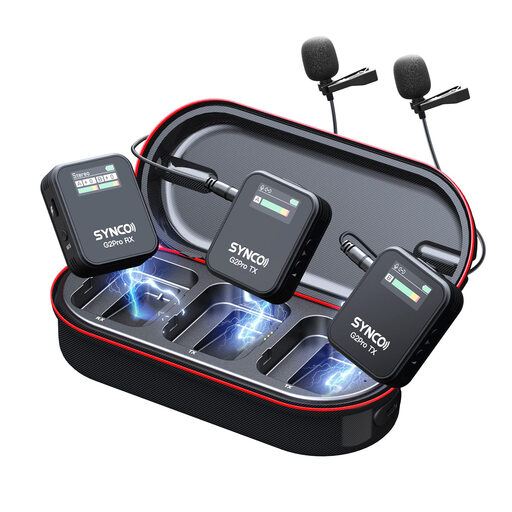
SYNCO G2(A2) Pro wireless lavalier microphone

SYNCO G2(A2) Pro Wireless Lavalier Microphone

For anyone who wants to practise wirelessly and try noise reduction.

The product name mentions noise reduction. Check that the receiver is compatible with your device and make a test recording to assess your pronunciation.

Joybuy

SYNCO P2ST wireless lavalier microphone with USB-C, dual microphones and charging case

SYNCO P2ST Wireless Lavalier Microphone USB-C, Dual Mic

For anyone who wants to move around freely during practice and try noise reduction.

The product name lists USB-C, Dual Mic, 2.4GHz and a charging case. Check that the receiver connection is suitable for your recording device.

Joybuy

Moman MA6 lapel microphone with 6 m cable and 3.5 mm connection

Moman MA6 Lavalier Microphone, 6m, 3.5mm, Omnidirectional

For anyone looking for a wired lapel microphone and who doesn’t want to use a wireless transmitter while practising.

The product name lists a 6 m cable, a 3.5 mm connection and an omnidirectional pickup pattern. Check that the connection and recording app are compatible with your device.

Joybuy

Frequently asked questions

Will noise reduction get rid of sounds made by other people in your home?

No, don’t assume that noise reduction will remove every sound. RØDE describes the Wireless Micro’s processing as suitable for continuous noise, not sudden loud sounds. Record close to your mouth and compare a test recording with processing switched on and off.

Can you plug a lapel microphone with a 3.5 mm plug directly into your phone?

Only if the connection and the rest of your recording setup are compatible. IK Multimedia specifies a compatible 3.5 mm TRRS input conforming to CTIA/AHJ, or a suitable adapter, for the iRig Mic Lav. Then make a test recording to check that your app is using the external microphone.

How can you avoid clothing rustle in your recording?

Position the microphone capsule and cable so that they don’t rub against your clothing. Shure explains that contact with clothing or a cable can cause unwanted noise. After clipping it on, make a short recording while moving as you would during practice.

What are your rights when buying online or if a microphone is faulty in the Netherlands?

When you buy remotely from a professional seller, you’re generally entitled to a 14-day cooling-off period, although there are exceptions. The Dutch government also distinguishes between the cooling-off period and your right to a product that meets reasonable expectations; there is no fixed statutory guarantee period for all products. Check the terms that apply to your purchase and contact the seller if there’s a fault.

Can you practise and record at home if other people in your household can be heard?

Let the people you live with know that you’re recording, and take care when sharing recordings in which they can be heard. The Dutch Data Protection Authority’s guidance on privately held video footage doesn’t provide a complete answer for every situation involving audio recordings.
