What should you look for in a lapel microphone?
First decide which voices need to be captured. Then choose based on freedom to move, connection type and the arrangements for recording pupils’ voices.
| What to consider |
What to look for when buying |
Who is this important for? |
| The teacher’s voice |
Check where the microphone is worn, then listen back to a test recording made in the classroom. |
If I mainly want to listen back to my own explanations, I’ll check the microphone placement and make sure the connection suits my recorder. Around 31% of consumers prioritise recording their own voice. |
| Freedom to move |
Compare the cable length with your classroom layout. For wireless models, check the receiver and each transmitter’s operating time. |
If you move between the board and desks, you won’t want an audio cable keeping you in one place. Around 25% of consumers put freedom of movement first. |
| A second speaker |
Check whether the exact set includes two transmitters and whether the recorder saves the signals in the way you want. |
If I also want to record a pupil or conversation partner, I’ll check whether they can wear their own microphone. Around 19% of consumers prioritise recording a second speaker. |
| Connection to your device |
Check the device and port, whether you need an adapter, and whether the recording app accepts USB audio. |
If you want to use your existing phone, recorder or camera, you’ll need a set that works with its connection and recording app. Around 13% of consumers make device compatibility their main consideration. |
| Identifiable pupil voices |
Decide what you need the recording for and discuss how information, access and storage will be managed at your school. |
If pupil voices aren’t needed, I’ll want to avoid capturing them unnecessarily. Around 12% of consumers prioritise limiting recordings of pupils. |
Lapel microphones for lesson recordings on Joybuy
This selection includes wired and wireless lapel microphones to compare based on your device, freedom to move and the number of speakers you want to record.
 Image unavailable
RØDE Wireless Micro Camera Kit, USB-C
An option to compare if you want two speakers to wear a microphone each. Check that the receiver is compatible with your recording device.
The product name lists two microphones, a camera receiver, a smartphone receiver, a charging case and USB-C.
View on Joybuy
 Image unavailable
SYNCO S8 lapel microphone
An option to compare for a recording setup with a smartphone, PC or laptop, or camera. Check which connection works with your device.
View on Joybuy
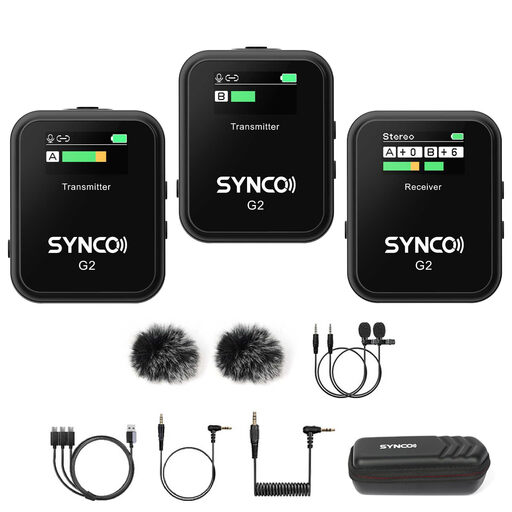 Image unavailable
SYNCO G2(A2) wireless lapel microphone, 2.4G
The dual-channel specification makes this an option to compare if you want to record more than one speaker. Check what’s included in the set and that it connects to your recording device.
View on Joybuy
 Image unavailable
Moman M1CXT wireless lapel microphone, USB-C
The 2TX+1RX specification makes this set an option to compare for a setup with two transmitters. Check that your device supports USB-C audio.
The product name lists USB-C and a 2TX+1RX set configuration.
View on Joybuy
 Image unavailable
Verbex K9-Black wireless mini lapel microphone
An option to consider if your recording device has a compatible Type-C connection. Check that the device supports audio through that connection.
The product name lists a Type-C interface.
View on Joybuy
Frequently asked questions
Is one microphone worn by the teacher enough to record answers from the class?
Not if you want to capture pupils’ answers clearly and reliably. Decide which speakers need to be recorded and make a test recording with your chosen setup. Two transmitters are designed for two people to wear, not necessarily for recording a whole classroom.
How do you check your microphone setup before a lesson?
Check the input or phone port, then make a short test recording using the app you plan to use and listen back to it. According to RØDE, the standard Wireless Micro requires an app that accepts USB audio; the smartLav+ uses TRRS.
What can you do if your microphone develops a fault during normal use?
For a consumer purchase in the Netherlands, you can contact the seller about your statutory guarantee. The Dutch government explains that there is no fixed statutory two-year guarantee period; what you could reasonably expect from the product and the cause of the fault are important.
Can you simply keep or share identifiable pupil voices recorded during a language lesson?
Don’t assume that you can. The Dutch Data Protection Authority sets out schools’ duties to provide information and demonstrate accountability when processing personal data. Discuss the purpose, legal basis, access, retention period and any sharing in line with your school’s applicable policy. Guidance on online video calls does not automatically apply to every in-person lesson recording.
Do you need a licence to use a wireless lapel microphone in the Netherlands?
That depends on the system and the frequency used. The Dutch Authority for Digital Infrastructure (RDI) describes frequency bands that can be used without a licence, but available UHF frequencies may vary by location. Check the version of the system and the guidance for where you plan to use the microphone.


