
Facilitator staying in one place
Wants to record calm speech using a simple wired set-up. Check that the microphone connection is compatible with your phone or recorder; RØDE and Sennheiser describe wired models with different connections.


If you stay in one place during the meditation, a wired lapel microphone is a sensible place to start, provided its connection matches your recording device. If you’ll be moving around, consider a wireless system with the right receiver instead. A lavalier microphone with a portable recorder is another option if you want to record locally and transfer the files afterwards. Shure highlights the importance of positioning and making a test recording; be sure to check these in the hall where you’ll be recording.
Wants to record calm speech using a simple wired set-up. Check that the microphone connection is compatible with your phone or recorder; RØDE and Sennheiser describe wired models with different connections.
Needs freedom of movement and should test the receiver, power supply and connection of a wireless system in the hall where it will be used. RØDE and DJI provide details of different models and their operating conditions.
Wants to record and manage the audio file carefully, especially if participants can be recognised by their voices. The Dutch Data Protection Authority notes that identifiable audio recordings may be personal data.
Choose this option: if you’ll mostly stay in one place and running a cable to your phone or recorder is practical. Check the connection on the exact model: the RØDE smartLav+ uses 3.5 mm TRRS, while the Sennheiser XS Lav USB-C has a USB-C connection.
Bear in mind: the cable limits your movement, and TRRS and USB-C are not interchangeable.
Choose this option: if you’ll be moving around the hall or want to record more than one speaker. Check how many transmitters are included and which receiver comes with the exact kit.
Bear in mind: you’ll need to charge it and test the connection at the venue. The Dutch Authority for Digital Infrastructure advises using the correct frequency band; some bands require a licence.
Choose this option: if you want to record locally without relying on a wireless connection to a phone or camera. Zoom describes the F2 as a recorder supplied with a lavalier microphone.
Bear in mind: you’ll need to prepare the power supply and storage, then transfer the file afterwards. A recorder won’t prevent clothing rustle or other sounds from being picked up by the microphone.
| What to consider | What should you look for? | Who is this important for? |
|---|---|---|
| Clear speech | Test the positioning, fastening clip and supplied windscreen with a trial recording. Shure highlights microphone positioning and clothing rustle as things to consider. | If I speak softly, I want to hear my voice clearly without distracting handling noise; around 36% of consumers prioritise clear speech. |
| Connection | Check the plug type, microphone input and recording app compatibility. For a wireless system, check the receiver too. | I want to know before the session whether my phone, recorder or camera will work with the microphone; around 29% of consumers give device compatibility top priority. |
| Freedom of movement | Check the number of transmitters and receivers, the stated operating time and the system’s frequency requirements. | If I walk around the hall while leading the session, I don’t want a cable to restrict me; around 21% of consumers prioritise freedom of movement. |
| Recording file | Check whether the exact model records locally, and make sure power, storage and playback of a test file are all sorted. | For a session that can’t be repeated, I want to check in advance that a recording file has been created; around 14% of consumers prioritise this reassurance. |
Wired microphones can use different connections. A plug that physically fits doesn’t prove that your phone, recorder and recording app support the microphone.
Before ordering, check the exact microphone model, your device’s input, any adapter you may need and the recording app together.
You may need a different microphone model or a suitable adapter for the connection you’ve chosen.
DJI states that the Mic Mini’s maximum range was measured in an open environment with no obstructions or interference. That figure doesn’t predict how the connection will perform in a community hall.
Before the session, walk the route you plan to use with the system and listen back to a test recording.
According to its product description, the RØDE Wireless Micro Camera Kit includes both a camera receiver and a USB-C receiver. So check the full model name and what’s included in the kit.
Compare the exact product name and included components with the connection you need.
If you also want to connect a camera, you may need a model that includes the right camera receiver.
RØDE offers both wired lavalier microphones and wireless clip-on systems for smartphones. These product ranges use different connections and are not interchangeable.
The XS Lav USB-C is a wired clip-on microphone for a device with a compatible USB-C microphone input.
The BY-M1 is a wired lavalier microphone for use with compatible phones, cameras and recorders, among other devices.
The F2 combines a portable recorder with a lavalier microphone for local voice recording.
The Mic Mini is a wireless clip-on system for anyone who wants freedom of movement; the components you need depend on your set-up.
This selection focuses on wireless lapel microphones for mobile recording, with models for USB-C or a stated universal interface.
 No image available
May suit you if you want to record wirelessly with a compatible USB-C receiver.
The description mentions monitoring and charging the device at the same time via the receiver while in use. For Android, it states that a Type-C connection and OTG support enabled are required.
 No image available
A wireless lavalier model for recording; check that Type-C is compatible with your recording device.
The product description states a battery life of 3–6 hours and a Type-C connection.
 No image available
The two-microphone model may suit you if you want to record two speakers; check that your device has a compatible connection.
The title and product specifications state that it has two microphones and Type-C. The stated battery life is 3–6 hours.
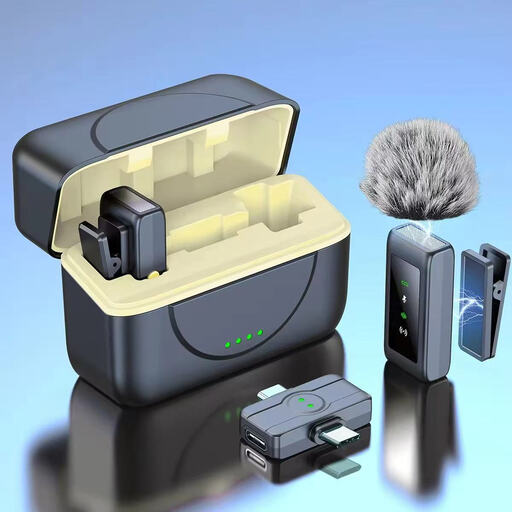 No image available
The two-microphone model may suit you if you want to record two speakers; check that the stated interface works with your device.
The product specifications mention a universal interface, a magnetic charging case and a stated battery life of 3–6 hours.
 No image available
A single-microphone model for wireless recording; check that the interface is compatible with your recording device.
The product specifications mention a universal interface and a stated battery life of 3–6 hours.
Start around chest-pocket height, keeping the microphone capsule clear of clothing and jewellery. Shure highlights both positioning and rustling clothing as things to consider. Record a few calm sentences and some movement, then listen back before participants arrive.
Not always. According to the Dutch Authority for Digital Infrastructure, wireless microphones generally don’t require a licence, but some frequency bands do. Check the frequency and transmission requirements for the exact system against the Dutch regulations.
An audio recording in which someone can be identified may be personal data. If the GDPR applies to the processing, you need a valid legal basis. Consent is one possible basis, but it isn’t automatically the only one. Before recording or sharing, decide which voices will be captured and how the people involved will be informed.
According to the Dutch government, you’re entitled to a product that works as it should, and the seller must resolve any problem with a faulty product. There’s no fixed statutory guarantee period for all products; what you can reasonably expect depends, among other things, on the product and how it’s used.