
Solo speaker recording on a device
You’ll mainly be recording your script in one place and want to choose a connector that suits your device. Wired USB-C and TRRS models are possible options; Sennheiser and Shure describe these connector types.


If you’ll be staying by your phone or computer while recording, start by looking at a wired lapel microphone with a compatible connector. If you want to move around the room, compare wireless sets. Before you start, check that your recording app is using the external microphone and that the set includes enough transmitters for the number of speakers. Manufacturer information about features is not comparative audio testing, so make a short test recording in the room.
You’ll mainly be recording your script in one place and want to choose a connector that suits your device. Wired USB-C and TRRS models are possible options; Sennheiser and Shure describe these connector types.
You want to move around while practising without a cable limiting how far you can be from your phone. A wireless clip-on set could suit you, provided the receiver works with your recording device, as with the variants described by RØDE.
You’re recording together or taking turns, and want a set with two transmitters. RØDE and DJI describe systems that can use two transmitters; also check how your recording device captures both voices.
First decide how you’ll connect the microphone and how much freedom of movement you need. Then check that the set is suitable for the number of speakers.
| What to consider | What should you look for? | Who is this important for? |
|---|---|---|
| Clarity | Attach the microphone carefully, then listen to a short test recording on the device you plan to use. | If I want to record a spoken script, I want to judge how my voice, echo and background noise sound in my room. Around 36% of consumers say clarity is their main concern when buying. |
| Connection | Check the port, the microphone input you need and whether the recording app uses the external microphone. | If I’m using my own phone or computer, I want to know in advance whether the connection I choose will work with my recording setup. Around 29% of consumers say device connectivity is their main concern when buying. |
| Freedom of movement | Compare the limitations of a cable with a wireless receiver that works with your recording device. | If I walk around the room while practising, I don’t want to be restricted by how far I can be from my device. Around 21% of consumers say freedom of movement is their main concern when buying. |
| Two speakers | Check how many transmitters are included and whether the recording app supports the type of recording you need. | If two of us are recording, I want to know whether we can each use our own transmitter and whether both voices will be recorded. Around 14% of consumers say recording with two speakers is their main concern when buying. |
A device may have a 3.5 mm connection without supporting the TRRS microphone connection used by the Shure MVL.
Check what the port is for and make a test recording with the adapter you plan to use. A compatible adapter may be an extra accessory; otherwise, you may need a different microphone.
The RØDE Wireless Micro uses a receiver that connects to a smartphone, so wireless does not automatically mean that the microphone itself saves an audio file.
Check where the recording is saved and whether the app uses the external input.
RØDE describes the Wireless Micro’s operating time as including extra charge from the case. This is not the same as the continuous operating time of a transmitter.
For a long session, compare the transmitter’s own operating time with the planned recording length.
Sennheiser offers wired lapel microphones with different connections, including USB-C and 3.5 mm TRRS.
The Shure MVL is a wired lapel microphone for use with a compatible 3.5 mm TRRS input.
The Wireless Micro is a wireless smartphone set that, according to RØDE, is available with either a USB-C or Lightning receiver.
DJI describes the Mic Mini as a wireless set with adjustable noise cancellation.
BOYA describes the BY-M1 as a wired clip-on microphone for uses including voice recording.
This product selection focuses on wireless sets for recording with freedom of movement or with two speakers. Check the receiver, connection and included transmitters for each set.
 No image available
This set could suit you if you want to record wirelessly or use two transmitters. Check that the receiver connects to your recording device.
The product name lists two transmitters, one receiver and a charging case. The product description mentions two levels of AI noise cancellation; assess the effect with a test recording in your room.
 No image available
This wireless set could suit you if you want to record with a USB-C device. Check that the receiver and recording app work together.
The product information lists a USB-C receiver and two transmitters. The product name also mentions a range of 300 m, noise cancellation and 30 hours of operating time; check which operating time is right for your recording.
 No image available
This wireless set could suit you if you want to move around while recording or use two transmitters. Check which receiver you’ll use for your recording.
The product information lists two transmitters and a USB-C smartphone receiver. The product name also mentions a camera receiver and charging case.
 No image available
This set could suit you for a wireless recording with two speakers. Check that your recording device and app support the type of recording you need.
The product name lists two transmitters, one receiver and a charging case. The product description mentions recording with two people and use with smartphones, cameras and computers.
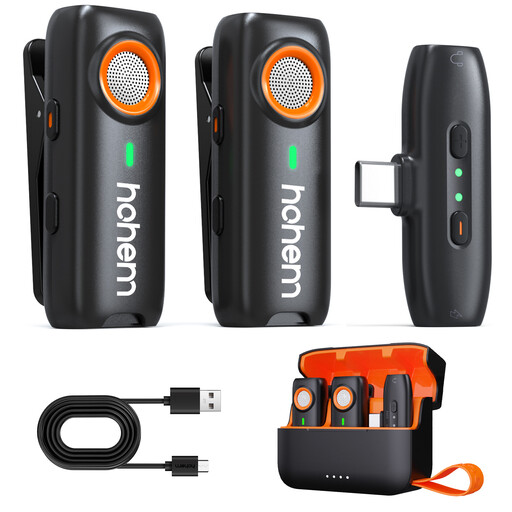 No image available
This wireless lapel microphone could suit you if you want more freedom of movement while recording. Check that the Type-C connection works with your recording device.
The product information lists three noise-cancelling modes and clip or magnetic attachment. The product name mentions a range of 100 m and a battery life of 20H; test the microphone in the room where you’ll be recording.
First check that the connection and recording app are actually using the external microphone. Make a short test recording and listen to it before recording your full script.
Attach the clip so that fabric doesn’t rub against the microphone, then record another short clip. Sennheiser and Shure list a clip and windshield with the models mentioned; listen back to check whether the position works for your situation.
For a consumer purchase in the Netherlands, the seller is responsible for the statutory guarantee. According to ACM ConsuWijzer, the seller must provide a free remedy if a product breaks during normal use earlier than you could reasonably expect. What is reasonable depends on the product and the circumstances.
A recording in which someone can be identified may contain personal data. Schools must meet GDPR obligations when processing it, including having an appropriate legal basis and informing the people concerned. Whether consent is required depends on the specific situation; discuss school recordings with the person responsible.