Match the lapel microphone to your recording device and the number of voices you want to record at once. For one speaker in a fixed position, a compatible wired microphone may be enough, while a wireless set gives you more freedom to move. Check the connection, receiver and set configuration, then make a test recording with the clothing and vocal dynamics of the presentation in mind. Noise cancellation or a stated transmission range does not guarantee a good recording in your classroom. If pupils can be identified in the recording, the school must also consider its purpose, the legal basis under the GDPR and how the recording will be used.
Who is this relevant to?
Recording a solo performer
You want to record one voice in a fixed position and are looking for a suitable, simple connection without an unnecessary wireless system. Sennheiser’s XS Lav Mobile product specifications list a 3.5 mm TRRS plug; RØDE describes Lavalier GO as having a TRS connection.
Recording an active performance
The speaker walks around or gestures during the presentation. In that case, freedom of movement and a securely fastened microphone matter more than the simplicity of a cable.
Recording a dialogue
Two performers speak at the same time or take turns quickly. Check how many transmitters are included in your chosen set and whether the receiver is compatible with your recording device; RØDE and DJI describe sets with two transmitters.
What should you look for when choosing?
For a dramatic classroom presentation, your choice will mainly depend on clarity, connectivity, freedom of movement and the number of voices speaking at once.
| Concern |
What to look for |
Who is this for? |
| Clarity and clothing noise |
Attach the microphone so that clothing or hair does not cover the capsule. Listen back to a test recording using the actual clothing, with both quiet and loud passages. |
If I want every line to remain clear and clothing not to rub against the microphone, I prioritise positioning and a test recording. Around 33% of consumers put clarity at the top of their list when buying. |
| Connection to the recording device |
Check the port and whether the connection is TRS, TRRS or USB-C. Also check whether the app accepts external USB audio and whether you need a suitable adapter. |
I want to know in advance whether the microphone will connect to my phone or camera, so that the recording isn’t held up by the wrong plug or receiver. Around 27% of consumers prioritise device compatibility. |
| Freedom of movement |
Consider where the speaker will move during the performance. Check how the microphone is attached and test a wireless connection in the recording location. |
If the performer moves around the classroom, I don’t want a cable to restrict them. Around 20% of consumers put freedom of movement at the top of their list when buying. |
| Number of voices |
Count how many performers speak at the same time and check exactly how many transmitters are included in the chosen configuration. Choose a receiver that works with your phone or camera. |
For a dialogue, I want to know whether each person speaking at the same time has their own transmitter. Around 20% of consumers want to record two voices at once. |
Common buying mistakes
-
Assuming TRS and TRRS are the same connection
The RØDE Lavalier GO has a TRS plug; RØDE recommends a suitable adapter for use with a phone that has a TRRS input.
Before you buy, check the plug, the device’s port and whether you also need a suitable digital adapter for a phone without a 3.5 mm port.
-
Choosing a phone version for recording with a camera
According to RØDE, the receiver configurations differ between the standard Wireless Micro and the Camera Kit.
Choose the version based on the actual input on your camera or phone; don’t rely on the transmitter’s name alone.
-
Expecting noise cancellation to eliminate clothing noise
DJI describes noise cancellation as a feature of the Mic Mini. Shure describes friction between clothing and a microphone or cable as a separate source of recording noise.
Test the microphone’s position with the clothing or costumes that will be worn during the presentation, and listen back to the recording before the performance begins.
Brands to consider
Sennheiser
The XS Lav Mobile is designed for wired recording of one speaker with a compatible device that has a 3.5 mm TRRS input.
- According to its product specifications, the XS Lav Mobile has a 2 m cable, a clip and a windscreen.
- The cable restricts movement; check that the TRRS plug is compatible with your recording device.
RØDE
The Wireless Micro is a wireless option for recording on a phone; Lavalier GO is a separate wired TRS microphone.
- RØDE lists two transmitters for the Wireless Micro.
- The standard set requires a phone app that accepts USB audio. According to RØDE, you need a camera receiver to connect it to a camera with a 3.5 mm audio input; Lavalier GO requires a suitable adapter for use with a TRRS phone.
DJI
The Mic Mini configuration with two transmitters and one receiver may suit a recording with two performers; check the exact set and connection.
- DJI states that the Mic Mini receiver can connect to two transmitters at once.
- Noise cancellation and automatic limiting are DJI features and claims, not the result of independent testing in a classroom.
Hollyland
According to Hollyland, the LARK M2 is available in phone, camera and Combo versions; the version you choose determines the connection you get.
- Hollyland describes the LARK M2 as having a lightweight transmitter and adjustable noise cancellation.
- A manufacturer’s stated battery life or transmission range does not guarantee uninterrupted recording at school.
Joybuy products
These Joybuy products are wireless lapel microphones or microphone sets for recording a presentation. Check the number of transmitters for each model and whether the receiver is compatible with your phone or camera.
 No image available
DJI Mic Mini 2S (2 TX + 1 RX + Charging Case)
With two transmitters, this is an option for a presentation with two speakers.
The product name lists 2 TX, 1 RX and a charging case. The product description mentions cameras and smartphones; check that this version’s connection is compatible with your recording device.
Joybuy
 No image available
RØDE Wireless Micro Camera Kit
This set is an option if you want to record wirelessly with a camera or smartphone and choose the right receiver for your device.
The product name lists two microphones, a camera and smartphone receiver, a charging case and USB-C.
Joybuy
 No image available
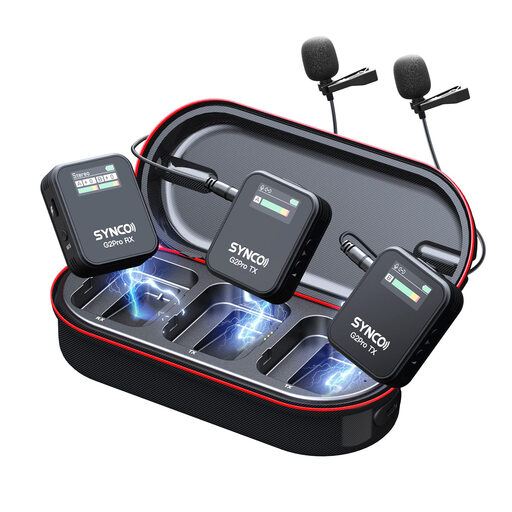
SYNCO G2(A2) Pro
This model may suit you if you’re looking for a wireless lapel microphone for a presentation; check in advance which receiver and connection are compatible with your recording device.
Joybuy
 No image available
Moman M1CXT Wireless Lavalier Microphone, USB-C, 2TX+1RX, 150m Range
With two transmitters, this is an option for a dialogue; the product name lists USB-C for the receiver.
The product name lists 2TX+1RX and a range of 150 m. Check that the USB-C connection is compatible with your recording device and that the stated range suits your classroom layout.
Joybuy
 No image available
DJI Mic 3 (2 TX + 1 RX + Charging Case)
With two transmitters, this model is an option if you want to record two performers at once.
The product name lists 2 TX, 1 RX and a charging case. Check that the receiver and connection are compatible with the device you plan to use to record the presentation.
Joybuy
Frequently asked questions
Can I plug a 3.5 mm lapel microphone straight into my phone?
That depends on the plug and your phone’s port. Sennheiser lists a TRRS plug for the XS Lav Mobile; for Lavalier GO with its TRS plug, RØDE recommends a TRS-to-TRRS adapter when using a phone with a TRRS input. If your phone doesn’t have a 3.5 mm port, also check whether a digital adapter is suitable.
How can I prevent rustling during a presentation?
Attach the microphone so that clothing doesn’t rub against the capsule or cable, and listen back to a test recording with the actual clothing or costumes. This positioning advice does not guarantee that all classroom noise will be eliminated.
Do I need recording equipment as well as the microphone?
With the standard RØDE Wireless Micro, the transmitters send audio to a receiver connected to a phone; the recording app must accept USB audio. For another set, check what the receiver connects to and where the recording will be saved.
What should I do if a microphone I’ve bought turns out to be faulty?
When you buy as a consumer in the Netherlands, the product must be of satisfactory quality. Report the fault to the seller and ask for an appropriate solution. The Dutch government explains that there is no fixed statutory guarantee period that applies to every product in the Netherlands.
Can the school record and share a presentation featuring identifiable pupils?
According to the Dutch Data Protection Authority, a sound recording in which someone can be identified is personal data. If the school processes this kind of data, it must determine the applicable legal basis under the GDPR in advance and inform pupils and parents; the assessment depends on the purpose and use of the recording. The Authority sets out separate consent rules for recognisable images of pupils; those rules do not automatically apply in the same way to every audio-only recording.


