
Interviewer using a phone or recorder
You want to record one speaker clearly using equipment you already own. Check the connection and make a test recording. Oral History, RØDE and Shure provide useful information about recording and connections.


Start with a lapel mic that you can confirm connects to your phone or recorder, then make a test recording using the clothing and set-up you’ll actually use. For two speakers, consider using two microphones and recording each voice separately. A standalone recorder worn by the speaker avoids relying on a wireless audio link, but you’ll need to manage the power and files yourself.
You want to record one speaker clearly using equipment you already own. Check the connection and make a test recording. Oral History, RØDE and Shure provide useful information about recording and connections.
You also need to record the interviewer’s questions and want a set-up for two speakers, ideally recording each voice separately. DJI describes internal recording on Mic 2 transmitters; check the set and recording settings you choose.
You want to reduce interruptions and the risk of losing files, so you’re considering power, available recording time and how to keep the original file. Oral History recommends checking recording duration and file formats in advance.
Oral History recommends checking your recording equipment, recording duration and file format in advance. Then decide whether you’re recording one voice, want to capture both speakers or prefer to record locally on the speaker.
Choose this option: if one speaker is usually sitting still and your recorder or phone has a compatible microphone input.
Keep in mind: the cable needs to be routed safely, and a 3.5mm plug alone doesn’t guarantee compatibility.
Choose this option: if you need to record both the interviewer and interviewee clearly, or cables would get in the way in the booth.
Keep in mind: check the number of transmitters, the connection and power, and whether you can record separate channels.
Choose this option: if you want to record audio on the speaker without relying on a wireless audio link.
Keep in mind: you’ll need to check the power and storage, then transfer the file safely afterwards.
| What to consider | What to look for when buying | Who is this important for? |
|---|---|---|
| Connection | Check the microphone input, TRS or TRRS plug, any adapter you may need and the recording app by making a test file. | If I want to use my existing phone or recorder, the plug needs to fit the input. Around 33% of consumers rank the connection as their top priority. |
| Clothing noise and clarity | Secure the microphone firmly, minimise paper noise and listen back while the speaker moves as they normally would. | When I need clear speech, I want to know how clothing and movement will sound in the recording. Around 27% of consumers put interference-free sound first. |
| Two voices | Check the number of microphones or transmitters and whether you can record both voices separately. | If I want to hear my questions as well, I need a set-up that captures both speakers. Around 20% of consumers prioritise recording two voices. |
| Recording file | Check the available recording time, power and storage. Create a playable test file and keep the original. | For a long interview, I want to be able to rely on and find the source file afterwards. Around 20% of consumers put recording security first. |
TRS and TRRS are different connections, so a microphone may not work with your chosen recorder or phone straight away.
Check the plug type and input, and test any adapter with the recording app you plan to use.
You may need a suitable adapter, so check before choosing a set.
A microphone on the interviewee won’t necessarily capture the interviewer’s questions at the same level.
Check exactly what’s included and whether the settings you choose can record both voices separately.
You may need a second microphone or a different set for two speakers.
A recording format won’t recover a missing file or prevent audible clothing rustle.
Test the microphone placement, power and storage in the booth, then play back the test file before the interview begins.
Lavalier GO is designed for a compatible 3.5mm TRS input; wireless interview sets are a different product option.
MVL is a wired lavalier for recording with a compatible smartphone or tablet.
V.Lav is a wired option for set-ups using devices with a 3.5mm microphone input.
The F2 is a portable recorder with a lavalier for recording locally on one speaker.
Mic 2 is a wireless option for interviews. Check the version and recording settings you choose.
This selection includes wireless microphone systems and a wired lapel microphone. Check the connection, number of microphones and recording equipment required for each version.
 Image unavailable
A wireless lapel microphone system to consider if you don’t want a cable between the microphone and recording device.
The product name specifies 48 kHz/24-bit and a transmitter weight of 9 g.
 Image unavailable
The product name describes a wireless set with two microphones for an interview with two speakers.
This version includes a camera and smartphone receiver and a charging case. Check that the receiver is compatible with your recording device.
 Image unavailable
A wireless microphone listed as USB-C for recording with a compatible USB-C device.
Check the connection and functionality with your own recording device and app before recording your interview.
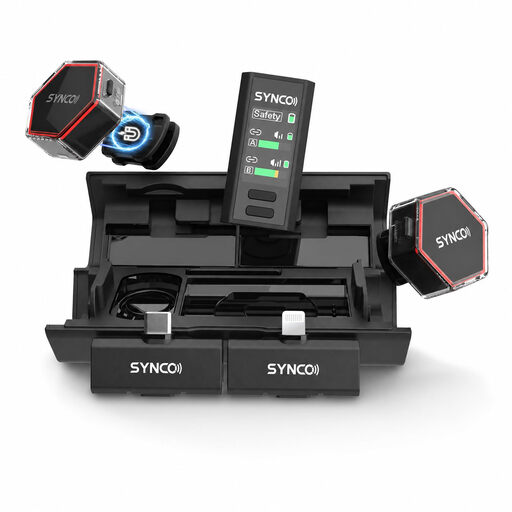 Image unavailable
The product name lists iPhone, Android and camera as device types for this wireless lavalier.
Check that the receiver and connection are compatible with the specific device you want to record with.
 Image unavailable
A wired lavalier for recording with a compatible device; the product name lists smartphone, PC, laptop and camera.
Check the connection on your recording device and make a test recording using your chosen app.
Make a short recording wearing the clothes and sitting in the position you’ll use for the interview. Listen back for clothing rustle, paper noise and differences between the voices. Check the power and available recording time in advance.
No, it depends on the plug and the phone’s input. Shure lists a TRRS connection for the MVL and says some phones need a suitable CTIA-compliant adapter; the RØDE Lavalier GO uses TRS. Test your chosen combination with your recording app.
Check whether the version you choose includes the adapter, second microphone, batteries or memory card you need. In the Netherlands, according to the Dutch government, there is no fixed statutory guarantee period for all products. If a product is faulty, the seller must offer a solution.
Don’t assume that you can; discuss recording, keeping and publishing the interview separately in advance. Oral History recommends getting explicit consent to record and archive. If the GDPR applies to the processing, you need an appropriate legal basis; consent is one option. The Dutch Data Protection Authority states that purely personal or household use falls outside the GDPR.