What should you look for when choosing?
Start with your main task. Annotating requires a tablet, stylus and app that work well together; comparing maps calls for a comfortable working area that’s still easy to take with you.
| What to consider |
What should you check? |
Who should give this more weight? |
| Annotating and sharing PDFs |
Check stylus compatibility, what’s included in the box, and whether you can import and export your own PDFs. |
If you want to mark up reports by hand during the workshop and share your notes later, the stylus and app combination is what matters most. Around 33% of consumers prioritise PDF annotation. |
| Viewing maps and figures |
Compare screen size, resolution and weight, and check whether your viewer can display documents side by side. |
If you want to view map details, figures and related text at the same time, a larger working area is important. Also consider how easy the tablet is to carry and hold for long periods. Around 27% of consumers prioritise screen space. |
| Using files offline |
Download the PDFs and map areas you need in advance, then open them once without a network connection. |
If your connection might be unreliable during the workshop, make sure the specific documents and maps you need are available locally before you set off. Around 20% of consumers make offline access their top priority. |
| Viewing outdoors and moisture |
Check the screen in similar lighting conditions and review the terms for the brightness mode and any IP rating. |
If you’ll mainly be checking maps outdoors, reflections and lighting conditions can affect how easy the screen is to use. A rating is not a guarantee for every situation. Around 20% of consumers prioritise outdoor readability and protection. |
Tablets at Joybuy
These product picks are aimed at annotating documents and viewing maps and research images. For each version, check whether a stylus is included and whether the connections and apps suit your workshop.
 No image available
Lenovo Idea Tab Plus WiFi, 12.1-inch, 2.5K, 8 GB RAM, 256 GB, with stylus, Rose
The stylus and screen size mentioned make this a good fit for handwritten notes on documents and viewing maps.
The product name specifies a 12.1-inch 2.5K screen, 8 GB RAM, 256 GB storage and a stylus.
View at Joybuy
 No image available
Apple 13-inch iPad Air (M4) Wi-Fi, 128 GB, blue (2026)
The 13-inch model gives you plenty of screen space for maps and documents. Apple Pencil is listed as sold separately with this version.
The product name specifies Wi-Fi and 128 GB storage. Apple Support explains how to use Markup to annotate PDFs on iPad.
View at Joybuy
 No image available
TECLAST T65, 13.4-inch, 120 Hz, Android 16, Dual SIM 4G, 128 GB, with folio case
The large screen is useful if you want to view maps and landscape images while you’re out and about; the product name also mentions a folio case.
The product name lists 120 Hz, Android 16, Dual SIM 4G and 128 GB storage.
View at Joybuy
 No image available
Blackview Zeno 10, 11-inch, 2K, 128 GB, with keyboard and stylus, blue
The included stylus could be useful for handwritten notes. Check that the keyboard bundle suits the way you work.
The product name specifies an 11-inch 2K screen, 128 GB storage, a keyboard and a stylus.
View at Joybuy
 No image available
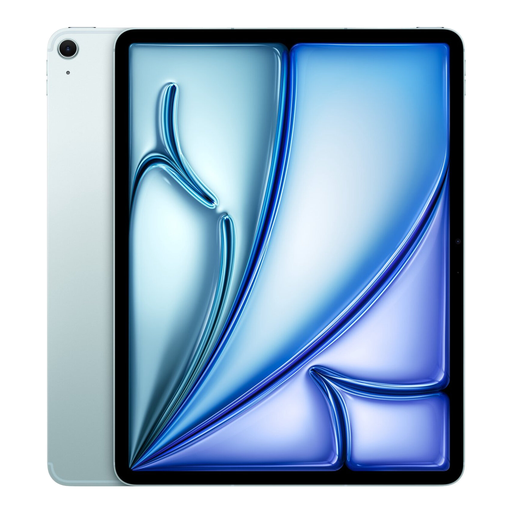
Apple 13-inch iPad Air (M3) Wi-Fi + Cellular, 512 GB, blue (2025)
The 13-inch screen is useful if you want more space to view maps and documents. The Cellular version gives you a mobile connection as well as Wi-Fi.
The product name specifies 512 GB storage. Check which Apple Pencil is compatible with this model and whether it’s included with the version you choose.
View at Joybuy
Frequently asked questions
How do I prepare a tablet for a workshop without reliable Wi-Fi?
Save your own PDFs locally and open them once without a network connection before you leave. Also download the map areas you need in advance. Apple Support explains how to use offline maps on iPad; Google Maps Help notes that, in the Android method it describes, walking and cycling routes aren’t available offline. Saving a map area won’t automatically include your research files.
Can I share notes on a research PDF later?
Yes, with features that support PDF annotation and saving or sharing files. Apple Support explains how to use Markup on iPad; Samsung Netherlands covers importing, annotating, saving and sharing PDFs in Samsung Notes. Test the export with one of your own files and the app you plan to use during the workshop.
How can I tell whether the right stylus is included with the tablet?
Check both which stylus is compatible and what’s included with the exact version. Apple lists different Pencil models for different iPads; Lenovo’s stylus bundle can vary by version. Don’t rely solely on a tablet being described as supporting a stylus.
Is a larger tablet screen always better for maps?
A larger screen gives you more room to view maps and text, but it can be less comfortable to hold for long periods or carry around. The Consumentenbond points out that larger tablets can quickly become heavy and impractical to hold for extended periods. Compare the screen size and weight with the way you plan to use the tablet.
Are a matte finish or IP68 enough for outdoor use?
No. Neither tells you on its own how well a tablet will work in every outdoor setting. TCL describes the NXTPAPER 11 Plus as having a paper-like screen; Samsung’s IP68 rating for the FE models mentioned is based on laboratory tests in fresh water. Check the screen in similar lighting conditions and take the terms for the specific rating into account.


