
35mm photographer with limited space
You want to scan strips of negatives without having to leave a large flatbed scanner set up permanently. Film holders and the space the set-up takes up when in use both matter.


Start with the size of your negatives: a compact 35mm scanner won’t work for 120 film. Then choose between scanning directly to an SD card, using computer software or photographing the film with a camera set-up. Check the holders, workspace and equipment required for each option, too. Stated resolutions aren’t directly comparable and, on their own, don’t tell you how much detail a landscape photo will retain.
You want to scan strips of negatives without having to leave a large flatbed scanner set up permanently. Film holders and the space the set-up takes up when in use both matter.
You also have 120 negatives and want to check the exact image format and supported holders before compact size becomes the deciding factor.
You already have camera equipment and want a set-up that can be put away, provided your macro lens and film holder are compatible.
First, work out which film formats you have. Then compare the space required, the editing options you want and the equipment you’ll need.
| What to consider | What to look for | Who should consider this? |
|---|---|---|
| Negative format | Check that the scanner and holder support 35mm, 120 or the exact image format you have. | If you also have medium-format negatives, make sure the whole image will fit in the holder. Around 29% of consumers put format compatibility first. |
| Storage and workspace | Compare the dimensions with your shelf space and the clear space you’ll need to scan. | If you want to put the whole set-up away after use, allow for holders and any camera equipment, too. Around 29% of consumers give the space required their highest priority. |
| Detail and editing flexibility | Distinguish optical resolution or sensor pixels from interpolated output, and check the software requirements. | If you want to crop or edit landscape images, look beyond the stated megapixel count. Around 24% of consumers prioritise detail and editing flexibility. |
| Workflow and equipment | Check whether you’ll need an SD card, a computer or a camera with a suitable macro lens. | If you want to work through strips of negatives without a complicated set-up, it’s important to know what equipment your chosen method requires. Around 18% of consumers give a straightforward workflow their highest priority. |
An interpolated output resolution isn’t the same as extra detail actually captured by the scanner. Manufacturers make this distinction for models such as the reflecta x33-Scan and x66-Scan.
Compare the stated sensor or optical specifications and the available settings. Don’t treat figures from different manufacturers as an independent test of image quality.
Supported film formats vary by model; a 35mm holder can’t accommodate an entire medium-format image.
Make a list of your film and image formats, then check the holder supplied with each model. If the formats aren’t supported, you may need a second scanning method.
The VALOI easy35 v2 is a set-up for a camera and macro lens. Lens compatibility depends on factors including magnification, focusing distance and filter thread.
Check your camera, macro lens and the exact contents of the kit before choosing this option.
Epson describes the V39II as a photo and document scanner. Epson lists the film-compatible Perfection V600 Photo and V850 Pro as discontinued.
For a flatbed scanner, check that the exact model has confirmed transparency scanning functionality and suitable film holders. An unsuitable model may mean you still need another scanning method.
The x33-Scan offers a standalone option for 35mm; the x66-Scan adds support for certain 120 formats.
The OpticFilm 8200i SE is designed for 35mm and uses a computer-based workflow; the OpticFilm 120 Pro is a separate model for larger 120 formats.
The easy35 v2 is a compact digitising set-up that attaches to a macro lens, for anyone who already has suitable camera equipment.
The Slide N Scan with a 5-inch screen is a standalone option for formats including 35mm, 110 and 126.
These are cameras for the camera-scanning route, not complete negative scanners. You’ll also need a suitable macro lens and film holder to photograph film; check that they’re compatible with your set-up.
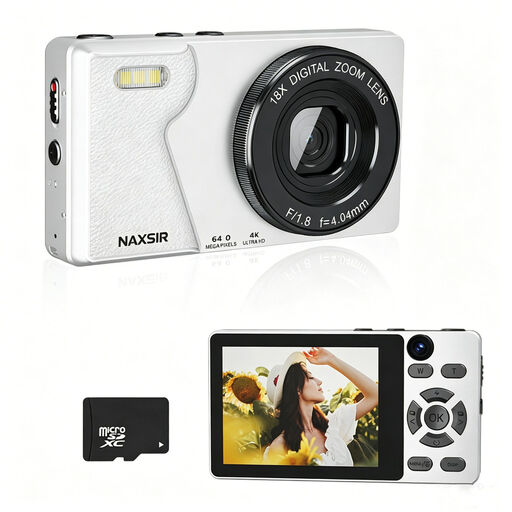 No image available
At most, this camera can serve as one component of a camera-scanning set-up; you’ll need to check separately that it’s compatible with a suitable macro lens and film holder.
The product title mentions a 32 GB memory card.
 No image available
This camera could be part of a camera-scanning set-up, but the listed zoom lens isn’t described as a macro lens. Check whether you also have a suitable macro lens and film holder.
The product title mentions a 16-50mm zoom lens.
Not simply because it’s compact. Check the exact film format and holder: reflecta lists 120 formats from 6 × 4,5 to 6 × 9 cm for the x66-Scan, while Plustek lists formats up to 6 × 12 cm for the separate OpticFilm 120 Pro.
It depends on the method you choose. For a standalone scanner, you’ll need a compatible film holder and suitable SD storage; the VALOI easy35 v2 also requires a compatible digital camera and macro lens. If you’re using a computer-based scanner, check that the software works on your system.
Don’t rely on infrared-based dust and scratch removal for conventional silver-based black-and-white film. According to the SilverFast manual, this feature isn’t suitable for that type of film. Keep the film and holder clean, and assess any corrections in the scan.
For online consumer purchases from a business, you generally have a 14-day cooling-off period. The Government of the Netherlands lists exceptions, including purchases from a private individual; check which rules apply to your purchase.
No. The Government of the Netherlands states that there’s no fixed statutory warranty period. Check the warranty terms for the product and seller; a voluntary warranty is separate from your statutory rights.