
Creator of close-up knitting tutorials
You film hands and small stitches, and want to reduce distracting cast shadows without losing the texture of your knitting. Adobe explains that direct, hard light can create sharp shadows and high contrast.


If you mainly film hands and stitches, start with adjustable continuous lighting that you can angle towards your work and soften if needed. Then choose between an LED panel, ring light or COB light with a light modifier. The right option also depends on your overhead view, the space around your table and the power supply. To keep yarn colours looking true, use a light colour you can control and set your camera’s white balance accordingly. Test the complete set-up with the yarn you plan to film.
You film hands and small stitches, and want to reduce distracting cast shadows without losing the texture of your knitting. Adobe explains that direct, hard light can create sharp shadows and high contrast.
You film different colours or variations and want to keep the lighting and camera white balance consistent between videos. Nikon explains how white balance helps capture colours under the lighting you use.
You have little room for anything beyond your camera, yarn and moving hands. How a light is mounted and the height it sits at determine whether it will work with your overhead view.
First decide where to put the light and camera. Then choose the type of light and check whether you can adjust its direction and colour settings to suit your filming.
A good fit if: you want to light your work table from an angle with a panel you can position as needed. According to Godox, the Godox P260C Pro has a diffuser and adjustable white light from 2800–6500 K.
Bear in mind: check that the panel fits above or beside the table without getting in the way of your camera, hands or needles. The stated specifications are not a test with your yarn.
A good fit if: you want a set-up with a ring, stand and phone holder, and its shape works with your filming angle. According to the manufacturer, the NEEWER SRP18-2.4G comes with a stand and phone holder.
Bear in mind: check that the ring, camera and your moving hands don’t block one another in your overhead view, and that the stitches still have enough definition.
A good fit if: you want to build your own lighting set-up around a fixed filming spot, controlling the direction and spread of the light. According to amaran, the amaran Halo 100x has a Bowens mount for a compatible light modifier.
Bear in mind: a compatible light modifier isn’t necessarily included. Also check that the complete set-up, including the stand, fits in your workspace.
| What to consider | What should you check? | Who is this important for? |
|---|---|---|
| Visible stitches and shadows | Check whether you can adjust the brightness and direction of the light, and whether a diffuser or suitable softbox will work in your set-up. Record a test clip with your hands moving. | When I film stitches up close, I want to make sure my hands don’t block the light and hide the detail. Around 36% of consumers put visible stitches at the top of their list of buying priorities. |
| Yarn colours across recordings | Compare the adjustable colour temperature and stated colour rendering of the exact model. Set your camera’s white balance under the lighting you’ll use, then compare test footage with the real yarn. | When filming different yarn colours, I want to keep colour reproduction consistent in my online shop videos. Around 29% of consumers put colour consistency first. |
| Space around the work table | Measure the table edge and available clearance. Check whether a clamp or stand will fit and whether the complete lighting set-up will block your work. | When my table is already full, I want to be able to position my camera, yarn and hands freely. Around 21% of consumers mainly choose based on the workspace required. |
| Stable recording and power | Check the power supply and what’s included with the exact version. Record a test clip using your camera settings and check for visible flicker. | When I’m recording several clips, I want a suitable power supply and no distracting flicker in the footage. Around 14% of consumers put uninterrupted recording first. |
The stated CRI is a manufacturer’s specification for the model. The ambient light and camera white balance also affect the colours in your footage.
Set the white balance under the lighting you’ll actually use, then compare a test clip with the yarn.
A suitable light modifier, power supply or mounting option can vary between versions. For the amaran Halo 100x, the manufacturer lists compatible light modifiers as sold separately.
Check what’s included with the exact set and which additional parts you need before choosing a type of light.
A stand or phone holder won’t tell you whether your camera, hands and knitting will all have a clear view from above.
Try out the filming angle at your work table first, then check whether a ring light or an angled panel will fit.
According to Godox, the P260C Pro is an adjustable bi-colour LED panel with a built-in diffuser and adjustable white light from 2800–6500 K.
According to Elgato, the Key Light Air MK.2 is designed to attach to the edge of a desk and offers adjustable light from 2900–7000 K.
According to NEEWER, the SRP18-2.4G is a ring light with a stand and phone holder.
According to amaran, the Halo 100x is a bi-colour COB light with a Bowens mount for a compatible light modifier.
This selection includes COB video lights, a ring light and compact LED video lights. Check that the power supply, mounting options and accessories for each model suit your table and filming angle.
 No image available
Suitable for a fixed filming spot if you want bi-colour light and a Bowens mount for your choice of light modifier.
200 W; adjustable light from 2700–7000 K; Bowens mount; built-in power adapter according to the product name.
 No image available
Suitable if you want to use a ring light with a stand and the ring won’t get in the way of your camera set-up.
10 inches; remote control; three colour modes and ten brightness levels according to the product name; 63-inch stand according to the product name.
 No image available
Suitable as compact extra lighting when filming with the DJI Osmo Pocket 3.
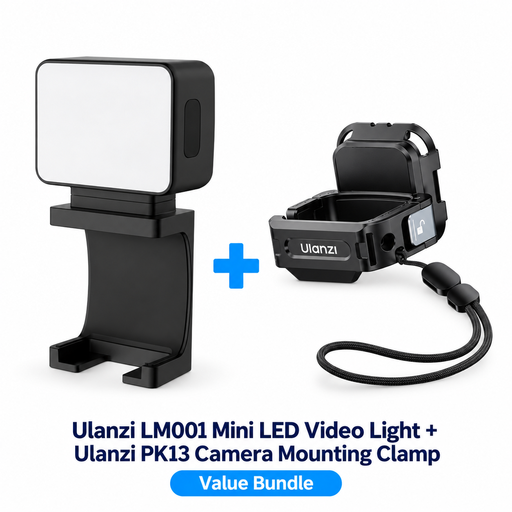
According to the product name, the bundle includes a PK13 mount for the DJI Osmo Pocket 3; check that it fits your camera.
 No image available
Suitable if you’re looking for a portable light with adjustable bi-colour illumination for your filming environment.
60 W; bi-colour from 2700–6500 K; full colour spectrum; built-in 59 Wh battery according to the product name.
 No image available
Suitable if you’re looking for a rechargeable LED video light for camera recordings.
Rechargeable; colour: black.
Angle an adjustable light source towards your work and test its position while moving your hands. Diffusion can soften harsh shadows. In your footage, also check that the stitches still have enough definition.
Not necessarily. Keep the lighting consistent and adjust your camera’s white balance to match. Compare test footage with the real yarn; a manufacturer’s CRI specification doesn’t replace this check.
First, record a test clip using the light and camera settings you plan to use. Nikon explains that flicker can occur when the shutter speed and frame rate don’t match certain light sources. So check your camera’s anti-flicker settings too.
Check which EU product safety requirements apply to the light and power supply on offer, and whether CE marking is required for that version. The Netherlands Food and Consumer Product Safety Authority states that the Low Voltage Directive applies within the limits of 50–1000 V AC and 75–1500 V DC. Check each component against the requirements that apply to it.