If you want to view and save the count on the device itself, choose hardware with a screen and storage, such as the Adafruit MacroPad RP2040 or M5Stack Cardputer-Adv, and program the counting and saving functions yourself. If you have a computer next to your knitting, a compact keypad may be enough, provided your software saves the count locally. Before buying, check the power supply, what’s included and whether you can retrieve the count after switching the device off.
Who are these options suitable for?
Knitters who want to see the count on the device
You want to press a button, see the count straight away and pick up where you left off after switching the device off. To do this, you’ll need to program the counter and the functions for saving and retrieving the count yourself. Adafruit Learning System and M5Stack provide information about the relevant hardware.
Knitters with a computer beside them
You mainly need a small keypad, and can use a computer programme to display and store the count locally. Pimoroni describes the Keybow 2040 as a programmable keypad; check how your software will save the count.
Makers building a portable counter
You want to combine keys, a screen and a battery in one programmable device, and set up the controls and storage yourself. M5Stack describes the Cardputer-Adv as an integrated device, but you’ll need to build the counter function yourself.
What should you look for when choosing?
Macropad with screen
Choose this if: you want to programme individual keys and display the count on the same device.
Bear in mind: you’ll need to write the counter and storage code yourself. USB-C power requires a suitable power source.
Portable mini computer
Choose this if: you want to count without a connected computer and value an integrated screen, keyboard and battery.
Bear in mind: a microSD slot doesn’t mean that a card or counter programme is included. You’ll need to set up saving and restoring the count yourself.
Keypad with a local computer
Choose this if: you already have a computer beside your knitting that can store the count locally.
Bear in mind: Pimoroni doesn’t list a built-in screen for the Keybow 2040, so you’ll need another way to view the count.
First decide where the count will be stored and how you’ll retrieve it after restarting. Then choose the keys, display and power supply that suit your workspace.
| Consideration |
What should you check? |
Who is this important for? |
| Saving the count |
Check where your programme saves the count, and test whether it can be retrieved after switching the device off. Writing from CircuitPython requires a suitable storage configuration, as described by Adafruit Learning System. |
I want to pick up on the same round after a power interruption, so the count must be saved locally and restored on restart. Around 36% of consumers prioritise keeping their count. |
| Controls and corrections |
Decide which actions you’ll programme, such as adding a round or going back, and where you’ll view the count. |
While knitting, I want to add or correct a round using a clearly identifiable key. Around 29% of consumers prioritise ease of use and error correction. |
| Using it without a computer |
Check that your chosen model has a screen and a suitable power supply. Don’t assume that a battery guarantees a particular run time. |
I want to move my knitting without having to connect a computer each time. Around 21% of consumers particularly value being able to count without a connected computer. |
| Customisation |
Compare what’s included in the exact version and check which parts and programming documentation you’ll need. |
As a maker, I want to choose the keys and case myself, and I’m happy to take on extra assembly and programming. Around 14% of consumers prioritise being able to build and customise their own device. |
Common buying mistakes
-
Assuming memory automatically saves the count
Flash memory or a microSD slot won’t save the current count automatically. Your counter programme must actually save the count and read it back when it starts.
Test counting up, saving, switching off and retrieving the count before using the counter for a knitting project.
-
Buying a bare macropad as if all the parts were included
What’s included varies by version. Pimoroni states that the bare Keybow 2040 requires switches and keycaps, so check the parts list for the version you choose.
Compare the exact contents with the parts you’ll need for assembly and programming.
-
Choosing a keypad without a screen when you want to read the count from it
The Pimoroni Keybow 2040 specification doesn’t list a built-in screen, while the Adafruit MacroPad and M5Stack Cardputer-Adv do have screens.
Before buying, decide where the current count will be displayed. If necessary, include a separate display solution in your design.
Brands to compare
Adafruit
The MacroPad RP2040 is designed for a counter you programme yourself, with keys, an OLED screen and a rotary encoder.
- Adafruit Learning System lists 8 MB of flash memory and USB-C for power and data.
- The hardware doesn’t include a ready-made counter or automatically saved count. Also check whether you’re choosing a bare unit or a starter kit.
M5Stack
The Cardputer-Adv combines the components for a portable build project. The CardKB v1.1 is a separate keyboard module for use with a compatible host.
- M5Stack lists a microSD slot and built-in battery for the Cardputer-Adv.
- The CardKB v1.1 isn’t a complete counter with a screen and saved count on its own. Don’t confuse this module with the Cardputer-Adv.
Pimoroni
The Keybow 2040 is a compact keypad for use beside a local computer or with a display you design yourself.
- Pimoroni lists sixteen keys and 2 MB of flash memory.
- The specification doesn’t list a built-in screen. The bare version is sold without switches and keycaps, and you’ll need to write your own software for the counter.
Raspberry Pi
Pico development boards are an option if you want to put together the buttons, display and case yourself.
- Raspberry Pi Documentation describes programmable Pico boards with built-in flash memory.
- A Pico isn’t a ready-made keyboard. You’ll need additional input components and your own counter and storage code.
Products on Joybuy
A programmable keypad for input in a DIY project. Check that its controls and software suit your counter setup.
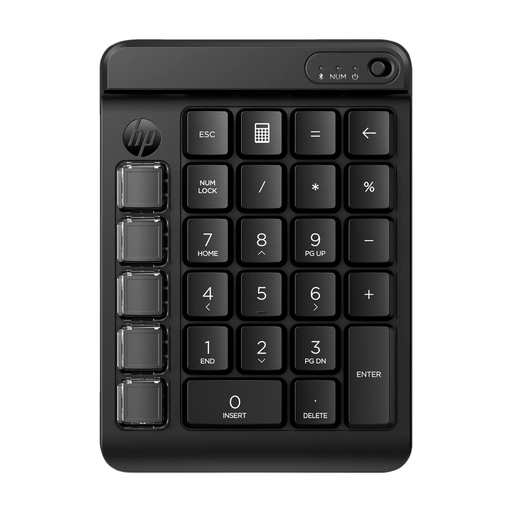 Image unavailable
HP 435 Programmable Wireless Keypad
This programmable keypad can be used as an input device in a DIY project. Your own software and setup will need to provide the counter function and store the count locally.
This model is described as wireless and programmable. Before buying, check that it works with the controls in your counter setup.
Joybuy
Frequently asked questions
Is built-in memory enough to keep counting after switching the device off?
No, not on its own. Your counter programme must write the current count to local, non-volatile storage and read it back when it starts. Adafruit Learning System explains that writing from CircuitPython to the CIRCUITPY drive requires a suitable storage configuration, so the computer and device don’t write to the file system at the same time.
Can I read the count from a Keybow 2040 without a computer or extra screen?
If you want to see the count, plan for a separate display: the Pimoroni Keybow 2040 specification doesn’t list a built-in screen. You’ll also need to programme the counter function yourself.
Which parts should I check are included in a kit?
Check what’s included in the exact version. Pimoroni states that the bare Keybow 2040 requires switches and keycaps; these parts are listed as included with the Adafruit starter kit. Also check what power supply and programming connection your setup requires.


