Who is this camera choice relevant to?

A maker who wants to show off their stitches

You want to capture small knitted details as well as the whole toy. The close-up capabilities of the specific camera and lens help determine how large those details appear in the frame. For example, OM SYSTEM lists macro shooting modes for the Tough TG-7.

A seller with a dedicated photography spot

You photograph several toys for a consistent series and want to be able to repeat the framing, background and lighting. Canon describes a tripod as a useful aid for achieving consistent compositions in product photography.

A photographer with limited table space

You need to fit the toy, background, camera and lighting on or around a small table. So compare the complete setup and the framing you want, not just the size of the camera body.

What should you look for when choosing?

Compact camera with close-up modes

Best for: you want to try taking photos of the whole toy and its finer details without changing lenses.

Bear in mind: a fixed lens limits your options later on, and you’ll need to check for yourself whether the framing you want works with your toy.

Mirrorless camera with a standard zoom

Best for: you want to switch between photographing whole toys and other subjects, with the option to choose a different lens later.

Bear in mind: the standard zoom included in the kit isn’t necessarily a macro lens. You may need a separate close-up or macro lens to capture smaller details.

Mirrorless camera for photos and demonstration videos

Best for: you want to make videos as well as take photos, holding a toy up to the camera. Sony describes a Product Showcase mode for the ZV-E10 II.

Bear in mind: that mode doesn’t guarantee that a stationary toy on a table will be in focus automatically. Check the close-up capabilities of the specific kit lens too.

What to consider What should you check? Who is this important for?
Small stitches and facial details Check the magnification and focusing distance of the specific lens at the setting you plan to use. For the RF-S 18-45mm at 18 mm, Canon lists a maximum magnification of 0.14× with autofocus and 0.25× with manual focus. If you want stitches or embroidered details to fill the frame, framing is your top priority. Around 36% of consumers put these details first.
A consistent series of product photos Check whether you can see the screen from where the camera is positioned, and whether there’s room for a support and lighting around the table. Canon describes a tripod as a useful aid for consistent compositions. If you photograph several whole toys in a similar way, you’ll want to repeat the framing, background and lighting. Around 29% of consumers prioritise this type of product series.
Space on the table Try out the complete setup, including the toy, the framing you want, the camera, support and lighting. OM SYSTEM says the compact camera has a fixed lens; with a mirrorless camera, check the focusing distance at the zoom setting you’ve chosen. If your workspace is cramped, the whole setup needs to fit without the camera or lighting getting in the way of your framing. Around 21% of consumers choose mainly based on this limited space.
Demonstration videos as well as photos Check that the product presentation you want works with the specific camera version and kit lens. Sony describes a Product Showcase mode on the ZV-E10 II for holding a product in front of the lens. If you also want to demonstrate a toy in a video, video controls and the framing you need matter alongside still photos. Around 14% of consumers prioritise this combination.

Easy-to-miss buying considerations

  • Assuming a standard zoom is a fully fledged macro lens

    The maximum magnification of Canon’s RF-S 18-45mm varies according to the zoom and focus settings. A standard zoom kit, such as the one Nikon offers with the Z50II, doesn’t tell you by itself how large an individual stitch will appear in the frame.

    First, note how small the detail you want to photograph is. Then check the specifications for the exact kit lens at the setting you plan to use.

    If you can’t achieve the framing you want with the kit lens, you may need a separate close-up or macro lens.

  • Focusing only on camera features and forgetting about your table setup

    Even a suitable camera won’t take care of positioning the toy, background and lighting for you. Consistent framing and a stable setup also matter for repeatable product photos.

    First, see if everything fits on or around the table at the same time. A support or extra lighting will take up space too.

    A support or extra lighting doesn’t just need planning; it also needs space in your setup.

  • Assuming the Sony ZV-E10 and ZV-E10 II are the same kit

    The Joybuy product page for the ZV-E10 lists a 16-50mm kit lens. The Sony option for the ZV-E10 II is a different camera version and lists an E PZ 16-50mm OSS II kit lens.

    Before buying, compare the full model name and the included lens. Similar-looking names don’t mean the versions are identical.

Camera brands to compare

OM SYSTEM

The Tough TG-7 is a compact camera with a fixed lens. It may be worth considering if you’re looking for built-in close-up capabilities.

  • OM SYSTEM lists macro shooting modes for the TG-7, though this alone doesn’t determine how your particular knitted toys will be framed.
  • A fixed lens doesn’t offer the same choice of lenses as a mirrorless camera.

Canon

The EOS R50 with RF-S 18-45mm is a mirrorless camera kit for anyone who wants to switch between overview and detail shots.

  • Canon publishes different focusing distances and maximum magnifications for the RF-S 18-45mm at different focal lengths and with different focusing methods.
  • You shouldn’t automatically treat the standard zoom as a dedicated macro lens; choosing another lens is a separate decision.

Nikon

The Z50II with NIKKOR Z DX 16-50mm VR is a mirrorless camera kit with a standard zoom for tabletop subjects and other photography.

  • Nikon lists a minimum focusing distance of 0.2 m for this lens.
  • That distance alone doesn’t tell you how large an individual stitch will appear in the photo.

Sony

The ZV-E10 II with E PZ 16-50mm OSS II is worth considering if you want to make demonstration videos as well as take photos.

  • Sony describes a Product Showcase mode for the ZV-E10 II, designed for holding a product in front of the lens.
  • This feature isn’t a standalone assessment of tabletop photography, and it doesn’t replace checking the kit lens’s close-up capabilities.

Cameras for this photography task on Joybuy

This Joybuy selection includes cameras described in their product information as suitable for photography, including compact models, mirrorless cameras and a camera with instant printing. For each model, check that the lens, focusing and controls suit the details you want to capture and the table space you have available.

DJI Pocket 3 camera with Ulanzi storage case

DJI Pocket 3 camera with Ulanzi storage case

The product description lists the camera for photography and focusing on stationary subjects. Check whether you can get the close-up you want with your toy.

The description mentions a 2-inch rotating screen and 3-axis stabilisation.

View at Joybuy

DJI Osmo Pocket 3

DJI Osmo Pocket 3

The product description lists photography and focusing for still images. Check whether its close-up capabilities will give you the framing you want.

The description mentions a 2-inch rotating touchscreen and 3-axis stabilisation.

View at Joybuy
Sony ZV-E10 with 16-50mm zoom lens

Sony ZV-E10 with 16-50mm zoom lens

This kit may suit you if you want to combine photos with demonstration videos; the product description lists a Product Showcase mode.

The description mentions a vari-angle LCD screen and a 16-50mm kit lens. According to the product information, an adapter and charger aren’t included. This is the ZV-E10, not the ZV-E10 II.

View at Joybuy
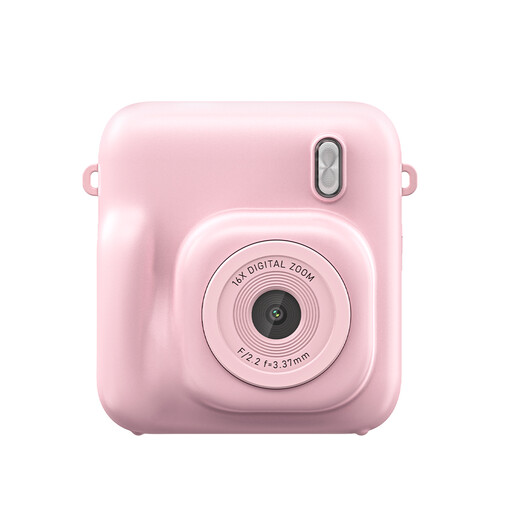
Songdian instant-print camera, pink

Songdian instant-print camera, pink

The product information lists digital photos and instant printing. Check whether the fixed focus suits the distance at which you want to photograph the toy.

The product description mentions fixed focus and an LED fill light.

View at Joybuy
Sony ZV-1 compact camera

Sony ZV-1 compact camera

The product description lists the camera for photography and vlogging. Check whether the built-in lens can achieve the framing you want for your knitted toys.

The description mentions a tilting touchscreen, autofocus and image stabilisation.

View at Joybuy

Frequently asked questions

Do I need a macro lens to photograph the whole toy?

Not necessarily. A whole figure and an individual stitch call for different framing. If you’re using a kit lens, check its maximum magnification at the setting you plan to use. Canon publishes different figures for the RF-S 18-45mm depending on focal length and focusing method.

How can I make a series of photos taken on the same small table look consistent?

If possible, keep the camera, background and lighting in fixed positions, and check the framing before each shot. Canon describes a tripod as a useful aid for consistent framing and reducing camera shake in product photography. That doesn’t mean a tripod is automatically an essential purchase.

What should I check about the kit and any extra equipment?

Check exactly which lens comes with the camera body and whether it can achieve the detail framing you want. Nikon lists a 16-50mm lens for the Z50II kit and says that a charger isn’t included. Check what’s in the kit you’re considering.

How do the cooling-off period and statutory guarantee work when buying online in the Netherlands?

For many eligible distance purchases from a business, you have a 14-day cooling-off period, although exceptions apply. According to the Dutch government, there is no fixed statutory guarantee period in the Netherlands: a product must meet reasonable expectations, and if it’s faulty, the seller must provide a solution. This is about consumer rights, not the terms and conditions of a particular seller.
