Start with the photos you need: one showing the whole glove and, only if you need the stitches to fill the frame, separate close-ups. First, test your current camera in even light with a fixed set-up. A new camera with interchangeable lenses is only worth considering if you can’t achieve the framing or focus you want with your existing kit. For every deal, check which lens is included and how much your complete set-up will cost.
Who is this for?
Maker who wants to show off the stitches
You want to take close-ups of the knit as well as a photo of the whole glove. The focusing capabilities of the specific lens will affect whether you can get the framing you want. Canon Netherlands, OM Digital Solutions and Sony respectively describe extension tubes, a close-up mode and a separate macro lens.
Seller offering colour options
You photograph the same glove in several colours and want to keep the lighting and white balance under control without misrepresenting the product. Canon Netherlands explains how to use white balance, while the Netherlands Authority for Consumers and Markets outlines that a product presentation must not give consumers a misleading impression of what is on offer.
Small online shop with regular photoshoots
You take new product photos regularly and would benefit from a repeatable frame and a set-up with components you can keep track of. Canon Netherlands explains how to use a tripod for consistent composition.
What should you look for?
| What to consider |
What should you check? |
Who is this most relevant to? |
| Stitches and knit texture |
Take a test shot of the smallest stitch you want to show. Check the focus, the magnification of the specific lens, and the space between the camera, glove and lights. |
If I want small stitches to fill the frame, I first need to know whether my current lens can focus on them. Around 33% of consumers put detail above everything else. |
| Colour options |
Compare test shots taken under the same lighting and with the same white balance setting against the glove itself, including after export. |
If I offer several colour options, I want the photos to show them clearly and accurately. Around 27% of consumers prioritise colour accuracy. |
| Repeatable set-up |
Check that the camera and tripod fit securely in the desired position and that you can easily check the framing. |
If I regularly take new catalogue photos, I want to be able to repeat the same framing easily. Around 20% of consumers give repeatability top priority. |
| Complete set-up |
Compare what’s included in the deal with your requirements for test shots before deciding whether you need a new camera or an additional lens. |
If I want to keep track of the whole set-up, I need to know exactly what the deal includes. Around 20% of consumers start by considering the total cost of purchase. |
Common pitfalls
-
Mistaking a standard zoom for a macro lens
A camera body or kit zoom won’t automatically give you the magnification needed to fill the frame with stitches. The Canon and Nikon kits described list their zoom lenses; Sony describes its FE 50 mm F2.8 Macro as a separate lens.
Check the full lens model and what’s included in the kit. Only consider extra macro equipment if a test shot shows you need it to achieve the detail framing you want.
A suitable close-up or macro lens may need to be bought separately.
-
Assuming a short focusing distance guarantees a usable photo
The OM SYSTEM Tough TG-7 manual specifies close-up shots from as near as 1 cm in close-up mode. That distance alone doesn’t tell you whether your set-up can accommodate both the whole glove and the close-up you want.
Test both framings and check that there’s enough room for the lighting when taking close-ups.
-
Confusing an attractive screen colour with accurate product representation
White balance affects the colours captured in your photos. According to the Netherlands Authority for Consumers and Markets, a product presentation must not give consumers a misleading impression of what is on offer.
Keep your lighting and white balance consistent, and compare the published photo with the colour option being sold.
Taking test shots and making any necessary adjustments takes extra time.
Brands to compare
Canon
The EOS R50 is a mirrorless camera worth considering if you may want to expand your online shop set-up later with a compatible lens.
- Canon Netherlands lists a movable touchscreen for the EOS R50 and specifies which lenses are included in the relevant deal.
- The deal details don’t prove that every EOS R50 kit includes a macro lens.
Nikon
The Z50II with NIKKOR Z DX 16-50mm VR is a zoom kit to compare for photos showing the whole glove.
- Nikon Netherlands specifies the zoom lens included with this kit.
- The kit description doesn’t confirm that the lens can show your smallest stitches filling the frame.
Sony
An E-mount system could suit a set-up where you pair a compatible camera body with a separate macro lens.
- For its separate FE 50 mm F2.8 Macro, Sony Netherlands specifies 1:1 macro images and compatibility with full-frame and APS-C E-mount cameras.
- This specification applies to this lens and doesn’t automatically apply to a camera kit with a different lens.
Fujifilm
The X-S20 is a mirrorless camera to compare if RAW files are part of your editing workflow.
- Fujifilm X Series Netherlands lists RAW shooting for the X-S20.
- Whether a deal is suitable for filling the frame with stitches also depends on the compatible lens actually included.
OM SYSTEM
The Tough TG-7 is a compact alternative to compare if you don’t want to change lenses.
- The OM Digital Solutions manual specifies shots from as near as 1 cm in the dedicated close-up mode.
- That distance applies to this mode and doesn’t, on its own, tell you whether your desired framing and lighting will work.
Joybuy products
This Joybuy selection includes cameras and bundles whose product information mentions photography or additional lighting for product photography. For knitted gloves, check separately whether the camera and lens can handle the framing you want.
 No image available
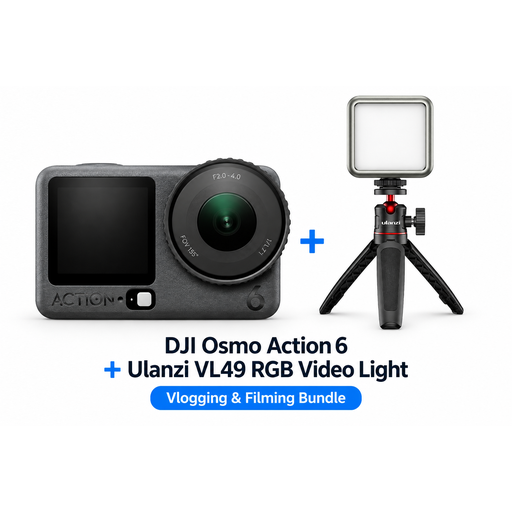
DJI Osmo Action 6 Adventure Combo + Ulanzi VL49 RGB video light
Consider this bundle if you’d also like the additional lighting mentioned for your product photos. Use test shots to check whether the camera captures the details you want.
The bundle includes an Osmo Action 6 camera and a Ulanzi VL49 RGB video light.
View at Joybuy
 No image available
DJI Osmo Pocket 3 Creator Combo + Ulanzi VL49 RGB video light
Consider this combination if you’re looking for a portable camera set-up with the additional lighting mentioned. Test separately whether the camera meets your requirements for detail shots.
The bundle description lists an Osmo Pocket 3 and an RGB light.
View at Joybuy
No image available
DJI Osmo Pocket 3 + Ulanzi VL49 RGB video light
Consider this combination if you want to look at a portable camera and the additional lighting mentioned together. Use test shots to assess the close-ups you want.
The product information lists an Osmo Pocket 3 and a Ulanzi VL49 RGB light.
View at Joybuy
 No image available
DJI Osmo Pocket 4 Standard Combo
Consider this model if you’re looking for a camera with a rotating screen. Use test shots to check whether the framing and focus work for your glove photos.
The product name lists a 1-inch CMOS sensor, 4K/240fps, 2× lossless zoom, 107 GB of built-in storage and a 2-inch rotating screen.
View at Joybuy
 No image available
KOMERY G7 5K digital camera, white
Consider this compact camera if you’re looking for a portable model. Take a test shot to check whether the stitches you want to show are in focus and large enough in the frame.
The product name lists 5K and 80 MP; the product description mentions autofocus and 18× optical zoom.
View at Joybuy
Frequently asked questions
Do I need a macro lens to photograph the whole glove?
Not necessarily. First, take the overview shot you want with your current camera or the exact kit lens. A separate macro option is mainly worth considering if the smallest stitches don’t appear large or sharp enough in the framing you want.
How can you make photos of different gloves look consistent?
Keep the camera position and background fixed, check the lighting and use the same white balance process each time. Before publishing a colour option, compare the final image with the actual product.
What should I check about what a camera kit includes and its service?
Check exactly which camera body, lenses and other components are included, and ask the seller about the terms that apply to your purchase. The statutory guarantee described by the Netherlands Authority for Consumers and Markets applies to sales to consumers. If you’re buying for your business, don’t assume the same consumer terms will apply.
Are heavily edited product photos always allowed for an online shop in the Netherlands?
No, not if the presentation gives the average consumer a misleading impression of what is on offer. The Netherlands Authority for Consumers and Markets describes incorrect or unclear information as potentially misleading. So check that edited colours and the product details shown still match the glove being sold.


