If you don’t already have audio equipment, an all-in-one Wi-Fi speaker is usually the simplest choice. If you have suitable active speakers or an amplifier, a separate network player may be a good fit. Before you buy, check that your music service and account work with the model you’ve chosen, who can control the music and whether you have a safe spot away from direct splashes.
Who is this guide for?
Parents who want to play music straight away
You’re looking for one complete speaker for the kitchen-diner and want to check first that you can play children’s songs through your preferred service. Once set up, a Wi-Fi speaker can stream music on its own.
Families who want to agree on how it’s used
You want to think about who can choose the music, how the volume is controlled and whether you want a speaker with built-in microphones. Your music account settings also play a part.
Owners of existing speakers
You already have an amplifier or active speakers and want to keep using them. The available inputs determine whether a separate network player will work with your setup.
What should you look for?
Start with the playback setup that suits your existing equipment. Then consider the music service, controls and where you’ll put the speaker.
| What to consider |
What should you check? |
Who is this important for? |
| Access to children’s songs |
Check that your chosen music service and playback setup work with the exact model and account. Also review the settings for explicit content. |
If you want the chosen account to provide access to suitable music, this should come first. Around 28% of consumers say access to suitable children’s songs is their top priority. |
| Complete setup |
Check whether you already have speakers and an amplifier, and which connections are available. A separate network player does not have a speaker of its own. |
If you want to play music without first combining extra audio equipment, a ready-to-use setup matters most. Around 22% of consumers prioritise having a complete setup. |
| Controls and choice of content |
Check the controls on the device, your account settings and whether you want built-in microphones. Keep the volume at a safe level: loud sound can damage hearing. |
If you want to decide who chooses the music and how children use the speaker, these control options are key. Around 22% of consumers say child-friendly controls are their top priority. |
| Where to put it in the kitchen |
Check the available space, Wi-Fi and plug socket coverage, and the instructions for the exact model. Moisture-resistant does not mean waterproof. |
If the available space in your kitchen-diner is a deciding factor, you’ll want to place the speaker away from direct splashes. Around 17% of consumers prioritise finding a suitable spot in the kitchen. |
| Existing setup |
Make a note of the inputs on your amplifier or active speakers. Passive speakers also need a suitable amplifier. |
If you want to keep using audio equipment you already own, connecting to your current setup is most important. Around 11% of consumers prioritise reusing existing equipment. |
Common buying mistakes
-
Mistaking a separate network player for a complete speaker
A network player such as the WiiM Pro Plus sends audio to other equipment; it doesn’t play music through a built-in speaker.
Before choosing a separate player, check which speakers, amplification and inputs you already have.
-
Assuming moisture-resistant means splashproof
Sonos describes the Era 100 and Era 100 SL as moisture-resistant, but not waterproof. Direct contact with water can damage a speaker that isn’t waterproof.
Place the speaker away from direct splashes and follow the instructions for your specific model.
-
Choosing a speaker before checking your music service
Account features and a device’s playback support are separate things. Spotify offers managed accounts for young listeners, with settings that include controls for explicit content.
Check your account settings and try out how to use your preferred playback setup with the speaker you’ve chosen.
Brands to compare
Sonos
The Era 100 and Era 100 SL are all-in-one Wi-Fi speakers worth comparing if you don’t already have a suitable audio setup.
- Sonos lists Wi-Fi, Bluetooth and AirPlay 2 for these models.
- The Era 100 SL doesn’t have built-in voice control. A separate Sonos adapter is needed for the line-in connection mentioned.
- Sonos describes both models as moisture-resistant, not waterproof. Setup is via Wi-Fi and the Sonos app.
Denon
The Home 150 NV is an all-in-one HEOS speaker for anyone who wants physical preset buttons and doesn’t need built-in microphones.
- Denon lists three preset buttons, AirPlay 2, HEOS multi-room and playback from a Spotify account.
- Without microphones, there’s no built-in voice control either.
- Check compatibility with your other devices if you want to group them using HEOS.
WiiM
The Pro Plus is a separate network player for existing active speakers, amplifiers or receivers.
- WiiM lists analogue RCA and digital outputs, and documents Spotify Connect support for this device.
- The Pro Plus isn’t a complete speaker. You’ll need suitable active speakers or an amplifier and speakers.
JBL
The Authentics 200 is an all-in-one Wi-Fi speaker worth comparing if you’re interested in having several ways to play music.
- In its 2023 launch materials, JBL listed AirPlay, Spotify Connect and built-in Chromecast among the features of the Authentics series.
- This isn’t an independent comparison, and it doesn’t guarantee that every service or voice feature will work with every current Dutch account.
Bluesound
The PULSE FLEX is a compact all-in-one network speaker in the BluOS platform.
- Bluesound lists AirPlay 2, Spotify Connect, Bluetooth, three presets and controls on the device.
- If you want to group devices, check that the platform is compatible with the other devices in your home.
Joybuy products
These product picks focus on all-in-one speakers for listening to music at home, including Wi-Fi and Bluetooth models.
 No image available
Bose Lifestyle Ultra Speaker - Black
An all-in-one speaker with Wi-Fi and multi-room support, for anyone who wants to control their music through an app.
The product information lists Bluetooth and LAN. Check that your preferred music service and playback setup work with your account.
View at Joybuy
 No image available
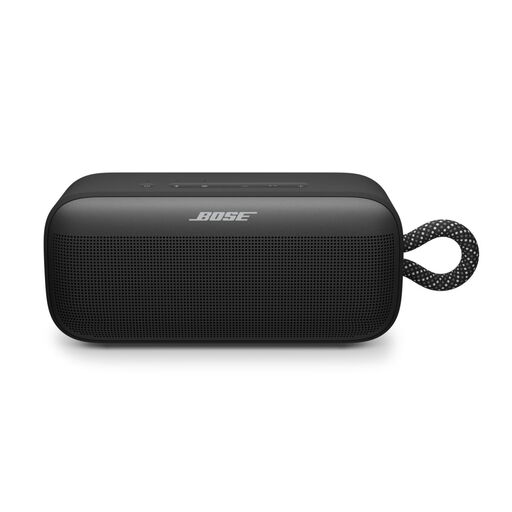
Bose SoundLink Plus Black
This portable Bluetooth speaker is a good choice if you want to play music from a paired device.
The product information lists IP67, USB-C and a stated playback time of up to 20 hours. Check that Bluetooth from your music source suits the way you want to control playback.
View at Joybuy
 No image available
Edifier ES300 WLAN & Bluetooth Speaker - 60W
An all-in-one speaker with WLAN and Bluetooth, for anyone who wants to compare different ways to play music.
The product information lists AirPlay 2, USB, AUX, app control and multi-room support. The built-in battery has a stated playback time of up to 12 hours.
View at Joybuy
Frequently asked questions
Can you play children’s songs with just a separate network player?
No. A separate network player such as the WiiM Pro Plus sends audio to a suitable amplifier, receiver or active speakers. If you have passive speakers, also check what kind of amplifier you’ll need.
How can you make a music service more suitable for a young child?
If you use Spotify, Spotify says you can set up a managed account for a young listener. This lets you manage explicit content and certain artists or tracks, among other things. Also check how the account works with the speaker you’ve chosen.
Can you put a moisture-resistant speaker next to the sink?
Moisture-resistant doesn’t mean waterproof. Sonos describes the Era 100 and Era 100 SL as moisture-resistant, but warns that direct contact with water can damage a speaker that isn’t waterproof. Choose a spot away from direct splashes and follow the model’s instructions.
What should you check to protect your privacy when using a network speaker?
The Dutch Data Protection Authority recommends checking the privacy policy, data security and provider before you buy. Also check whether the specific model has built-in microphones. A model without microphones doesn’t remove privacy considerations around your account and app.
What are your rights if a player you bought online breaks soon after purchase?
With normal use, a product in the Netherlands must meet what you could reasonably expect from it. According to ACM ConsuWijzer, the seller must offer a solution if a product is faulty. For an ordinary online product purchase, you’re also generally entitled to a 14-day cooling-off period from delivery. Check which exceptions apply to your purchase.


