Who is this guide for?

Watching with the kitchen lights on

You want to eat or move around during the comedy without having to darken the kitchen-diner too much. Picture size and light output are important considerations. For example, Epson Nederland lists white and colour light output in the CO-FH02 model specifications.

Limited space for projection

You only have a few suitable places for the projector and picture. So first measure the distance to the wall and compare it with the throw distance of the exact model you’re considering. BenQ Nederland gives the TH671ST as an example of a short-throw projector.

Easy streaming

You want to be able to put the projector away after watching and check in advance that your film source and sound will work with your setup. BenQ lists Google TV and built-in speakers among the GV50’s features; XGIMI also lists that streaming platform for the MoGo 4.

What should you look for when choosing?

Portable smart projector

A good fit if: you want to put the projector away and can dim the lights during the film.

Bear in mind: brightness figures such as ANSI and ISO lumens aren’t directly comparable, and they don’t tell you on their own how a large picture will look with the kitchen lights on.

Brighter model for a mostly fixed setup

A good fit if: you want to leave more ambient lighting on while watching and have enough distance from the wall.

Bear in mind: a higher stated light output doesn’t guarantee that every picture size will be easy to see in all lighting conditions.

Short-throw projector

A good fit if: a standard projector can’t produce the picture size you want from the available position.

Bear in mind: a short throw won’t, by itself, solve issues with ambient light, sound or safe positioning near the cooking area.

What to consider What should you check? Who is this most important for?
Visibility with the kitchen lights on Make a note of which lights will stay on and assess your preferred picture size in those conditions. Don’t compare lumen figures without checking how they were measured. If I need the lights on to eat or move around during the comedy, I want to know how the picture will look on my wall. Around 36% of consumers say visibility with the kitchen lights on is their top priority.
Picture size and positioning Measure the distance from the lens to the wall and the available wall width. Compare these with the throw ratio of the exact model. With only one suitable position, I want to know in advance whether it will produce a picture that fits. Around 29% of consumers give positioning space and picture size top priority.
Film source and clear dialogue Check that your preferred service or connected player will work, and see which audio connections are available. If possible, listen from where you’ll be sitting. If following the dialogue is my main concern, I’ll check my film source and how the sound carries from the dining table. Around 21% of consumers prioritise playback and clear speech.
Safe positioning and maintenance Follow the model’s installation and operating instructions, and check that the projector will be away from cooking vapour. If it uses a lamp, check which replacement lamp is suitable. For a projector in a kitchen-diner, I want to consider cooking vapour, mounting and any maintenance it may need. Around 14% of consumers make safe positioning and maintenance their main priority.

Common buying mistakes

  • Comparing lumen figures with different ratings directly

    ANSI, ISO and other lumen ratings aren’t necessarily measured on the same basis. None of these figures tells you on its own how a picture will look on your wall with the kitchen lights on.

    Check the measurement standard and the picture size you want. If possible, watch a dark film scene under the lighting you plan to use while watching.

  • Assuming a stated maximum picture size will suit your space

    The picture width you can achieve depends on the throw distance and lens of the exact model.

    Before buying, measure the distance from the lens position to the wall and the available wall width. Compare these with the model’s throw ratio or use its projection calculator.

    You may need to reposition the projector or use suitable mounting equipment.

  • Mounting the projector near cooking vapour or in an unsuitable location

    Epson warns that greasy smoke can damage components with certain wall or ceiling installations, potentially creating a risk of the projector falling.

    Choose a position away from cooking vapour and follow the installation and operating instructions for your chosen model.

  • Considering only the projector itself

    Connections, built-in features and light source type vary from model to model. BenQ lists a separate replacement lamp for the TH671ST.

    Check what you already have and what your chosen setup needs. Don’t assume accessories are included unless this has been confirmed for the exact version.

    Depending on the model, you may also need an external playback device, a separate audio solution or a suitable replacement lamp later on.

Brands and models to consider

BenQ

The GV50 is a portable smart projector, while the TH671ST is designed for a different setup, with a short throw distance.

  • BenQ lists 1080p, 500 ANSI lumens, Google TV and built-in speakers for the GV50. For the TH671ST, BenQ describes a picture of around 100 inches from around 1.5 metres.
  • The stated brightness alone doesn’t determine how well a picture will show up under your kitchen lighting. The TH671ST uses a lamp, so check your film source and sound setup too.

Epson

The CO-FH02 is a Full HD 3LCD model to consider if you want to take a higher stated light output into account.

  • Epson Nederland specifies 3000 lumens of white and colour light output for the CO-FH02. This is a model specification, not a measurement of how the picture will look in your kitchen-diner.
  • Epson warns that certain wall or ceiling installations in greasy smoke may cause material degradation and create a risk of the projector falling. Carefully assess the location you choose and follow the installation instructions.

XGIMI

The standard MoGo 4 is a compact, battery-powered option for a portable film setup.

  • XGIMI lists 1080p, 450 ISO lumens and Google TV for the MoGo 4. The manufacturer states that it offers up to 2.5 hours of video in Eco mode.
  • Battery life is stated for the mode specified and is a manufacturer claim. Don’t confuse the standard MoGo 4 with the MoGo 4 Laser or a bundle with different accessories.

Projectors on Joybuy

These projectors offer different options for watching films in a kitchen-diner, from portable models with built-in features to a standard projector for a fixed setup. Check the distance, film source, audio and intended location for each version.

Yaber L2 projector

Yaber L2 projector

The stated short throw distance could be useful if you have limited space between the projector and wall.

The product listing specifies native 1080p, 520 ISO lumens, Google TV, HDMI and two 5 W speakers.

The stated throw ratio is 1,17:1, with a specified picture range of 40–150 inches. The 360° gimbal can be angled in different ways; check the positioning and installation instructions for your space.

Joybuy

HP CC360 FHD Smart Projector

HP CC360 FHD Smart Projector

The built-in streaming features may suit you if you want to get started without a separate player. Check that the film you want is available from your provider.

The listed specifications are native 1080p, 220 ANSI lumens, autofocus and 6 W stereo speakers.

The product information lists streaming apps, wireless casting, HDMI and Bluetooth audio. Check which connection suits your film source.

Joybuy

Video projector with built-in apps and 180° rotation

Video projector with built-in apps and 180° rotation

The rotating casing could be useful if you want to angle the projector flexibly; check the intended projection position in advance.

The product name lists built-in apps, Play Store, Wi-Fi 6, Bluetooth and HDMI and USB compatibility.

The stated picture range is 50–200 inches and the digital zoom is 50%–100%. These are stated ranges, so check what picture size you can achieve from your position.

Joybuy

N3 Max Smart Projector

N3 Max Smart Projector

This portable model with built-in streaming features could suit a film setup you want to move around.

The product title lists 1000 ISO lumens, Dolby Audio, native Netflix and VIDAA OS. Autofocus and automatic keystone correction are also mentioned.

4K support is listed; this doesn’t mean it has native 4K resolution. Check that it works with your preferred film source and has the connections you need.

Joybuy
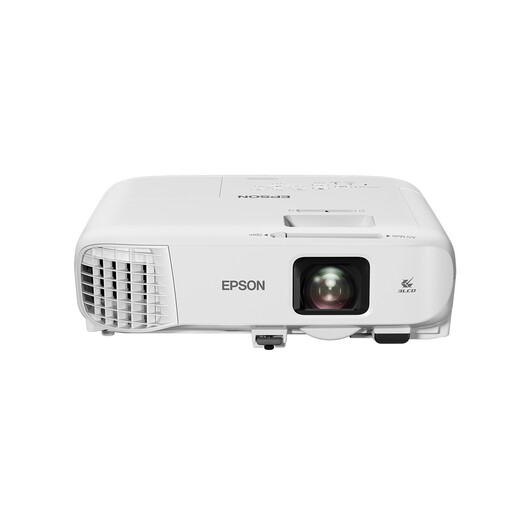
Epson EB-992F Full HD 3LCD projector

Epson EB-992F Full HD 3LCD projector

This standard-throw projector may be worth considering if you’re looking at a fixed setup and a higher stated light output.

The product listing specifies 4000 ANSI lumens, Full HD 1080p, 3LCD, 1,6× optical zoom and a built-in 16 W speaker.

Wi-Fi and Bluetooth are listed as unavailable. Bear this in mind if you want to use a wireless film source.

Joybuy

Frequently asked questions

How can I tell if the picture will work from my dining table?

Measure the available wall width and the distance from the intended lens position to the wall. Compare these with the throw ratio of the exact model: BenQ lists a ratio of 1,2 for the GV50 and states that the TH671ST can produce a picture of around 100 inches from around 1,5 metres.

Is a higher lumen rating enough to watch with the kitchen lights on?

No. A lumen rating alone can’t predict how a picture will look on your wall with the kitchen lights on. Consider the measurement standard, picture size and which lights will stay on during the film. If possible, assess the picture in those conditions.

Can I ceiling-mount the projector near the cooking area?

Assess the exact location and follow the model’s installation instructions. Epson warns that greasy smoke may damage components with certain wall or ceiling installations, potentially creating a risk of the projector falling over time. A position exposed to cooking vapour may therefore be unsuitable.

Does built-in streaming mean every classic comedy will be available?

No. A streaming platform or supported app doesn’t guarantee that a particular film is included in your subscription or catalogue. Check the title with your provider and, if it isn’t available, see whether you can connect your own permitted playback device.

What are my rights if a projector bought online isn’t suitable or breaks too soon?

For a standard online purchase, ACM ConsuWijzer says you’ll generally have a statutory cooling-off period of up to 14 days after delivery, with some exceptions. Products must also meet legal requirements under normal use. If they don’t, the seller is responsible for providing an appropriate solution free of charge.
