What should you look for?
First, check the keyboard layout and input language you use every day. Then decide which features, shape and dimensions are right for you.
| Consideration |
What should you check? |
Who should give this more weight? |
| Shortcuts and editing |
Compare the physical layout and navigation keys. Check whether any key-customisation software works with your computer. |
When rewriting chapters, I want navigation and editing keys close at hand; around 36% of consumers give easy-to-reach shortcuts top priority. |
| Key feel and hand position |
Try out the key shape and positioning where possible. Also consider your desk, screen and room to move around. |
During long typing sessions, I want to assess key feel and hand position at my own desk; around 29% of consumers put these points first. |
| Punctuation and accents |
Test the characters you use most with your intended physical layout and input language; don’t rely on the QWERTY label alone. |
If I often type em dashes or accented letters, I want to know which input method works on my system; around 21% of consumers make special characters their top priority. |
| Noise and desk space |
Check the key mechanism and keyboard width. Consider whether you regularly need a numeric keypad. |
At a shared or small desk, I want to take noise and available space into account; around 14% of consumers put these factors ahead of other considerations. |
Brands to consider
These brands illustrate different keyboard shapes and features. The details below apply to the models or product ranges mentioned, not automatically to every product from each brand.
Logitech
The MX Keys S is a conventional wireless option for anyone who wants to customise keys without choosing a split layout.
- Logitech lists programmable keys, Smart Actions via Logi Options+ and backlighting.
- Smart Actions require Logi Options+; check compatibility with your computer. The claim of quieter typing is not an independent comparison.
Keychron
The K8 Pro is a mechanical TKL model for anyone who wants to configure keys or macros themselves.
- Keychron lists key remapping via Keychron Launcher.
- Hot-swap capability depends on the exact version. Check the layout and specification before choosing a model.
CHERRY
The STREAM KEYBOARD TKL is a compact, wired model with a scissor mechanism and a familiar main key area.
- CHERRY describes the model as suitable for quiet typing.
- The model doesn’t have a numeric keypad. According to Microsoft Support, the Windows Alt codes described require one; the number row at the top won’t work for this.
R-Go Tools
The Split Break is a wired keyboard with two separately positionable halves and a US QWERTY version.
- The manufacturer says the two halves can be positioned separately and lists a break indicator.
- The manufacturer associates health benefits with the design, but results aren’t guaranteed for every writer. Try the layout at your own workstation.
Keyboards at Joybuy
This Joybuy selection features mechanical keyboards with a US layout. Compare the physical layout and test the characters you use often before choosing a model.
 Image unavailable
Ticktype DP104 Tri-Mode Wireless Mechanical Keyboard, Full-Size, US Layout
The product information mentions macro software via a dedicated driver; check that the software works with your computer and writing software.
The product title lists 108 keys, a full-size layout and tri-mode wireless connectivity.
View at Joybuy
 Image unavailable
Ajazz AK820 Pro 75% Mechanical Keyboard, QWERTY US Layout
The more compact 75% layout may be worth considering if you want to leave space beside your keyboard; check that the physical layout suits the way you type.
The product title lists a mechanical tri-mode keyboard with a US QWERTY layout.
View at Joybuy
 Image unavailable
KEYSME Lunar 01 80% Tri-Mode Mechanical Keyboard, QWERTY US Layout
The programmable knob may be useful if you want to assign an extra control; check which functions and software work with your system.
The product title lists an 80% layout, US QWERTY, hot-swappable switches and PBT keycaps.
View at Joybuy
 Image unavailable
Razer Huntsman V3 Pro Keyboard, US QWERTY Layout
The product information mentions additional key customisation via Razer Synapse; check that the software works with your computer and writing software.
The product title lists a US QWERTY layout.
View at Joybuy
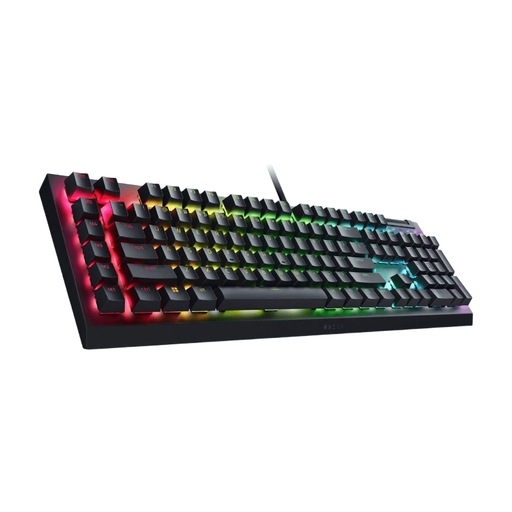 Image unavailable
Razer BlackWidow V4 X Mechanical Gaming Keyboard, Green Switch, US QWERTY Layout
Check that the physical US QWERTY layout suits the characters and shortcuts you use with your own input settings.
The product title lists a mechanical keyboard with Green Switch and a US QWERTY layout.
View at Joybuy
Frequently asked questions
Do I need a programmable keyboard for shortcuts?
No, you don’t: apps can have their own key combinations. First, try the shortcuts you already use in your word processor. Programmable keys are most useful if you want to customise recurring actions.
How do you set up a keyboard for special characters?
First, check the physical keyboard layout and selected input language. Windows includes a symbols panel, among other options; the Alt codes described by Microsoft require a numeric keypad. On a Mac, the app, language and keyboard layout can affect which combinations are available.
Should you use a split keyboard to prevent discomfort?
No, a split keyboard won’t automatically prevent discomfort. Check whether it feels comfortable on your desk and take regular breaks from screen work; a keyboard is no substitute for a suitable workstation or breaks. The health benefits described by R-Go Tools are manufacturer claims.
What if a keyboard you bought online doesn’t suit you or breaks quickly?
For online consumer purchases, you generally have 14 days from delivery to change your mind, subject to legal exceptions, according to ACM ConsuWijzer. This is separate from your rights if a product doesn’t meet the standard you could reasonably expect under normal use; if there’s a fault, contact the seller to arrange an appropriate solution.
What product rules apply to an electronic keyboard in the Netherlands?
Electrical and electronic equipment placed on the market in the Netherlands must meet the applicable European requirements and carry the required CE marking, according to the Dutch Authority for Digital Infrastructure. Check the marking on the specific model; its brand or model name alone doesn’t show that it meets these requirements.


