Start with a layout that makes your usual shortcuts and symbols easy to find. Then decide whether hand position, desk space or a familiar typing feel matters most to you. A split keyboard has a different layout and may take some getting used to; a compact or conventional keyboard may fit your existing workflow better. Consider the setup alongside the rest of your workspace, too.
Which keyboard is right for you?
Home worker who types for long periods
If you type a lot, you may want to consider the position of your hands and forearms, as well as the layout of your entire workspace. Arboportaal points out that screen-based work can involve repetitive hand movements and static strain.
Database designer who uses keyboard shortcuts
If you use the same functions frequently, check whether the physical keys and any programmable features work with your software. Logitech describes programmable features for the MX Keys S.
Home worker with limited desk space
If you want to keep space free beside your keyboard, weigh up a compact layout against the convenience of a dedicated number pad. Logitech lists the MX Keys Mini as a compact model, while CHERRY specifies that the KC 6000 SLIM is a 440 mm-wide full-size keyboard.
What should you look for when choosing?
Split ergonomic keyboard
Suitable for: anyone who wants to consider hand and forearm position during long typing sessions.
Bear in mind: an unfamiliar layout may take some getting used to; the intended posture benefits are no guarantee of a particular outcome for you.
Conventional full-size keyboard
Suitable for: anyone who wants a familiar layout and a dedicated number pad, for example for entering figures.
Bear in mind: a full-size keyboard takes up more width; also check the connection required and compatibility with your device.
Compact keyboard
Suitable for: anyone who values desk space more than a dedicated number pad.
Bear in mind: check that the layout includes the keys you need for database work.
| What to consider |
What to look for |
Who is this important for? |
| Hand position and workspace |
Compare the layout and dimensions; also consider the position of your mouse, arms and keyboard. |
If I type for long periods, I want a layout that suits my workspace and lets me take my posture into account. Around 40% of consumers prioritise hand position when typing for long periods. |
| Keys and shortcuts |
Check the physical layout, important keys and any software requirements for programmable features. |
For database work, I want easy access to the symbols and functions I use often. Around 30% of consumers prioritise key layout and shortcuts. |
| Desk space and number entry |
Measure the available width and decide whether you need a dedicated number pad. |
If my desk space is limited, I want to make the most of it without choosing a number pad I don't need. Around 20% of consumers prioritise desk space. |
| Connection and typing noise |
Check the available port and operating system; don't judge noise solely by product terminology. |
At a permanent home workstation, I want to know whether the connection is suitable and whether the typing feel works for my environment. Around 10% of consumers prioritise the connection or typing noise. |
Common buying mistakes
-
Assuming an ergonomic label guarantees you won't experience discomfort
The layout of your whole workspace and taking breaks from screen work still matter. A product claim about posture is no proof of a particular health outcome for you.
Choose a shape that suits your workspace and vary your posture. If you develop symptoms, consider discussing them with an occupational health doctor.
-
Assuming versions with the same model name have the same layout
Key positions and the physical layout can determine whether a keyboard suits your software and way of working.
Before buying, check the full model name, an image of the keys, the layout and compatibility with your device.
-
Choosing a compact or wired keyboard without checking your workspace
Compact may mean there's no dedicated number pad. According to CHERRY, the KC 6000 SLIM requires USB-A and Windows.
Measure your desk and check your ports, operating system and need to enter figures. If you need a number pad, you may need a separate one.
Brands to compare
Logitech
The MX Keys S, compact MX Keys Mini and split ERGO K860 offer different layouts to compare.
- Logitech describes programmable features for the MX Keys S and a split design for the ERGO K860.
- Claims about noise, comfort or posture come from the manufacturer; check the model version and compatibility, and allow time to get used to it.
CHERRY
The KC 6000 SLIM is a wired, full-size alternative for a permanent workstation.
- CHERRY specifies scissor keys and a width of 440 mm.
- According to CHERRY, USB-A and Windows are required; check that they suit your computer and working environment.
Microsoft
The Microsoft Ergonomic Keyboard is worth considering if you're looking for an ergonomic layout and a USB connection.
- Microsoft confirms that this model is a USB keyboard and provides instructions for use and shortcuts.
- The available product information does not support a comparison of comfort or availability with other models.
Keyboards at Joybuy
This selection includes keyboards with number-entry or programmable features, as well as compact models for smaller workspaces. Check that the layout of the version you choose suits your database work.
 No image available
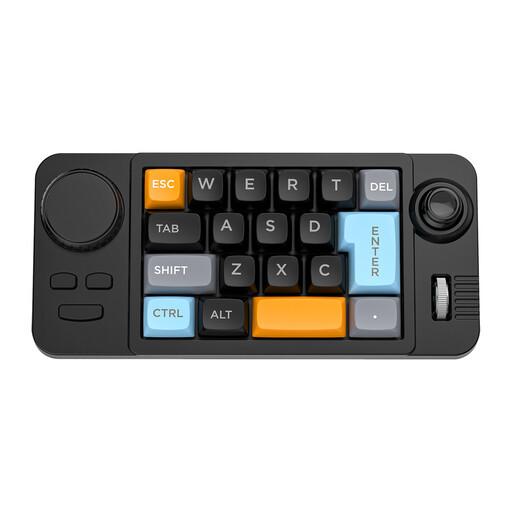
NAXSIR 19-key Wired Gaming Keyboard
Could be a good fit if you're looking for programmable features, but check whether a 19-key version has everything you need for database work.
Wired; hot-swappable; macro-programmable, with joystick, rotary knob and RGB lighting.
View at Joybuy
 No image available
KEYSME Lunar 01 80% Tri-Mode Mechanical Keyboard, QWERTY US, White
The compact 80% layout could be a good fit if you want to free up desk space; check that QWERTY US suits the way you use your keyboard.
Tri-mode connectivity; hot-swappable switches; PBT keycaps; programmable rotary knob; 4000mAh battery.
View at Joybuy
 No image available
Apple Magic Keyboard Universal USB + Bluetooth, QWERTY Dutch, Black
Could be a good fit if you want a number pad and navigation keys; check that the connection and layout are right for your computer.
QWERTY Dutch; USB and Bluetooth; rechargeable battery; scissor mechanism; number pad and navigation keys.
View at Joybuy
 No image available
Apple Magic Keyboard with Touch ID for Mac models with Apple silicon, Dutch
Could be a good fit if you're looking for a compact layout; before buying, check that your Mac meets the compatibility requirements listed.
Tenkeyless; QWERTY Dutch; Bluetooth; rechargeable battery. According to the product title, Touch ID is intended for Mac models with Apple silicon; the product description specifies macOS 11.4 or later.
View at Joybuy
 No image available
Siukie CR108 108Keys Detachable Switch Wired Mechanical Keyboard
Could be a good fit if you're looking for a full-size layout with a number pad for entering figures.
108 keys; wired USB connection; hot-swappable switches.
View at Joybuy
Frequently asked questions
If I work on a laptop from home for long periods, should I use a separate keyboard?
According to Arboportaal, for employees who spend more than two hours a day working at a screen, the screen and keyboard must not be attached to each other. Laptop users must be able to use a separate screen or keyboard. This requirement applies to employees' workstations; if necessary, discuss your setup with your employer.
How should I set up my keyboard for long working sessions?
Consider the position of your keyboard alongside your chair, screen and mouse, and take regular breaks from screen work. Arboportaal recommends changing your posture regularly and taking short breaks; a different keyboard is no substitute for these measures.
What if I don't like the typing feel or layout after buying online?
According to ACM ConsuWijzer, online consumer purchases generally come with a statutory cooling-off period of up to 14 days after delivery. Check which exceptions and return conditions apply. The cooling-off period is separate from your statutory guarantee rights if a product is faulty.
Is the statutory guarantee on a keyboard always limited to two years?
No. ACM ConsuWijzer states that the law does not set a fixed duration for the statutory guarantee; what matters is what you can reasonably expect from the product. If a product develops a fault through normal use, contact the seller.


