Buying priorities
The physical key markings and the input settings on your computer are two separate choices. Test the languages and characters you need for code and portal text before choosing a model.
| What to consider |
What should you look for? |
Who is this important for? |
| Multilingual characters |
Check the physical keyboard layout and test your computer’s input sources with the languages and characters you use. |
If I write portal text in several languages, I want to enter the accents and characters I need without guesswork. Around 36% of consumers put multilingual characters first. |
| Programming characters and actions |
Compare the position of frequently used symbols and check whether the model supports key remapping or suitable configuration software. |
When coding, I want to type symbols quickly and, if useful, customise recurring actions. Around 29% of consumers prioritise coding and shortcuts. |
| Hand position during long sessions |
If you’re considering a split model, try positioning both halves at your own workstation. Also consider the layout of the rest of your workspace. |
If I spend a long time at the computer, I want to assess what positioning works for my desk. Around 21% of consumers put hand position first. |
| Connecting to a permanent workstation |
Check which USB connection you need, and weigh up a full-size keyboard with a number pad against the space available on your desk. |
For a desktop computer, I’d prefer a simple connection over features I don’t need. Around 14% of consumers prioritise simplicity at a permanent workstation. |
Joybuy keyboards for coding and multilingual input
This selection includes keyboards for coding and recurring actions, with compact layouts and different connection options, as well as a 104-key model. Set your preferred language and input layout on your computer too, and check that the physical key markings suit the characters you use.
 Image unavailable
Corsair K70 PRO TKL Magnetic-Mechanical, US QWERTY, MGX v2
A good fit if you want to set up reprogrammable keys and macros for coding.
US QWERTY layout; TKL format; the description lists Corsair iCUE and a detachable wrist rest.
View at Joybuy
 Image unavailable
Turtle Beach Vulcan TKL, AZERTY, Linear Titan Switch
A compact option if you’re looking for an AZERTY layout and want to set up macros.
TKL format; wired with USB-C; RGB; macros via Turtle Beach Swarm software.
View at Joybuy
 Image unavailable
AJAZZ AK820 Pro 75%, US QWERTY, tri-mode
A good fit if a compact layout and the ability to switch between devices matter to you.
75% layout with 82 keys; US QWERTY; USB-C, Bluetooth and 2.4 GHz; connects to up to three devices; TFT screen.
View at Joybuy
 Image unavailable
AJAZZ AK820 75% wired, US QWERTY
A wired option if you’re looking for a compact US QWERTY layout.
75% layout with 83 keys; USB-C; hot-swappable linear switches; volume knob and adjustable stand.
View at Joybuy
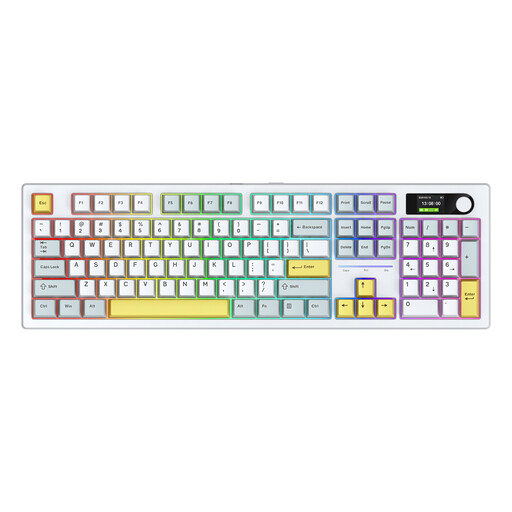 Image unavailable
Siukie ACH105, 104 keys, tri-mode, RGB
An option if you want to compare a full set of keys with several connection options.
Mechanical keyboard with 104 keys and colour screen; wired via USB-C, Bluetooth and 2.4 GHz.
View at Joybuy
Frequently asked questions
Do I need a special multilingual keyboard for portal text in several languages?
Not necessarily. Windows lets you add and switch between keyboard layouts. On a Mac, you can add input sources and switch between languages. Also check that the key markings and physical key positions on your chosen model suit your coding work.
How do I set up a new keyboard for coding and translations?
Set up your preferred keyboard layouts in Windows or add your preferred input sources on a Mac, then test the programming and language-specific characters you actually use. If you want to use model-specific macros or Smart Actions, check what configuration options you’ll need for those too.
What should I consider when working at a computer for long periods?
A split model gives you different positioning options, but consider your whole workstation and vary your tasks. Arboportaal outlines specific workplace requirements for employees who work at a screen for more than two hours a day; this condition isn’t a general buying threshold for every reader.
What are my rights if a keyboard bought online isn’t suitable or breaks too soon?
For online consumer purchases, you generally have a cooling-off period of up to 14 days after delivery, subject to statutory exceptions. ACM ConsuWijzer also explains the legal guarantee: if a product used normally doesn’t do what you were entitled to expect, the retailer is your point of contact. These rights are separate from any manufacturer’s guarantee.
Which safety rules apply to a wireless keyboard in the Netherlands?
For a keyboard with Bluetooth or another radio module, Dutch government information refers to the Radio Equipment Directive. This alone doesn’t mean that a particular model meets all applicable requirements; check the product information for the model you’re considering.


