
Vandaag of morgen in huis

Kwaliteit gegarandeerd

Welkomstaanbiedingen ontgrendelen: GRATIS bezorging | Tot 80% korting | Gratis 30 dagen JoyPlus-proefperiode
Download de app
A keyboard may seem like a straightforward purchase, until you find yourself using the wrong keys every day. An unsuitable layout, a missing number row or a wireless connection that is incompatible with your device may only become apparent once you start using it. So if you want to buy a keyboard, it pays to look beyond colour, brand and vague marketing claims.
In this buying guide, the Joybuy Product Recommendation Officer explains the key differences between a wireless keyboard, USB model, mechanical keyboard and keyboard for Mac, Windows or tablet. The recommendations are based on verifiable product specifications.
QWERTY, AZERTY and QWERTZ are not interchangeable. QWERTY is common in the Netherlands, but some models have a US International QWERTY layout. With this layout, punctuation and special characters may work differently from what you are used to.
An AZERTY keyboard may be suitable for users who work with a Belgian or French layout. So always check:
A wireless keyboard can work via Bluetooth or a 2.4GHz USB receiver. Bluetooth does not require a free USB port, but your device must support Bluetooth. An RF model will usually use a USB port.
Also consider power consumption. Some models use standard batteries, while others have a built-in rechargeable battery with a USB-C connection. A built-in battery is convenient, but it does need regular charging. With a model that uses a USB receiver, check whether your laptop only has USB-C ports; you may need an adapter.
RGB lighting, programmable keys and a mechanical feel may sound appealing, but they are not useful for every user. For example, a gaming keyboard with a compact layout may not have a numeric keypad. For spreadsheets, bookkeeping or data entry, a keyboard with a numeric keypad is more practical.
“Mechanical feeling” is also not the same as mechanical switches. According to the product information, the MageGee TS91 uses membrane keys with a mechanical feel. If you are looking for genuine mechanical keys, check the switch technology and model type carefully.
A USB keyboard is usually simple: plug it in and start typing. The Acer USB Wired Keyboard has a 1.45-metre cable and is described as plug-and-play for Windows. A wired model does not need batteries and is ideal for a permanent workstation.
A Bluetooth keyboard is more flexible for laptops, tablets and some smartphones. The Trust Vaiya supports Bluetooth for three devices and can also connect via a USB receiver. This makes it possible to switch between, for example, a laptop and a tablet. However, check that your operating system is supported.
The choice between full-size, tenkeyless and compact determines how much desk space you use. A full-size keyboard generally has a separate numeric section. A compact keyboard often leaves this out to save space.
For a home office, a quiet, low-profile keyboard is comfortable in shared spaces. Mechanical models may provide more tactile feedback, but noise levels vary considerably between switches.
A keyboard for Windows will not automatically work optimally with a Mac. Check for Windows or Mac keys, the Bluetooth version and the system requirements. According to the product details, the Apple Magic Keyboard with Touch ID is intended for Macs with Apple Silicon and a compatible version of macOS. Touch ID is therefore not a universal feature that works on every computer.
For a tablet keyboard, the physical connection is just as important. Microsoft Surface Pro Keyboard models use a magnetic Smart Connect connection and are linked to specific Surface Pro generations. The Apple Magic Keyboard for iPad Air uses the Smart Connector and is intended for certain iPad models. Always check your tablet’s exact model.
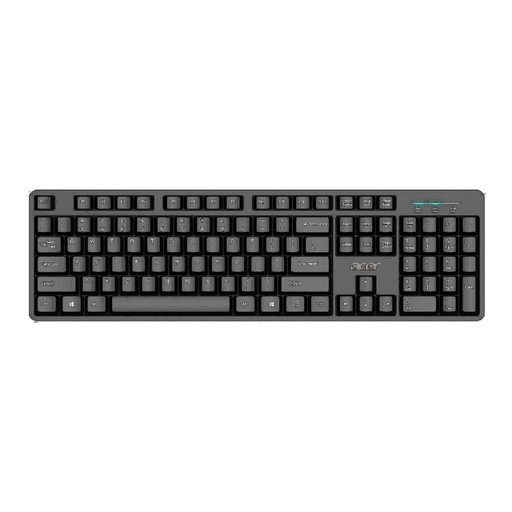
Why it suits this profile: This full-size USB keyboard is designed for everyday use at home or in the office and works without additional software when connected to an available USB port.
The wired connection eliminates battery management and connection issues. However, check that the US International layout suits your settings.
Full-size with 105 keys, a 1.45-metre cable and a water-resistant design according to the product information.
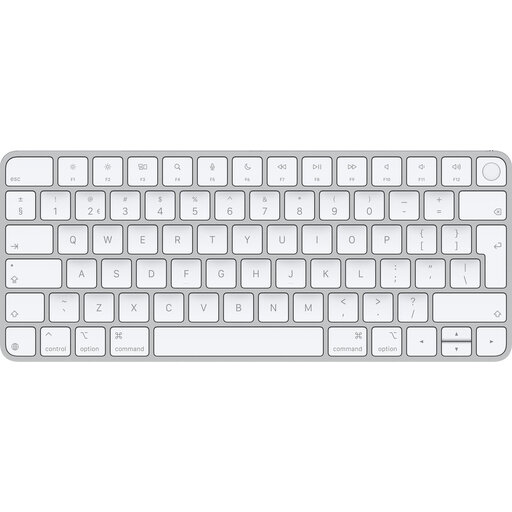
Why it suits this profile: For Mac users looking for a wireless, compact QWERTY solution with Touch ID and a rechargeable battery.
Compatibility is clearly defined: Mac with Apple Silicon and suitable macOS software. It is therefore not a universal choice for Windows.
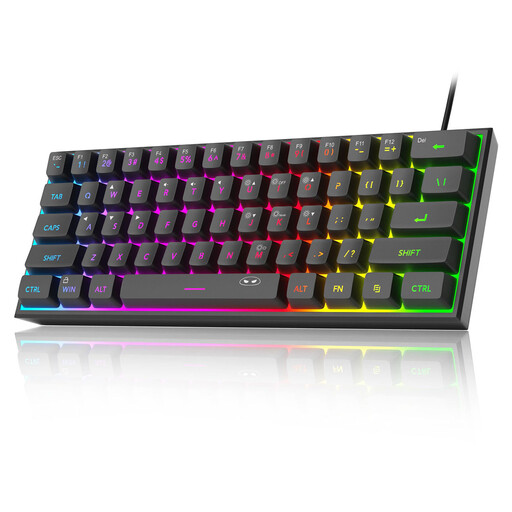
Why it suits this profile: This compact gaming keyboard is designed for users who want to keep desk space free for their mouse and appreciate RGB lighting.
The compact 60% layout makes it clear that there is no numeric keypad. The product information refers to membrane keys with a mechanical feel, not fully mechanical switches.
61 keys, USB connection, RGB lighting and a PCB rated IPX4 according to the description.
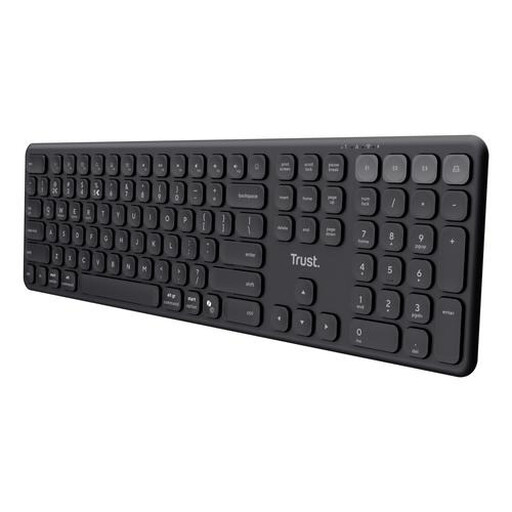
Why it suits this profile: Ideal for anyone who switches between a laptop, tablet and smartphone while still wanting to retain a full-size layout with a numeric keypad.
You are not limited to a single connection method: this model uses a USB receiver and three Bluetooth channels. However, the layout is US QWERTY.
Four paired devices, USB-C rechargeable battery and quiet scissor keys according to the product specifications.
We have put together a complete, up-to-date list of products that fully meet these strict selection criteria and the applicable European safety regulations.
For working from home, quiet key operation, a comfortable full-size layout and a reliable connection are important. Choose a keyboard with a numeric keypad if you often work with numbers. If you want to avoid cables, compare Bluetooth with a USB receiver and check how many devices you can pair.
That depends on the switches used, the build quality and how well it is maintained. Check the stated key lifespan and confirm that the model genuinely has mechanical switches. A product with “mechanical feeling” may also be a membrane model. For example, Acer states a lifespan of up to 5 million keystrokes; this is a product specification, not a guarantee of a particular service life.
A model with standard batteries will need replacement batteries from time to time. A keyboard with a built-in battery needs charging via USB-C, but does not require disposable batteries. When comparing models, look at the stated battery life, charging time and whether you can continue working while it charges. This helps prevent a low purchase price from ultimately proving less practical.
