
Writer of long chapters
If you write long passages, look for a familiar layout and a typing feel you find comfortable. Also decide whether a separate numeric keypad is worth the extra desk space.


Choose a keyboard with a layout you’re already comfortable with and keys that are easy to reach during long writing sessions. A compact model saves desk space, but doesn’t have a separate numeric keypad; a full-size model keeps one, while a split keyboard gives you more options for positioning your hands. The source window is part of your writing software: Microsoft Support explains how to navigate in Word, so there’s no need to switch between devices.
If you write long passages, look for a familiar layout and a typing feel you find comfortable. Also decide whether a separate numeric keypad is worth the extra desk space.
If you often look up names, places or passages while writing, check that the navigation keys are easy to reach. Microsoft Support describes the navigation pane and side-by-side document viewing as Word features.
If you want to adjust the position of your keyboard, mouse and hands to suit your workspace, compare a compact model with a fixed or separately split design. Logitech describes the ERGO K860 as having a curved, split frame; R-Go Tools describes the Split Break as having two separate halves.
First decide what matters most for your writing, then check the layout, connection and keys of the model you’re considering.
Ideal for: people who mainly write text and want to keep space clear beside the keyboard.
Bear in mind: there’s no separate numeric keypad; check where the navigation keys are, too.
Ideal for: people who want to keep a familiar layout or a separate numeric keypad.
Bear in mind: the wider design takes up more desk space.
Ideal for: people who want to try positioning their hands differently during long writing sessions.
Bear in mind: a fixed frame and separate halves offer different positioning options; manufacturers’ claims don’t guarantee that discomfort will be prevented or relieved.
| What to consider | What should you check? | Who is this important for? |
|---|---|---|
| Key feel and layout | Check the physical QWERTY layout, the shape of the Enter key and the typing feel. Decide whether you need a numeric keypad. | When I write for long stretches, I want a familiar layout and keys that feel comfortable to press. Around 36% of consumers are estimated to prioritise typing comfort in this context. |
| Navigating between text and sources | Check whether the model has arrow, Home and End keys, and test commands in your own writing software. A source window doesn’t, by itself, require you to switch between devices. | When looking up names and passages, I want to move easily between the source and my text. Around 29% of consumers are estimated to prioritise source navigation. |
| Space for your hands and mouse | Weigh up a compact design against not having a separate numeric keypad. For split models, compare a fixed frame with separate halves. | If I want to position my mouse and hands differently, I look at the keyboard’s size and shape. Around 21% of consumers are estimated to prioritise adapting their workspace. |
| Key noise and connection | Compare how noisy the exact model is and check that its connection suits your computer, such as a cable or USB receiver. | In a shared space, I want to consider how much noise my keyboard makes. Around 14% of consumers are estimated to prioritise quiet working. |
A source window is a feature of your writing software. Logitech describes device switching as moving between devices; that’s different from using two windows on the same computer.
First decide whether you work with multiple windows on one computer or actually type across separate devices.
The CHERRY STREAM KEYBOARD TKL doesn’t have a separate numeric keypad. The position of the navigation keys can also vary between compact models.
Check the exact layout and try the commands you use often before choosing a smaller design.
A split design gives you different positioning options, but it doesn’t prove that a model will prevent or relieve discomfort. Arboportaal also recommends paying attention to your workspace setup, varying your activities and taking breaks.
Compare the positioning options and assess the keyboard as part of your overall workspace.
The Trust Ody II is described as a standalone keyboard and also as part of a keyboard and mouse set.
Check the full product name and what’s included with the version you choose.
The range includes compact and full-size keyboards, as well as a split model, so you can compare different sizes and designs.
The wired STREAM KEYBOARD TKL is an option if you’re looking for a model without a separate numeric keypad.
The Split Break is worth considering if you want to position the two keyboard halves separately.
The Ody II is a full-size wireless keyboard with a USB receiver.
This selection includes keyboards for those who want to keep a numeric keypad, as well as compact models, including a wired option with a 75% layout.
 Image unavailable
Ideal if you want to keep a numeric keypad while writing.
 Image unavailable
A mechanical model for those who want to use a wrist rest while typing.
 Image unavailable
Ideal if you want a numeric keypad alongside the specified Touch ID version.
 Image unavailable
A compact layout to consider if you want your keyboard to take up less desk space.
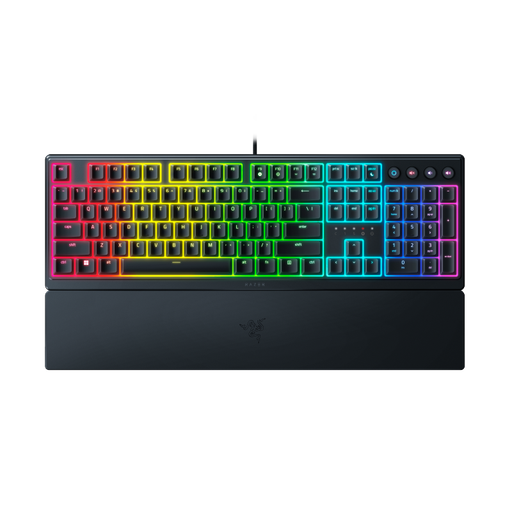 Image unavailable
Check that the US layout matches the one you want to write with.
No, a source window is a feature of your writing software. In Word for Windows, press Ctrl+F to open the navigation pane; Microsoft Support also explains how to view two documents side by side. Check the features available in your own programme and choose keys that are easy for you to reach.
A separate numeric keypad is useful if you often enter years or archive numbers and want to keep that layout. If you mainly write continuous text and want more space beside your keyboard, compare compact models and check which keys they leave out.
Not necessarily: a split design offers different positioning options, but it doesn’t guarantee that discomfort will be prevented or relieved. Compare a fixed frame with separate halves, and also consider your workspace setup, varying your activities and taking breaks; Arboportaal recommends paying attention to these factors.
According to the Dutch government, a 14-day cooling-off period applies in many cases when you buy from a business at a distance. Check who the seller is and which returns information applies; a longer voluntary returns policy is different from the statutory cooling-off period.
Pay attention to your workspace setup and vary your working posture. For employees who spend more than two hours a day working with display screens, Arboportaal sets out workplace requirements, including the option to use a separate screen or keyboard with a laptop. These employer rules aren’t general legal product specifications for every private buyer.