
Writer without a place to charge
You want to write a pitch without having to keep a plug socket free for your keyboard during the session. So compare replaceable batteries with a rechargeable battery that you can charge in advance.


When plug sockets are in short supply, a keyboard powered by replaceable batteries or a rechargeable battery that you charge in advance could be a good fit, provided the layout and connection suit your writing device. If you write for long stretches, consider the feel of the keys and how much room you need for your mouse too. If you switch between a laptop and tablet, check how many devices the specific model supports. A wired keyboard may also work if your device has a suitable spare USB port.
You want to write a pitch without having to keep a plug socket free for your keyboard during the session. So compare replaceable batteries with a rechargeable battery that you can charge in advance.
You spend a lot of time writing and editing, and want a key feel and size that suit your workspace.
For example, you switch between a laptop and tablet and want to check in advance that the connection, supported operating systems and ability to switch between devices meet your needs.
If you’re pitching without a spare plug socket, power is a good place to start. Your typing habits, devices and available desk space can then help you narrow down your options.
| What to consider | What to look for | Who should pay particular attention? |
|---|---|---|
| Power without a plug socket | Check whether the keyboard uses replaceable batteries or a rechargeable battery, and whether you can use it while it’s charging. | If I don’t want to keep a plug socket free for my keyboard while I write, I compare replaceable batteries with charging it in advance. Around 36% of consumers say power is their main concern. |
| Typing for long periods | Consider the physical layout, key spacing and size; a compact keyboard may feel different from a full-size model. | If I do a lot of writing and editing, I want a layout that feels comfortable without taking up too much desk space. Around 29% of consumers prioritise typing comfort. |
| Switching between devices | Check how many devices the model supports, which operating systems it works with, and whether you need Bluetooth or a USB receiver. | If I write my pitch on a laptop and proofread it on a tablet, I want to know whether I can connect both devices. Around 21% of consumers give switching between devices top priority. |
| Space and key layout | Measure the space available beside your notes and mouse, and check the model’s physical keyboard layout rather than relying on the product name alone. | If my desk is short on space or I need familiar punctuation keys, I want to check the size and layout supplied in advance. Around 14% of consumers look at this first. |
A keyboard with replaceable batteries will eventually need new ones; a model with a rechargeable battery will need charging. Logitech says the Pebble Keys 2 K380s uses two replaceable AAA batteries. Trust says you can use the Lyra while it’s charging.
Before you buy, decide which power option suits the time you have available to charge, and check what’s included with the specific model.
RTINGS says the Logitech Pebble Keys 2 K380s doesn’t come with a Logi Bolt receiver. If your device doesn’t have a suitable Bluetooth connection, this could affect how you connect the keyboard.
Check what’s included with the exact model and make sure your device supports Bluetooth before relying on a receiver.
If you need a receiver, check whether a compatible one is included or available separately.
The physical key layout can vary between models. An unfamiliar layout may affect where you find punctuation and shortcut keys while writing.
Compare the stated layout with clear product photos and check which version you’ll receive.
The Pebble Keys 2 K380s is a compact Bluetooth option powered by replaceable batteries, while the MX Keys S is a separate rechargeable, full-size model.
The Lyra is a compact, rechargeable range with Bluetooth and a USB receiver; Vaiya is a separate full-size range for use with multiple devices.
The KW 9100 SLIM is a full-size option with a rechargeable battery and a choice of Bluetooth or a 2.4 GHz receiver.
These keyboards are designed for wireless writing and use either replaceable batteries or a rechargeable battery. For each model, check that the layout and connection suit your devices and workspace.
 No image available
This compact, rechargeable model is an option if you don’t want to use a plug socket for your keyboard while you write.
The set includes a keyboard and mouse. It connects via Bluetooth or a USB receiver, and the product information says you can switch between up to three devices. The battery needs charging, and there’s no separate numeric keypad.
 No image available
The full-size layout with numeric keypad may suit you if you regularly enter numbers as well as text and have enough desk space.
This battery-powered model connects via a USB receiver, so your device needs a suitable USB port. The product name describes it as having quiet keys and a spill-resistant design.
 No image available
This rechargeable, full-size model is worth considering if you want a numeric keypad and have room for a larger keyboard.
Trust says the Vaiya range supports up to four devices. According to the product information, this model has scissor keys and a numeric keypad. The battery needs charging.
 No image available
The 75% layout is a compact option if you want to free up desk space; check that the layout suits the way you type.
The product information lists three connection modes: wired, Bluetooth and 2.4G, as well as a 4,000 mAh battery. The battery needs charging.
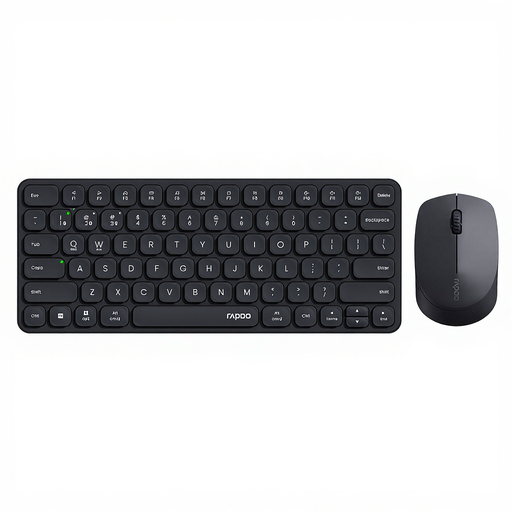 No image available
This battery-powered keyboard and mouse set may suit you if you don’t want to use a plug socket for your keyboard while typing.
The product information lists Bluetooth and 2.4 GHz via a USB receiver, and connection to up to four devices. The keyboard and mouse use batteries; if you use the receiver, check that your device has a suitable USB port.
No. A wired keyboard may also suit you if your device has a suitable spare USB port. A model with replaceable batteries doesn’t need charging while you write, whereas a model with a rechargeable battery needs to be charged in good time. Check the connection and power type for the specific model.
It depends on the keyboard and your devices. Logitech says the Pebble Keys 2 K380s can switch between three compatible devices; Trust says the Lyra has two Bluetooth connections and a USB receiver. Also check the supported operating systems and connections for the model you choose.
Take loose used household batteries to a collection point, such as a shop or supermarket that sells batteries. Don’t put them in your general waste. For a built-in battery, follow the instructions for the device.
For a typical online consumer purchase, you usually have a 14-day cooling-off period after delivery, subject to legal exceptions. This is separate from a fault: if the product breaks too soon under normal use, the seller must put it right for you free of charge under the statutory guarantee.
Radio equipment must meet European requirements. The Netherlands Authority for Digital Infrastructure says the CE marking must appear on the equipment. Check the product for the marking and follow the instructions for use.