For long-form writing, a familiar physical layout with easy-to-reach navigation keys is a sensible place to start. Then choose between a straight, compact or split model based on your workspace. You don’t need a special keyboard for offline references, but do check that its connection is compatible with your computer and whether any extra features you want require software. A keyboard lets you enter text, but it doesn’t store or manage your references.
Who is this relevant to?
Handbook writer who does a lot of editing
You write long chapters and want to move easily between text, headings and source references. CHERRY and Keychron describe models with different physical layouts and navigation options; check which version suits your habits.
Writer with a long-term desk setup
You want to consider keyboard shape, mouse space and posture together during long typing sessions. Arboportaal describes repetitive hand movements and static strain during screen work; an ergonomic model is no guarantee of fewer aches and pains.
Writer with offline references in several locations
You move between writing spaces or devices and want a connection and format that work with your computer. Logitech describes how the Pebble Keys 2 K380s switches between paired devices; extra features that depend on software are a separate consideration.
What should you look for when choosing?
First, compare the physical layout with the keys you use regularly when writing and editing. Then decide how much desk space you have and which connection you need.
| What to consider |
What to look for |
Who it matters most to |
| Layout and navigation |
Compare the physical layout of the exact version with the input language on your computer. CHERRY describes the KC 6000 SLIM as a full-size keyboard, 440 mm wide; Keychron describes the K8 Pro as an ANSI tenkeyless model. |
When I’m editing lots of chapters, I want punctuation and navigation keys to be where I expect them. Around 33% of consumers put layout and navigation first. |
| Typing without an internet connection |
Check which USB connection or wireless option is compatible with your computer. CHERRY lists USB-A for the KC 6000 SLIM; Keychron lists USB-C and Bluetooth for the K8 Pro. Remapping keys through Keychron’s web app is a separate feature. |
When I’m consulting offline references alongside my document, I want to be able to type without relying on extra software features. Around 27% of consumers put reliable typing without an internet connection at the top of their list. |
| Hand position and workspace |
Consider the position of your keyboard, mouse and screen together. Logitech describes the ERGO K860 as split; R-Go also describes the Split Break, which has two separately positioned sections. If possible, try the shape to see whether it suits your workspace. |
During long typing sessions, I want to consider my hand position and workspace setup together, without treating an ergonomic label as a promise. Around 27% of consumers prioritise hand position and workspace. |
| Portability and shared spaces |
Check the size, layout and connection of the exact version. Logitech says the Pebble Keys 2 K380s can switch between three paired devices; also check whether the physical key positions suit the way you work. |
When I write in different places or share a space, I look for a compact size and a layout that lets me work comfortably. Around 13% of consumers give portability or a shared workspace top priority. |
Common mistakes
-
Assuming a slim-looking model will automatically save space
CHERRY describes the KC 6000 SLIM as a full-size keyboard, 440 mm wide. So the name alone doesn’t tell you how much room you’ll have left for your mouse or papers.
Measure the available desk width and decide whether you need an integrated number pad.
-
Confusing software features with ordinary offline typing
Logitech lists Logi Options+ for Smart Actions on the MX Keys S. R-Go says the Break LED is controlled by Break software. These extra features are separate from basic typing.
Check in advance which software you need for the feature you want, and set it up before working offline if necessary.
-
Expecting an ergonomic label to make aches and pains disappear
Arboportaal describes repetitive hand movements and static strain during screen work. Comfort claims for split models come from the manufacturers and don’t prove that they’ll have the same effect for every user.
Consider your keyboard, mouse, chair, screen and variation in your work together. If necessary, get existing symptoms assessed.
-
Assuming a different regional layout is the same version
CHERRY offers a Mac version of the KC 6000 SLIM; Keychron lists an ANSI layout for the K8 Pro. R-Go lists several regional layouts.
For the specific version, check the full model name, physical layout, connection and whether you might need an adapter.
Brands to consider
Logitech
The models described range from the compact Pebble Keys 2 K380s to the split ERGO K860 and the backlit MX Keys S.
- Logitech says the K380s can switch between three paired devices. Smart Actions on the MX Keys S work through the Logi Options+ app, according to Logitech.
- The comfort claims for the ERGO K860 are the manufacturer’s own and don’t mean that the model will prevent discomfort for every writer.
CHERRY
The KC 6000 SLIM and KC 6000 SLIM FOR MAC are separate versions for different computer layouts.
- CHERRY lists a full-size layout, USB-A and a width of 440 mm for the Windows version.
- Check the physical layout and whether your computer supports the connection; the Mac version is a separate model.
Keychron
Keychron describes the K8 Pro as a mechanical tenkeyless model with an ANSI layout.
- Keychron lists USB-C, Bluetooth and configurable keys for this model.
- Keychron says keys are remapped through a web app. Check the layout and your preferred configuration before working entirely offline.
R-Go Tools
R-Go describes both the Compact Break and Split Break, with different shapes and setups.
- According to the manufacturer, the two sections of the Split Break can be positioned separately.
- R-Go says the Break LED is controlled by Break software. The shape alone doesn’t prove a health benefit for you personally.
Kensington
Kensington describes, among other models, the curved KB675 EQ TKL and a separate split wireless model.
- For the KB675, Kensington lists two Bluetooth connections, a USB-A receiver and support for Windows and macOS.
- Check the physical layout and computer compatibility for the exact version; comfort claims come from the manufacturer.
Keyboards at Joybuy
This selection includes keyboards for writing and editing, with compact and full-size layouts and both wired and wireless options.
 No image available
Turtle Beach Vulcan Mechanical Gaming Keyboard, Linear Titan Switch, TKL, AZERTY-BE, Black
A compact wired option to compare with your desk setup. The product name lists linear TITAN switches, USB-C, RGB, TKL and AZERTY-BE.
Check the physical AZERTY-BE layout if you’re used to different key positions.
View at Joybuy
 No image available
Wired Keyboard with Numeric Keypad, QWERTY, Full-size, Black
An option to compare if you’re looking for a full-size layout and a numeric keypad. The product name lists QWERTY and plug-and-play.
Check that the physical layout matches the input language on your computer.
View at Joybuy
 No image available
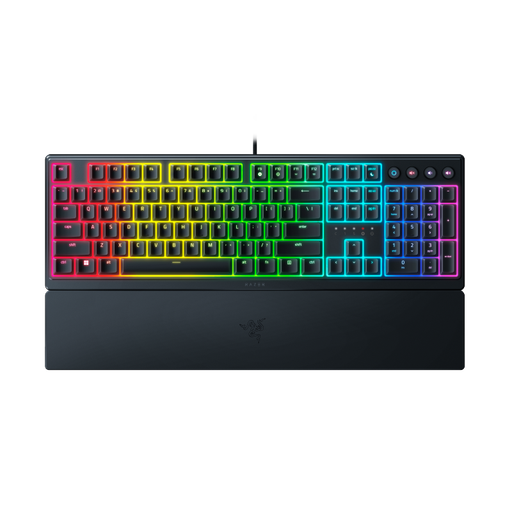
Razer Ornata V3 Low Profile Gaming Keyboard, US Layout
The product name lists a low-profile design and a US layout. Check that those physical key positions suit the layout you normally use.
View at Joybuy
 No image available
Apple Magic Keyboard Universal, USB + Bluetooth, QWERTY Dutch, Black
A version listed as Dutch QWERTY to compare with your writing habits. The product name lists USB and Bluetooth.
Check that the connection and physical layout suit your computer and input language.
View at Joybuy
 No image available
Apple Magic Keyboard with Touch ID, Dutch, for Mac models with Apple Silicon
A Dutch version to consider if your Mac meets the compatibility description in the product name. The product name lists Touch ID.
Before buying, check that your Mac model meets this requirement.
View at Joybuy
Frequently asked questions
Do I need a special keyboard for offline references?
No. Your keyboard is an input device, not where your references are stored. Do check that the USB or Bluetooth connection works with your computer. Macros or a break reminder may need separate software; R-Go says the Break LED is controlled by Break software.
How do I choose a layout for editing Dutch text?
First, compare the physical layout of the exact version with the input language on your computer. Then test the punctuation and navigation keys you use regularly. CHERRY describes the KC 6000 SLIM and the Mac version as separate models; Keychron lists an ANSI layout for the K8 Pro.
Should someone who writes on a laptop for long periods use a separate keyboard?
Arboportaal states that for an employee who spends more than two hours a day working with a screen, the screen and keyboard must not be attached to one another. This is a requirement for the work situation described, not a general buying requirement for every home writer. Arboportaal also recommends alternating screen work with other tasks.
What can I do if the keyboard isn’t suitable or breaks?
According to the Dutch government, many distance purchases come with a 14-day cooling-off period, although there are exceptions. There is no fixed statutory guarantee period in the Netherlands, but you’re entitled to a product that works properly and can contact the seller if there’s a fault. Also check the terms of the specific offer.


