
Writer at a shared desk
You write a lot of text close to other people and mainly want a quiet keystroke and a familiar layout. Quiet typing is a practical need here; statements about sound from CHERRY and Logitech are manufacturer claims.


For this library guide, start by choosing a keyboard that suits your workspace and computer. At a shared desk, a quiet keystroke and familiar layout may matter more than extra features. A wired model may suit a fixed workstation, customisable keys can help with repeated tasks in approved software, and a split design may work well if you can position it comfortably. CHERRY, Logitech, R-Go Tools and Kensington describe features of their own models; these are not independent sound or comfort measurements.
You write a lot of text close to other people and mainly want a quiet keystroke and a familiar layout. Quiet typing is a practical need here; statements about sound from CHERRY and Logitech are manufacturer claims.
You switch between text and reference images and want to know which keyboard shortcuts work with your computer and software. Microsoft Support explains the Windows shortcut for Snipping Tool; Logitech mentions Smart Actions via Logi Options+.
You want to position your keyboard, hands and mouse to suit your workspace, and are open to a compact or split model. Arboportaal describes repetitive tasks when working with screens; R-Go Tools and Kensington offer keyboards in different shapes.
First decide what matters most at your desk: quiet typing, working with images, positioning your equipment, or choosing the right layout and connection.
| What to consider | What to look for when buying | Who should pay particular attention? |
|---|---|---|
| Quiet typing | Compare the keystroke in your own working environment and check the exact version; a description such as ‘quiet’ is not a sound measurement. | If I work close to other people, I mainly want to type quietly. Around 33% of consumers prioritise quietness as their main reason for buying. |
| Text and reference images | Check that the keyboard shortcuts suit your operating system and software, and that you’re allowed to install any accompanying utilities. | When creating a guide, I want to switch easily between text and reference images. Around 25% of consumers give image-related features and shortcuts top priority. |
| Positioning and comfort | Consider desk space, hand size, mouse position and how long you might need to get used to a different shape. | If I type for long periods, I want to position my keyboard, hands and mouse comfortably. Around 25% of consumers put posture and positioning first. Arboportaal describes repetitive tasks and static strain when working with screens; a keyboard’s shape does not prove a health outcome. |
| Layout and connection | Check the layout and connection of the exact version, and whether you need a number pad. According to CHERRY, the CHERRY STREAM TKL has no number pad; the R-Go Split Break v.2 is available in wired and wireless versions. | I want a layout and connection that suit my computer and typing habits. Around 17% of consumers name this combination as their main buying priority. |
CHERRY and Logitech describe the sound characteristics of their own keyboards, but these manufacturer claims do not provide a basis for objectively ranking models by noise level.
Treat the description as something to consider and, if possible, try the keystroke and sound in your own working environment.
Microsoft Support notes that on Windows, you can also open Snipping Tool by pressing Windows key + Shift + S. So a dedicated key isn’t always necessary.
First check your operating system and the shortcuts you already use. Choose extra keys only if they improve the way you work.
Kensington lists people with medium to large hands as the target users for the Pro Fit Ergo Wireless. According to its manual, the R-Go Split Break v.2 is available in wired and wireless versions.
Check the fit, available space, keyboard layout and connection of the exact version before you choose.
The STREAM range includes a standard wired model and a TKL version without a number pad.
The MX Keys S is worth considering if you want to use customisable keys for repeated tasks involving your document.
The Split Break v.2 is designed for people who want to position the two keyboard halves separately.
The Pro Fit Ergo Wireless has a sloped, split design with an integrated wrist rest.
According to Microsoft, the Surface Keyboard (2nd Edition) combines a number pad with dedicated function keys.
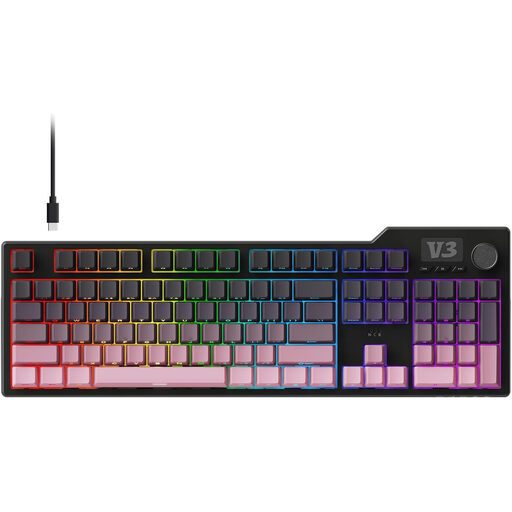
The Joybuy products below are keyboards for writing, with full-size and more compact options.
 No image available
A full-size mechanical keyboard may suit you if you’re looking for a full-size model. Check this model’s QWERTZ layout before ordering.
 No image available
This wireless full-size model may suit you if you want a number pad and quiet typing is important to you. The product name describes its keys as quiet; this is not a comparative sound measurement. The layout is QWERTY US.
 No image available
This full-size model may suit you if you’re looking for a number pad and a multi-device keyboard. The product name lists scissor keys and a QWERTY US layout.
 No image available
The 75% model may suit you if you’re looking for a more compact design. The product name lists tri-mode connectivity and QWERTY US; check that the layout and connection options work with your computer.
 No image available
The compact 60% model with 61 keys may suit you if desk space is limited. The product name lists a wired connection and QWERTY US layout.
No, not on a compatible Windows computer: Microsoft Support lists Windows key + Shift + S as the shortcut for opening Snipping Tool. Check the instructions for other operating systems and software.
First check which connections your computer supports, then look at the specifications for the exact version. The CHERRY STREAM KEYBOARD is wired; the R-Go Split Break v.2 is available in wired and wireless versions according to its manual; and Microsoft lists Bluetooth for the Surface Keyboard (2nd Edition).
Position your keyboard and the rest of your workspace to suit your work, and vary your tasks. Arboportaal describes repetitive tasks and static strain when working with screens; an ergonomic product design does not guarantee that it will prevent discomfort.
Arboportaal does not name a required brand or specific model. According to Arboportaal, for employees who work with screens for more than 2 hours a day, the screen and keyboard must not be attached to each other; laptop users must be able to use a separate screen or keyboard. Whether this employment requirement applies depends on your working arrangement and hours.
For a Dutch consumer purchase made remotely, ACM ConsuWijzer says you will generally have up to 14 days after delivery to change your mind, subject to exceptions that you should check in advance. If a product breaks sooner than you could reasonably expect under normal use, you can also ask the seller to put things right. These consumer rules do not necessarily apply to a business purchase made by a library.