What should you look for when choosing?
First, try out heading styles and navigation in your word processor. Then decide which keyboard features matter most for your workspace and check the exact model variant.
| Buying concern |
What should you check? |
Who is this important to? |
| Headings and revisions |
Try Heading 1 and Heading 2, then check whether you can move through your headings using the Navigation pane. Only then consider whether programmable keys would help with repetitive tasks. |
If I want to reorganise chapters and subheadings, my document structure needs to work well in my word processor. Around 36% of consumers prioritise that structure and revising headings when choosing a keyboard. |
| Long typing sessions |
Compare the shape and layout with your workspace, and try an alternative layout if possible. Don’t treat a keyboard’s shape as a way to treat discomfort. |
For long writing sessions, I want to choose a shape and posture that suit my workspace, without assuming they’ll have a particular effect. Around 29% of consumers prioritise comfortable typing over long periods. |
| Noise and space |
Check whether you need a number pad and what physical layout the model on offer has. Manufacturers’ descriptions of key noise aren’t independent sound measurements. |
In a shared workspace, I pay attention to noise and want enough space beside my keyboard. Around 21% of consumers put quiet operation and desk space first. |
| Switching between devices |
Check which connections and operating systems the exact model supports, as well as its physical keyboard layout. |
If I write on different devices or in different places, I want to know whether the connection and layout suit the way I use it. Around 14% of consumers prioritise switching between devices or workspaces. |
Keyboards on Joybuy
This selection of Joybuy keyboards includes options for writing long texts, with a range of layouts, sizes and connection types. Check each model to make sure its physical layout and features suit the way you write.
 No image available
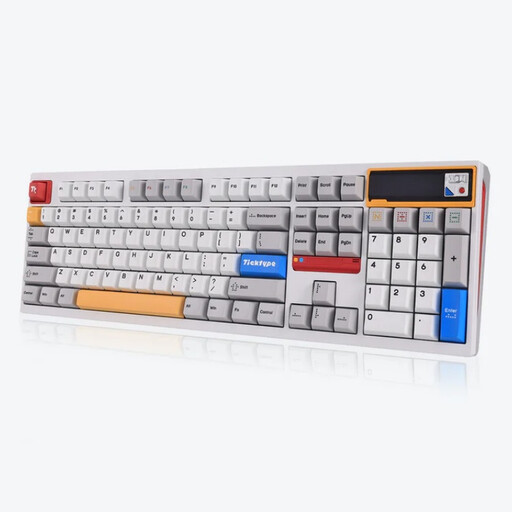
Ticktype DP104 Custom Tri-Mode, US layout, powder white
An option if you’re looking for a full-size keyboard with several connection options.
Mechanical keyboard with 108 keys, a hot-swappable layout and US keyboard layout. The product name mentions silent tactile switches; check that the US layout suits your typing needs.
View on Joybuy
 No image available
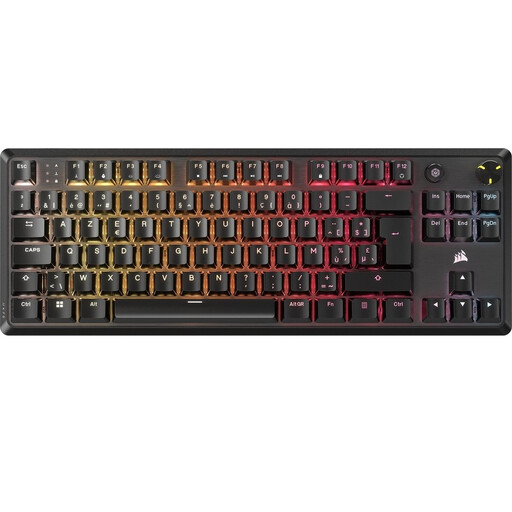
Corsair K70 CORE TKL, BE AZERTY, MLX Red
A TKL model to consider if you’re looking for a more compact keyboard without a number pad.
Mechanical gaming keyboard with BE AZERTY layout and MLX Red switches. Check that this physical layout suits the characters and shortcuts you use.
View on Joybuy
 No image available
Trust Vaiya Wireless Keyboard, US QWERTY
An option to compare if you want a full-size keyboard with a number pad.
The product name describes a wireless keyboard with a number pad and scissor keys. It has a US QWERTY physical layout, so check the key positions suit the way you type.
View on Joybuy
 No image available
Razer DeathStalker V2 Pro Tenkeyless, US layout
An option to compare if you’re looking for a tenkeyless gaming keyboard and don’t need a number pad.
The product name specifies a US layout. Check that it suits the characters and shortcuts you use when writing.
View on Joybuy
 No image available
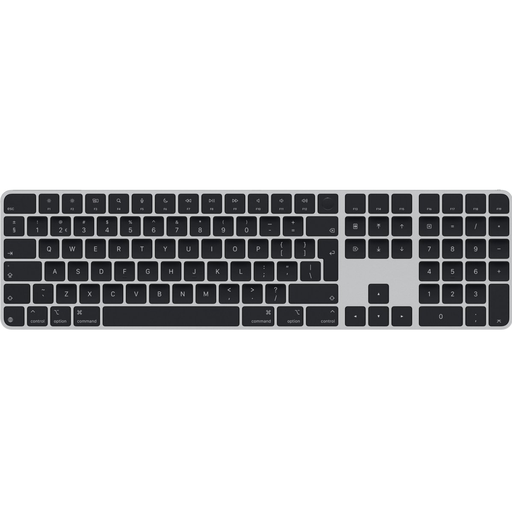
Apple Magic Keyboard, Dutch QWERTY, black
An option if a Dutch QWERTY layout is important for the text you type.
The product name mentions USB and Bluetooth. Check that the model and connection specified suit your computer and workspace.
View on Joybuy
Frequently asked questions
Do I need a special keyboard for nested chapter and paragraph headings?
No, you create heading levels in your word processor. In Word, you can use built-in styles such as Heading 1 and Heading 2 for multilevel numbering; headings in the main document text can then appear in the Navigation pane. Headings in text boxes, among other places, won’t appear there.
How can I avoid ordering the wrong keyboard layout?
Check the physical layout of the exact model on offer and look at the characters and shortcut keys you use often. The R-Go Compact Break model we looked at is QWERTY-US; for the K3 Max ISO, Keychron lists UK, German, Swiss and Nordic models, among others.
How should I set up a workspace for long writing sessions?
Think of the keyboard as part of your entire screen-based workstation, and vary the strain on your body. Arboportaal states that for employees who work at a screen for more than 2 hours a day, the screen and keyboard must not be attached to each other; this requirement doesn’t necessarily apply to every writer using a computer at home.
What if my keyboard breaks too soon under normal use?
In the Netherlands, the legal guarantee applies alongside any manufacturer’s or seller’s guarantee. According to ACM ConsuWijzer, there is no fixed statutory guarantee period: what you could reasonably expect from the product and how it has been used are what matter. The seller is your point of contact.
What rules apply to an electronic or wireless keyboard sold in the Netherlands?
Products covered by harmonised EU rules that specifically require CE marking must meet those marking requirements; wireless keyboards are also covered by the EU framework for radio equipment. A product listing or a matching model number alone doesn’t prove that the specific item on offer complies with the applicable rules.


