Who is this for?

Writers who review lots of edits

If you edit long documents, a layout that puts navigation keys and familiar shortcuts within easy reach can be useful. Microsoft Support notes that shortcuts described for a US layout may work differently on other layouts.

Writers who type for long sessions

If you type for extended periods, you may want to consider key feel, hand position and your workstation setup. A split keyboard lets you position its two halves separately, but it cannot guarantee a particular personal outcome.

Writers in shared spaces

If you want to avoid disturbing others, compare the typing noise and key feel. Scissor switches and mechanical switches are different types, and the noise can vary depending on the exact version.

What to consider when choosing

Flat keyboard with scissor switches

Good for: anyone looking for a full layout and laptop-style key feel for writing and editing.

Trade-off: a full-size keyboard takes up more desk space than a compact model.

Split keyboard

Good for: anyone who wants to position the two keyboard halves separately.

Trade-off: you may need time to get used to a different position, and it is no guarantee against discomfort.

Compact, programmable mechanical keyboard

Good for: anyone who wants to save space and remap keys for frequently used commands.

Trade-off: check that the navigation keys, layout and switch type suit you; remapping does not replace the features in your word processor.

Curved keyboard with palm rest

Good for: anyone who wants to try a different hand position without using two separate keyboard halves.

Trade-off: a manufacturer's comfort claims cannot predict how the shape will feel to you.

What to consider What to look for Who should pay particular attention?
Layout and editing tasks Try the arrow keys, function row and frequently used commands in your own word processor. Check the physical language layout of the exact version. If I often navigate through text and edits, I want quick access to the keys I usually use. Around 33% of consumers give layout and editing tasks their highest priority.
Hand position during long sessions If possible, assess the positioning at your own desk and take your mouse position into account too; don't treat an ergonomic label as a promise that it will prevent discomfort. If I write for long periods, I want to choose a hand position that suits my workstation. Around 25% of consumers give hand position their highest priority.
Key feel and typing noise Compare the key feel and noise of the exact version. Don't assume a keyboard is quiet based only on its brand name or the word ‘mechanical’. If I write in a shared space, I give considerable weight to typing noise and key feel. Around 25% of consumers give key feel and noise their highest priority.
Connectivity and devices For the exact version, check the connection type, operating system support and any software for customising keys. If I write on different devices or at different workstations, I want a connection and switching method that suits them. Around 17% of consumers give switching between devices and workstations their highest priority.

Avoiding common buying mistakes

  • Expecting the keyboard to track edits

    Track Changes and accepting or rejecting edits are features of your word processor. Programmable keys won't do this automatically.

    First, check how to use the review features and commands in your application. Only consider customising keys if you want quicker access to those commands.

  • Assuming every version of a model is identical

    Key layout, connectivity and switch type can vary between versions. As a result, a shortcut may work differently on another physical layout.

    Before buying, check the full variant name, layout and connection type, then compare them with the keys you use every day.

    An unsuitable layout, connection type or switch variant may mean you have to exchange the keyboard.

  • Assuming an ergonomic shape will prevent discomfort

    A keyboard's shape cannot predict how it will feel to you; your workstation and working habits also play a part.

    Consider hand and mouse position together and, where possible, compare the key feel before making your choice.

Brands to consider

Logitech

Relevant models range from a full-size, flat keyboard to a curved model with a palm rest.

  • Logitech says the MX Keys S can switch between up to three devices, and that Smart Actions works through the Logi Options+ app.
  • Check that the software is available for your computer. Logitech's comfort claims for Wave Keys are manufacturer claims; choose the layout that suits you.

R-Go Tools

The Split Break is an option if you want to position the two keyboard halves separately.

  • The manufacturer describes a software-controlled break indicator and light key action.
  • Check the version, layout and software compatibility. Its shape does not guarantee an individual health outcome.

CHERRY

The KC 6000 SLIM is a flat, full-layout keyboard with scissor switches, designed for a fixed workstation.

  • CHERRY specifies USB-A and Windows for this model.
  • According to CHERRY, this model has no backlighting. Check the physical version; layouts are not automatically interchangeable.

Keychron

The K3 Max is a compact mechanical option with a 75% layout.

  • Keychron specifies wired, Bluetooth and 2.4GHz connections for the K3 Max.
  • Check the language layout and version. Features of a specific ISO variant, such as hot-swappable keys, do not automatically apply to every K3 Max.

Keyboards at Joybuy

This selection includes keyboards for writing and editing, with both full and compact layouts, as well as wired and wireless options.
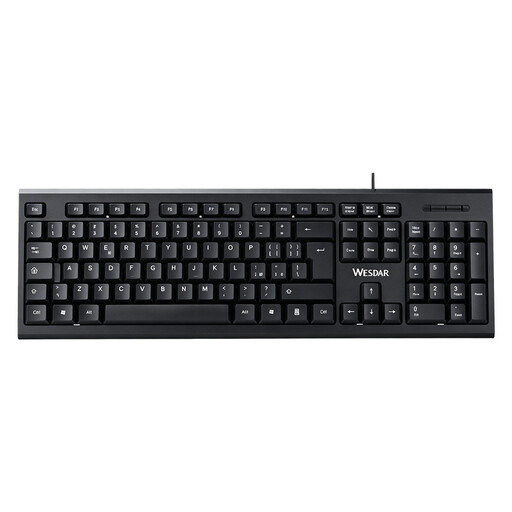
Wired keyboard with numeric keypad, QWERTY, black

Wired keyboard with numeric keypad, QWERTY, black

A full-size keyboard with a numeric keypad may suit you if you use lots of keys and navigation features while editing.

The title specifies a wired plug-and-play connection and a QWERTY layout.

Joybuy
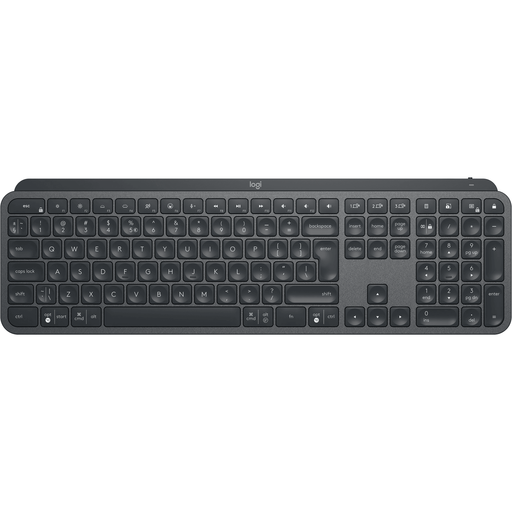
Logitech MX Keys for Business, QWERTY US

Logitech MX Keys for Business, QWERTY US

Suited to anyone looking for a full-size keyboard with a QWERTY US layout; check that the physical layout works with the shortcuts you usually use.

The product details mention customisable keys and switching between up to three devices.

Joybuy
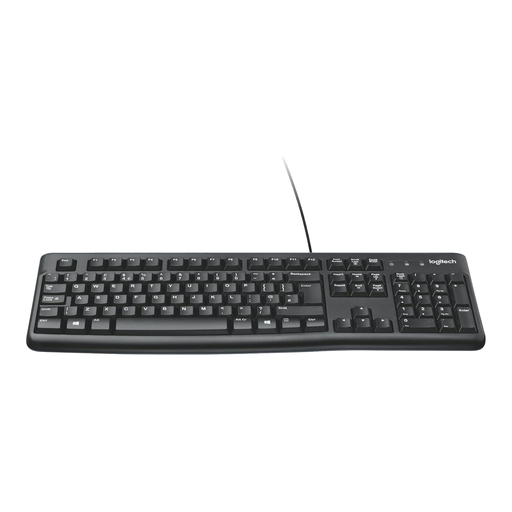
Logitech K120 wired keyboard, black

Logitech K120 wired keyboard, black

A wired option if you're looking for a full-size keyboard for long typing sessions.

The product information describes quiet, low-profile keys. Check the layout of the exact version before ordering.

Joybuy

Trust Vaiya wireless keyboard, full-size, numeric keypad, scissor switches, QWERTY US

Trust Vaiya, wireless, full-size, numeric keypad, QWERTY US

The full layout and numeric keypad may suit anyone who wants to use lots of keys directly.

The title specifies scissor switches and QWERTY US. The product details mention connections to up to four devices via Bluetooth or a USB receiver.

Joybuy

Ajazz AK820 Pro, 75% mechanical keyboard, QWERTY US, wired, Bluetooth and 2.4G

Ajazz AK820 Pro, 75% mechanical, QWERTY US, wired, Bluetooth and 2.4G

A compact 75% layout may suit you if you want to save desk space while still using navigation keys.

The title specifies QWERTY US and wired, Bluetooth and 2.4G connections. Check that the layout works with your shortcuts.

Joybuy

Frequently asked questions

Does a programmable keyboard track edits in my document?

No. In Word, you turn on Track Changes in the application and review edits there. Programmable keys can make commands easier to access; check your version of Word, operating system and key settings to set this up.

Do you need a special shortcut or US layout to review edits?

No. You can also manage edits using the Review tab in Word. Microsoft Support warns that published shortcuts are based on a US keyboard layout and may work differently on other layouts, so try your usual commands with the layout you choose.

What should you check about connectivity and settings?

Check the connection type and operating system for the exact version. CHERRY specifies Windows and USB-A for the KC 6000 SLIM; Keychron lists wired, Bluetooth and 2.4GHz connections for the K3 Max. Also check whether any software for customising keys is available for your computer.

What cooling-off period applies to online purchases in the Netherlands?

For online consumer purchases, a 14-day cooling-off period applies in many cases, according to the Dutch Government. The cooling-off period does not apply to every purchase.

Is a split keyboard essential if you write a lot?

No, the rule mentioned does not require a split keyboard. However, Arboportaal states that for employees who work with a display screen for more than two hours a day, the screen and keyboard must not be attached to each other.
