Choose a keyboard with a layout and key feel that are comfortable during long writing sessions, and navigation keys that suit the way you edit. Turn on Track Changes in your word processor, not on your keyboard; Microsoft Support explains how to do this in Word. Before buying, check the exact keyboard layout, device compatibility and product documentation, including the applicable CE marking.
Who is this for?
Dedicated journal writer
Writes longer passages and prioritises a comfortable key feel and a workspace that can be set up to suit them. The Chartered Institute of Ergonomics and Human Factors advises keeping your shoulders relaxed and forearms horizontal while typing; a keyboard’s shape alone cannot guarantee that using it will be free from discomfort.
Detail-focused editor
Reviews their own or shared edits and wants to move through the text easily. Microsoft Support explains how Word marks additions and deletions when Track Changes is turned on.
Writer using a shared or flexible workspace
Looks for quiet typing when working near others, or a connection that suits the devices used to edit the text. RTINGS.com describes scissor switches as a generally quieter choice for shared workspaces; check the noise level of the specific version.
What should you look for when choosing?
| What to consider |
What to look for |
Who is this important for? |
| Comfort during long sessions |
Compare the key feel and profile; set up your workspace so you can type comfortably. |
When I write for long periods, I want keys that remain comfortable to use and a posture I can adjust. Around 33% of consumers give typing comfort their highest priority. |
| Navigation while editing |
Check the arrow and other navigation keys on the exact version; check the editing features in your word processor. |
When reviewing changes, I want to move through the text quickly. Around 27% of consumers prioritise navigation while editing. |
| Key noise |
Check the stated switch type and, if possible, assess the noise level of the exact version. |
If you write near other people, quieter keys may matter more than pronounced feedback. Around 20% of consumers prioritise quiet keys. |
| Layout and connection |
Compare the physical QWERTY or AZERTY layout with your devices, and check the connection type, Bluetooth support and operating system requirements. |
When I switch between devices, I want both the physical keys and the connection to be compatible. Around 20% of consumers give layout and device compatibility their highest priority. |
Common pitfalls
-
Buying a keyboard as if it tracks changes by itself
The keyboard won’t turn on revision marks in your document. You need to use the feature in your word processor.
First, check how to turn on Track Changes, view edits and review them in the software you write in. Then choose keys that suit the actions you perform most often.
-
Assuming a compact version is the same keyboard in less space
A TKL model has no number pad; on other compact layouts, navigation keys may also be positioned differently or accessed using key combinations.
Compare the physical layout of the exact version with the keys you use when writing and editing.
-
Mistaking a product family name for a specific version
For example, Trust Ody II is used for both a standalone keyboard and a keyboard-and-mouse set. The product name alone doesn’t always make it clear what’s in the box.
Check the full model name, what’s included in the box, the layout and the connection for the version on offer.
-
Confusing an extended warranty with your statutory rights
A commercial guarantee doesn’t replace your statutory right to a product that meets the required standards. Business.gov.nl makes this distinction clear.
Check exactly what an additional service package covers and compare its terms with your statutory rights before choosing it.
Relevant brands
CHERRY
The STREAM KEYBOARD and the more compact STREAM KEYBOARD TKL are wired models with SX scissor switches.
- CHERRY describes the SX keys as quiet.
- The TKL version has no number pad. The description of the noise level is not an independent measurement; check the layout of the version on offer.
Logitech
The MX Keys S is a low-profile wireless keyboard with device switching; the ERGO K860 is a separate split keyboard.
- According to Logitech, the MX Keys S has programmable keys and switches between up to three devices at the press of a button.
- Ergonomic claims about the ERGO K860 don’t automatically apply to the MX Keys S or to every user.
R-Go Tools
The Split Break Version 2 is a two-part keyboard whose halves can be positioned separately.
- R-Go describes a break indicator that works with its own software.
- Check that the version and layout suit the way you type; this does not establish any health benefits.
Trust
The Ody II keyboard-and-mouse set is a wireless set for one workspace.
- Trust lists quiet keys, an adjustable typing angle and a stowable USB receiver.
- A standalone Ody II keyboard is a different version from the set; check what’s included with the specific model.
Apple
The Dutch Magic Keyboard version with Touch ID is worth considering if you want to use Touch ID with a compatible Mac.
- For this Touch ID version, Apple lists a Mac with Apple Silicon and macOS 15.1 or later as system requirements.
- These requirements don’t automatically apply to other Magic Keyboard versions.
Keyboards at Joybuy
This selection includes wired and wireless models for writing and editing, including QWERTY US, Belgian AZERTY and Dutch versions. Turn on Track Changes in your word processor. The Dutch Authority for Digital Infrastructure states that electrical and electronic equipment must have the correct CE marking; check the marking and product documentation for the exact version.
 Image unavailable
Logitech MX Keys for Business – QWERTY US
Worth considering if you write on a full-size layout and switch between devices.
The product information lists QWERTY US, a wireless connection and Easy-Switch for up to three devices.
Programmable features work via Logi Options+; charging is via USB-C.
Joybuy
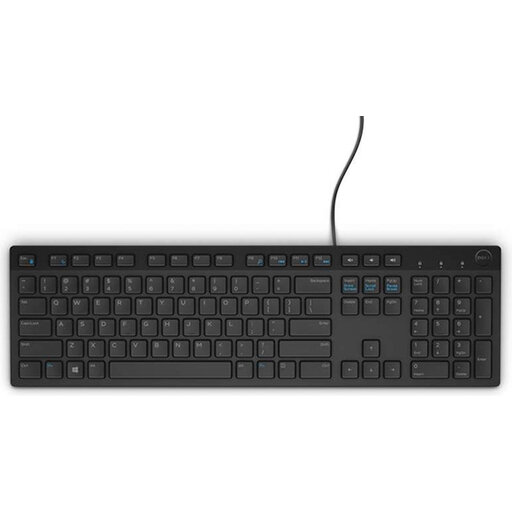 Image unavailable
Dell KB216 – USB, Belgian AZERTY, black
A wired option worth considering if you’re looking for a Belgian AZERTY keyboard with a number pad.
The product information lists a full-size layout, USB connection, quiet keys and navigation features.
The product information mentions a visible CE marking; this alone does not confirm that the version meets the applicable requirements.
Joybuy
 Image unavailable
Logitech K120 – wired USB keyboard, black
Worth considering for a dedicated writing space with a wired connection.
The product information lists QWERTY US International, a full-size layout with a number pad and low-profile keys.
According to the product information, the keyboard has a USB cable and adjustable feet.
Joybuy
 Image unavailable
Trust Vaiya – wireless keyboard, full-size, number pad, QWERTY US, black
An option worth considering if you want to write wirelessly on several devices and use a number pad.
The product information lists quiet scissor-style keys, QWERTY US and connection to up to four devices.
It connects via a USB receiver and three Bluetooth channels.
Joybuy
 Image unavailable
Apple Magic Keyboard with Touch ID and numeric keypad – Dutch, white keys
Worth considering if you’re looking for a Dutch layout and document navigation for a compatible Mac.
The product information lists Bluetooth, a rechargeable battery and document navigation keys.
According to Apple, this Touch ID version requires a Mac with Apple Silicon and macOS 15.1 or later.
Joybuy
Frequently asked questions
Does a special keyboard turn on Track Changes automatically?
No. In Word, turn on Track Changes from the Review tab; Word will then mark additions and deletions. Check how to view and accept or reject suggestions in your own word processor.
How can you set up a workspace for longer writing sessions?
Start by keeping your shoulders relaxed and your forearms horizontal while typing. Position your keyboard and mouse so you can rest your forearms when you’re not typing. The Chartered Institute of Ergonomics and Human Factors also emphasises moving regularly; a different keyboard is no substitute for a suitable workspace setup.
What should you look for in a wireless keyboard?
Check that your device supports the listed Bluetooth connection or USB receiver, and see how the keyboard is powered. The relevant software is needed for extra features, such as the programmable actions on the MX Keys S.
What are your rights when buying online in the Netherlands?
When you buy from a business at a distance, you’re generally entitled to a statutory 14-day cooling-off period; exceptions and the seller’s information are also relevant. You also have the statutory right to a product that meets the required standards. Business.gov.nl explains that a commercial guarantee doesn’t replace this statutory right.
What should you look for in a keyboard’s product safety?
The Dutch Authority for Digital Infrastructure states that electrical and electronic equipment must have the correct CE marking. Check the marking and product documentation for the exact version; a model name or product listing alone does not establish whether it meets the applicable requirements.


