What should you look for?
First check that the physical layout and access to symbols and navigation keys suit the way you work. Then consider your posture, switching between devices and how the keys feel.
| What to consider |
What to look for |
Who is this important for? |
| Layout and navigation |
Check whether it’s ANSI or ISO, the active keyboard language and direct access to frequently used symbols, arrow keys and function keys. |
If I use code symbols and navigation keys often while programming, I want to reach them without awkward key combinations. Around 33% of consumers prioritise the code layout. |
| Hand position and workspace |
Check whether the keyboard has a fixed split frame or separately adjustable halves; assess where your hands and mouse sit in your own setup. |
For long days at a screen, I want to choose a layout that suits my workspace and preferred hand position. Around 27% of consumers give hand position top priority. |
| Switching between devices |
Check which connections and device-switching options the exact version supports, and whether any software features work with your operating system. |
If I switch between, for example, a computer and a laptop, I want to change devices easily. Around 20% of consumers prioritise switching between devices. |
| Key feel and typing experience |
Compare the scissor mechanism or the mechanical switch you’re considering. Also check whether you need a number pad, backlighting or configuration software. |
In a shared workspace, I want to consider how the keys feel and how noisy the keyboard is, without prioritising customisation more than necessary. Around 20% of consumers start with quiet, simple operation. |
Keyboards at Joybuy
These keyboards suit different preferences for key layout, programmable shortcuts, compact size and quiet operation.
 No image available
Trust Ody II Wireless Keyboard and Mouse Set, White
A good option if you’re looking for quiet operation and a full-size US QWERTY keyboard with a number pad; check that the layout suits your settings.
View at Joybuy
 No image available
AULA WIN60HE 60% Wired Gaming Keyboard, Hall Effect Magnetic Switch
A good fit if you’re after a compact 60% layout and a wired connection; check that the layout gives you suitable access to the navigation keys you use most.
View at Joybuy
 No image available
HP 725 Multi-Device Rechargeable Wireless Keyboard
A good option if you want to switch between devices or use programmable keys; check which features work with your operating system.
View at Joybuy
 No image available
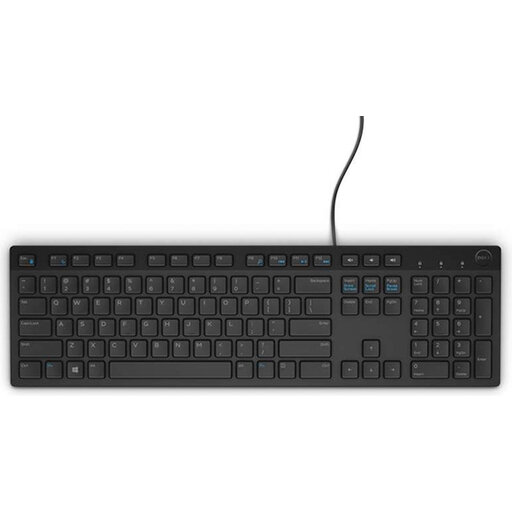
DELL KB216 USB Keyboard, Belgian AZERTY
Consider this version if Belgian AZERTY is the physical layout you need; also check that it matches the keyboard language configured on your computer.
View at Joybuy
 No image available
HP 450 Programmable Wireless Keyboard
A good option if you want to set up programmable shortcuts; check that the required software works with your computer.
View at Joybuy
Frequently asked questions
Do I need a mechanical keyboard for responsive web design?
No, a mechanical keyboard isn’t essential for building responsive layouts. First compare the layout of the symbols and navigation keys you use. Mechanical models are an option if, for example, you want hot-swappable switches or customisable key layers.
How can I make sure the characters I type match the symbols printed on the keys?
Check both the physical ANSI or ISO version and the active keyboard language on your computer. Try the code symbols and Dutch characters you use often before choosing a layout.
Do I have to use a separate keyboard with a laptop?
For employees who work at a screen for more than two hours a day, Arboportaal says the screen and keyboard must not be attached to each other. This means that when using a laptop, a separate screen or keyboard must be available. This is a workplace requirement that applies under specific conditions, not a rule requiring every personal buyer to choose a particular model.
What can I do if a keyboard I bought in the Netherlands is faulty?
Contact the seller. According to the Dutch Government, you’re entitled to a product that works properly; there is no fixed statutory guarantee period in the Netherlands. What you could reasonably expect from the product and the circumstances of the fault are important. A manufacturer’s guarantee does not replace these rights.
Can I try a keyboard bought online and return it?
For distance purchases from a business, the Dutch Government says you’ll often have a 14-day cooling-off period. Check who the seller is and what information they provide about the cooling-off period; this rule does not automatically apply to purchases from a private individual.


