Start by choosing a layout that makes the symbols and shortcuts in your development environment comfortable to use. Then decide whether posture, typing noise or switching between computers matters most to you. An adjustable split keyboard lets you change the position of its two halves, while a flat keyboard or programmable mechanical model involves different trade-offs. Kinesis warns that a keyboard cannot cure or prevent symptoms, and choosing one will not, by itself, make a website responsive.
Who is this relevant to?
Developers who type for long periods
If you build and maintain a booking site during long working days, consider how your keyboard, mouse and hands are positioned. TNO outlines factors to consider when working at a screen, while Logitech recommends setting up your workstation as a whole.
Developers who use lots of keyboard shortcuts
When writing code and testing forms or navigation, it’s useful to check in advance where the symbols and navigation keys are, and whether the keys can be remapped. Keychron lists QMK support for the V3 series, but the exact layout depends on the specific variant.
Developers working at shared workstations
If you work alongside others or switch between computers, consider the typing feel, connection and device switching. CHERRY lists USB-A for the KC 6000 SLIM; Logitech describes device switching and software features for supported models.
What should you consider when choosing?
Split keyboard
A good fit if: you want to adjust the distance between your hands and their angle at your workstation.
Trade-off: separately positioned halves take up desk space and require an adjustment period; the Logitech ERGO K860, by contrast, has a fixed, curved split.
Flat keyboard with scissor switches
A good fit if: you want a low-profile typing feel or need to keep noise in mind at a shared workstation.
Trade-off: check the exact layout and connection; software features such as Logitech Smart Actions require a supported device and Logi Options+.
Compact programmable mechanical keyboard
A good fit if: you want to remap keys and don’t need a number pad; the Keychron V3 ISO series has an 80% layout and QMK support.
Trade-off: the V3 series includes different ISO layouts, switches and keycaps, so check the full variant before ordering.
| Factor to consider |
What to look for when buying |
Who is this important to? |
| Posture when typing for long periods |
Compare a fixed split with separately adjustable halves, and check that the keyboard fits on your desk alongside your mouse. |
If you want to adjust your hand position during long working days, that flexibility may be decisive. Consumers who prioritise posture account for around 25% of the priorities mentioned. |
| Layout for coding and navigation |
Check whether it’s an ISO or ANSI version, where the symbols and navigation keys are, and whether your operating system supports remapping. |
If you use lots of symbols and shortcuts, you’ll want to know in advance whether the physical layout suits the way you work. Consumers who prioritise a coding-friendly layout account for around 25% of the priorities mentioned. |
| Sound and typing feel |
Check the key mechanism and, if possible, try the specific version. Don’t judge the noise from the word ‘mechanical’ alone. |
If you work close to others, typing noise may matter more than extensive remapping options. Consumers who prioritise quiet typing account for around 20% of the priorities mentioned. |
| Switching between computers |
Check the connection method, supported devices and whether the settings you want require additional software for each version. |
If you develop or test on several computers, quick switching may be your most important practical consideration. Consumers who prioritise device switching account for around 15% of the priorities mentioned. |
| Simple wired connection |
Check that the plug matches the available ports and review the stated support for your operating system. |
For a single, fixed workstation, a direct cable connection may be all you need. Consumers who prioritise a simple wired setup account for around 15% of the priorities mentioned. |
Pitfalls to avoid when choosing
-
Choosing based on the model name alone
The Keychron V3 ISO series is available with different physical layouts, switches and keycaps. The name V3 alone doesn’t tell you which version you’ll get.
Before buying, check the full variant and the position of the symbols you use when coding.
-
Expecting an ergonomic keyboard to solve symptoms
A keyboard is just one part of your workstation. Kinesis says that no keyboard can cure or prevent symptoms.
Choose based on the adjustability and fit you’re looking for, and consider the position of your chair, screen and mouse too.
-
Confusing a manufacturer’s warranty with your statutory rights
An additional manufacturer’s or retailer’s warranty is separate from your statutory rights if a product is faulty. The Dutch government says there is no fixed statutory warranty period in the Netherlands.
Check what an additional warranty covers, and contact the retailer if you have a problem with a faulty product.
Brands to compare
Logitech
The MX Keys S is a flat keyboard with customisable features; the ERGO K860 has a fixed, curved split.
- Logitech describes Smart Actions via Logi Options+ for the MX Keys S, and a split frame for the ERGO K860.
- The halves of the ERGO K860 can’t be positioned separately. For software features, check whether your device is supported.
Keychron
The V3 ISO series is designed for anyone looking for a compact mechanical keyboard with QMK remapping.
- Keychron lists an 80% layout and QMK support for the V3.
- The series includes several ISO layouts, switches and keycaps; the model name alone doesn’t identify the exact version.
CHERRY
The KC 6000 SLIM is a flat, wired, full-size keyboard with scissor switches.
- CHERRY lists USB-A and Windows support for this model.
- Check other versions separately if you need a Mac layout or a different connection.
Kinesis
The Freestyle2 series is designed for anyone who wants to adjust the distance and angle between the two keyboard halves.
- Kinesis describes the Freestyle2 as having separately positioned halves.
- Kinesis warns that a keyboard cannot cure or prevent symptoms; the adjustable setup also needs desk space.
Keyboards at Joybuy
This selection includes keyboards for programmable shortcuts, switching between devices, a compact wired setup and low-profile typing at a shared workstation.
 Image unavailable
HP 725 Multi-Device Rechargeable Wireless Keyboard
An option to consider if you want to switch between computers wirelessly and use programmable keys.
The product description lists a full-size layout, USB-C charging and connection via Bluetooth or a USB receiver. It also says you can switch between two Bluetooth devices and one device connected via the receiver.
View at Joybuy
 Image unavailable
HP 450 Programmable Wireless Keyboard
A potential fit if you’re looking for programmable shortcuts and a full-size keyboard.
The product description lists more than 20 programmable keys via HP Accessory Center, adjustable feet with up to 6 degrees of tilt, and compatibility with Windows 11.
View at Joybuy
 Image unavailable
AJAZZ AK820 MAX, wired with magnetic switches
A compact wired option if you don’t need a full-size keyboard.
The product information lists a 75% layout, a USB-C cable connection, a volume knob and hot-swappable magnetic switches.
View at Joybuy
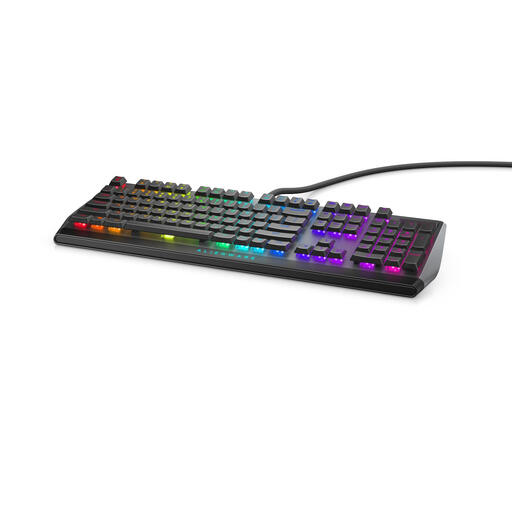 Image unavailable
Alienware AW510K USB Keyboard, Black, Grey
A potential fit for a wired setup where you want to use programmable keys.
The product description lists a QWERTY layout, programmable keys and Cherry MX Low Profile Red switches.
View at Joybuy
 Image unavailable
Trust Lyra Keyboard and Mouse, QWERTY US English, Blue
A set to consider if a low-profile typing feel and switching between devices are important to you.
The product description lists flat scissor-switch keys and quiet typing. It also lists connections for up to three devices via USB or Bluetooth; the layout is QWERTY US English.
View at Joybuy
Frequently asked questions
Which keyboard is right for lots of typing on a laptop?
For employees who work at a screen for more than two hours a day, Arboportaal describes a workstation requirement where the screen and keyboard aren’t attached to one another. In that situation, laptop users must be able to use a separate screen or keyboard. This is a conditional workstation requirement, not an obligation for every individual buyer to choose a particular model.
How should I set up a split keyboard?
Start by considering the position of your chair, screen, keyboard and mouse as a whole. If the halves can be positioned separately, you can adjust their distance and angle to suit your preferred setup. Don’t expect the keyboard itself to treat symptoms.
Do I need software to remap keys?
It depends on the model and the feature you want to use. Logitech lists Smart Actions via Logi Options+ for the MX Keys S; Keychron lists QMK support for the V3. Check software support for the exact version and your operating system.
What are my rights when buying online in the Netherlands?
For many applicable consumer purchases made at a distance, there is generally a 14-day cooling-off period, according to the Dutch government. This is separate from your rights if a product is faulty: the Dutch government says there is no fixed statutory warranty period in the Netherlands. Check who the seller is and which returns terms apply to your order.


