
Volunteer writing long texts
Writes and edits at a permanent workstation and wants to pay attention to hand and posture comfort. The Arboportaal recommends varying your activities during screen work.


Choose a keyboard that suits your layout, connection and workspace. A wired keyboard can be practical at a permanent desk, while a more compact or wireless model can save space or make it easier to switch between devices. Check the exact keyboard layout and whether any shortcuts require software. Offline access to reference materials needs to be set up separately on your computer or tablet; the keyboard does not store those files.
Writes and edits at a permanent workstation and wants to pay attention to hand and posture comfort. The Arboportaal recommends varying your activities during screen work.
Wants to leave room for a mouse and refer to text alongside other materials. A keyboard without a separate numeric keypad may be suitable if entering lots of numbers is not a priority.
For example, switches between a computer and tablet and needs to check that the connection and keyboard layout are suitable for each device.
First, choose a connection and layout that suit your computer and workspace. Then compare the size, key feel and any device-switching features. Set up offline access to your files separately.
| What to consider | What should you check? | Who is this important for? |
|---|---|---|
| Comfort when typing for long periods | Compare the key mechanism and size, and set up your workspace to suit you. The Arboportaal also recommends varying your activities and taking micro-breaks. | If you write long pieces, you’ll want a key feel and posture that suit you. Around 36% of consumers give long-term typing comfort top priority. |
| Connection at a fixed workstation | Check that your computer has the USB port you need. According to Trust, the Trust Primo Keyboard version has a USB-C cable and comes with a USB-A adapter. | If you use one computer and want a straightforward connection, compatibility is key. Around 29% of consumers prioritise an easy connection at a fixed workstation. |
| Space and switching between devices | Check whether you need a numeric keypad and whether the connection works with your devices. According to Logitech, the Logitech MX Keys S can switch between up to three devices. | If you want to save desk space or switch between devices, consider the size and connection. Around 21% of consumers give these needs top priority. |
| Key noise | Compare the mechanism on the exact version. CHERRY and Trust describe certain models as quiet, but this is not an independent noise measurement. | If you work in a shared space, you’ll want to consider others and the sound of the keys. Around 14% of consumers prioritise quieter keys. |
A keyboard lets you enter information, but it does not determine whether you can open files without an internet connection.
Check offline access on your computer or tablet, then choose a keyboard with a suitable connection.
Allow time to make the handbook and the reference materials you need available locally.
The wired Trust Primo Keyboard and a wireless Primo set differ in their connection and what’s included.
Check the full model name, connection, keyboard layout and whether a mouse is included with the version you’ve chosen.
The CHERRY STREAM KEYBOARD TKL does not have a separate numeric keypad.
Think about how often you enter numbers. If you do this frequently, check whether you’d like to use a separate numeric keypad.
You may need a separate numeric keypad if you enter a lot of numbers later on.
The MX Keys S and Signature K650 are different wireless keyboard models.
The wired STREAM KEYBOARD and STREAM KEYBOARD TKL differ in size, among other things.
The Trust Primo Keyboard version reviewed is a full-size wired keyboard.
The K3 Ultra-slim Wireless Mechanical Keyboard (Version 2) is a compact mechanical model.
This selection includes keyboards for a permanent writing space and a wireless model for use with multiple devices. Check that each model’s connection and keyboard layout suit your equipment.
 No image available
May suit a permanent writing space where you want to use a numeric keypad.
Full-size; QWERTY layout; numeric keypad; plug and play according to the product name.
 No image available
May suit you if you’re looking for a wireless model for use with multiple devices.
Full-size with numeric keypad; US QWERTY layout; scissor-mechanism keys according to the product name.
 No image available
May suit you if you’re looking for a wired mechanical model with a compact layout.
75% layout; wired; US QWERTY; hot-swappable linear switches according to the product name.
The listed layout is US QWERTY; check that it suits your needs.
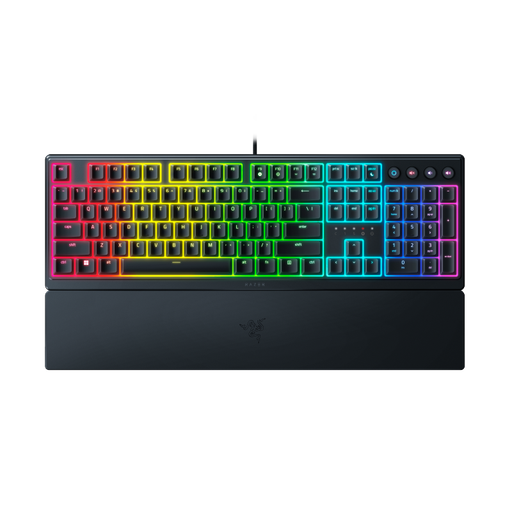 No image available
May suit you if you’re specifically looking for a low-profile keyboard.
US layout; low-profile design according to the product name.
Check that the US layout includes the keys you need for your handbook.
 No image available
May suit you if you’re specifically looking for a keyboard with a US QWERTY layout.
The product name specifies the US QWERTY layout.
Check beforehand that this layout suits your writing needs.
No. A keyboard lets you enter information on your device. Set up local access to the handbook and the reference materials you need separately on your computer or tablet.
Before buying, check which USB port your computer has. According to Trust, the Trust Primo Keyboard version reviewed uses a USB-C cable and includes a USB-A adapter. For other versions, check their own specifications.
No, a keyboard is not the only factor. For screen work, the Arboportaal also recommends varying your activities, taking micro-breaks and setting up your workstation properly. The regulations for employees who work at a screen for more than two hours a day have specific conditions and do not automatically apply to every volunteer.
According to the Rijksoverheid, when you buy from a business at a distance as a consumer, you will often have a 14-day cooling-off period. Check the applicable exceptions and the seller’s information. The Rijksoverheid also describes a take-back scheme for private buyers, whereby an old electrical appliance can be handed in when buying a similar one, including when buying online.
According to the Rijksoverheid, used batteries must not go in general waste. You can hand in household batteries at shops that sell batteries, among other places.