First, check whether you can read the key legends from your usual seated position in daylight, and whether the layout suits the characters and shortcuts you use. A conventional model won’t require you to learn new typing habits, while a programmable one may offer functions worth exploring for tasks you repeat. According to ZSA, the ErgoDox EZ has a split, customisable layout, but it takes time to get used to; backlighting alone won’t guarantee readability in bright sunlight, so consider the position of your window and screen too.
Who is this relevant to?
Programmer working beside a bright window
You want to be able to distinguish the key legends from your workstation, and you’re also considering whether you need to change the position of your desk or add window blinds. Logitech, CHERRY and Arboportaal offer relevant information about lighting, keyboards and the workplace.
Programmer who uses lots of keyboard shortcuts
You use programming symbols, navigation keys and repeated commands, and want to know whether a different layout or customisable keys would suit the way you work. Logitech and Keychron describe options for configurable actions and key customisation.
Programmer who spends long hours at a screen
You prioritise the position of your hands, keyboard and mouse, and are open to trying a different layout. ZSA describes the split ErgoDox EZ; TNO’s factsheet on working with display screens is published via Arboportaal.
What should you look for?
When running unit tests beside a bright window, the key considerations are readability, physical layout, customisation, posture and how simple you want things to be. The percentages below relate to consumers looking for a keyboard for this situation.
| What to consider |
What should you check? |
Who is this most important to? |
| Keys that are easy to read in daylight |
Check the key legends at your intended workstation, and consider the position of the window and any blinds. |
If I’m coding beside a bright window, I want to be able to distinguish the key legends from my usual seated position; around 28% of consumers in this situation prioritise readability. |
| Layout for code and shortcuts |
Check the exact version and the physical positions of punctuation, navigation and function keys. |
When I use lots of brackets, punctuation and navigation keys, I want to know where they are; around 22% of consumers prioritise a coding-friendly layout. |
| Customisable keys |
Check which keys you can customise, what software you’ll need and whether it suits your testing workflow. |
If I repeat test commands often, I want to find out whether key customisation suits the way I work; around 22% of consumers prioritise customisable keys. |
| Posture during long typing sessions |
Consider the space available for your mouse and forearms, and try an alternative layout if possible. |
During long testing sessions, I want to assess the position of my keyboard, hands and mouse as part of one set-up; around 17% of consumers start with posture. |
| Quiet typing and simple connectivity |
If possible, listen to the version you’re considering and check the connection type and any software requirements. |
In a shared workspace, I want to know whether quiet typing and simple connectivity matter more than extra settings; around 11% of consumers mainly choose based on quietness and simplicity. |
Common mistakes
-
Assuming backlighting guarantees readability in direct sunlight
Adjustable key backlighting doesn’t necessarily tell you how much contrast the legends will have from your seated position. Light coming through the window can also make the screen harder to see.
Check the keys in daylight and consider the screen position and any available blinds at the same time.
-
Assuming all ISO keyboards have the same layout
The Keychron K1 Version 6 is available in several ISO layouts, including UK, German, Swiss and Nordic.
Before buying, check the full variant name and the physical positions of the coding keys you use most often.
-
Thinking a split keyboard requires no adjustment
According to ZSA, the ErgoDox EZ has a split, columnar layout. The positions of your screen and mouse matter too; the design doesn’t guarantee a particular effect for every individual.
If possible, try the layout and assess your whole workstation before switching.
Brands to consider
Logitech
Worth considering if you’re looking for a simple wired model or configurable actions and lighting.
- According to Logitech, the MX Keys S adjusts its backlighting to suit the surroundings and supports Smart Actions through Logi Options+.
- This lighting feature doesn’t prove that the key legends will be easy to read beside every window. Check that the layout suits you too.
- According to Logitech, the K120 works via USB without requiring installation.
Keychron
The K1 Version 6 is worth considering if you’re looking for a compact, programmable mechanical keyboard.
- According to Keychron, this model supports key remapping and macros.
- The ISO layouts listed are UK, German, Swiss and Nordic; check that the version on offer has the key legends you want.
CHERRY
The STREAM KEYBOARD is a wired option with a low profile and scissor-switch mechanism.
- CHERRY lists hard-wearing key legends and quiet keystrokes among this model’s features.
- These are manufacturer claims, not independent measurements of readability in direct sunlight or noise levels at your workstation.
ZSA
The ErgoDox EZ is worth considering if you’re interested in a split, programmable, columnar layout.
- ZSA describes adjustable positioning for the two halves, interchangeable switches and a configurator.
- The unusual layout may take some getting used to. The manufacturer’s information doesn’t prove an individual health benefit.
Keyboards on Joybuy
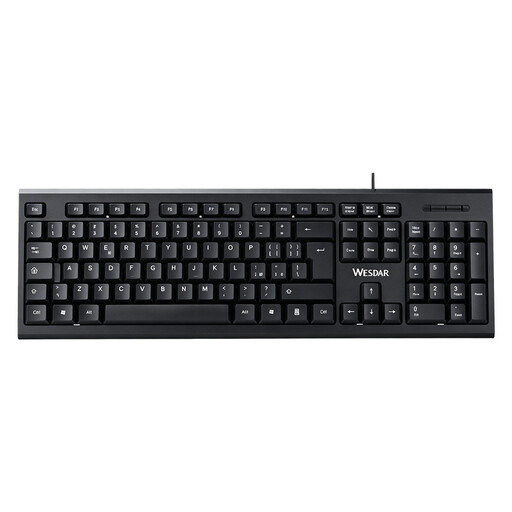
These Joybuy products range from a full-size wired keyboard to compact models with different layouts. When choosing a keyboard for unit tests, pay particular attention to the exact key legends and which keys you want to reach quickly.
 No image available
Wired QWERTY keyboard with numeric keypad
A full-size model may suit you if you want to keep a numeric keypad and a familiar layout.
Wired; QWERTY layout; numeric keypad; plug and play.
Joybuy
 No image available
AJAZZ AK820 MAX 75% Wireless Mechanical Keyboard, US QWERTY
The compact 75% layout may suit you if you want to save desk space and the stated US QWERTY key legends work for you.
75%; mechanical; US QWERTY; Bluetooth, 2.4G and USB-C; RGB lighting; hot-swappable switches.
Joybuy
 No image available
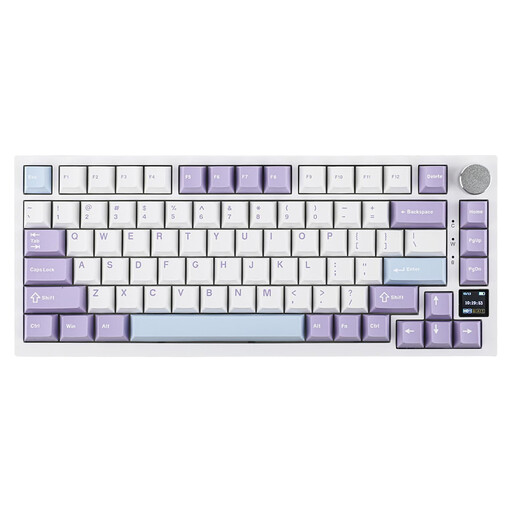
AJAZZ AK820 Pro 75% Mechanical Keyboard, US QWERTY
This compact model may suit you if you’re looking for a 75% layout and the physical US QWERTY layout matches the characters you use.
75%; mechanical; US QWERTY; wired, Bluetooth and 2.4G; TFT screen; RGB lighting; hot-swappable switches.
Joybuy
 No image available
Razer DeathStalker V2 Pro Tenkeyless, US Layout
The tenkeyless layout may suit you if you’re looking for a more compact keyboard with programmable keys and macro recording.
Tenkeyless; US layout; wired and wireless connections; programmable keys and macro recording. The product information advises against prolonged exposure to direct sunlight.
Joybuy
 No image available
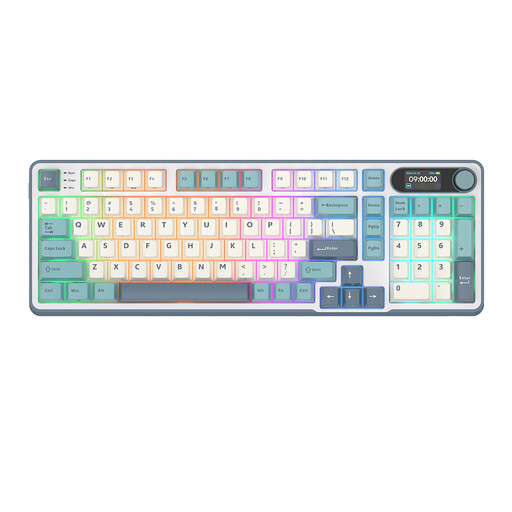
RK ROYAL KLUDGE S98, 98 keys
The stated 96% layout may suit you if you want to compare a more compact model with one that has a larger number of physical keys.
Mechanical; 96% layout; 98 keys; Bluetooth, 2.4G and USB-C; hot-swappable; RGB lighting.
Joybuy
Frequently asked questions
Is backlighting enough beside a bright window?
No, backlighting alone doesn’t guarantee that the key legends will be easy to read. Logitech describes lighting that adjusts to the surroundings for the MX Keys S; check the keys at your workstation in daylight too, and consider the screen position and blinds.
How do I get started with a programmable keyboard for testing?
First, check the physical layout and whether you can use the required software on your work computer. According to Keychron, the K1 Version 6 supports key remapping and macros via Launcher; Logitech describes Smart Actions for the MX Keys S through Logi Options+.
Do I need to be able to use a separate keyboard for long hours at a screen?
For employees who work with display screens for more than 2 hours a day, Arboportaal says that the screen and keyboard must not be attached to one another. If you use a laptop, you must be able to use a separate screen or keyboard; this is a conditional workplace requirement, not a general buying requirement for every reader.
What is the usual cooling-off period when buying online from a business?
The Dutch Government states that, in many cases, distance purchases come with a 14-day cooling-off period, and outlines some exceptions. Check the terms of the specific purchase; this isn’t a product-specific returns promise.


