Choose a layout that puts your most-used shortcuts within easy reach and fits on your desk alongside your mouse. In a shared room, quiet typing may matter more than a compact design; always check the exact version and connection. According to the Figma Help Center, you can’t carry out every action in Figma using only a keyboard: sometimes you’ll need a mouse or trackpad.
Who is this guide for?
Designer with a small desk
You want to leave room for your mouse and check that a compact layout has enough keys for the shortcuts you use most. Logitech describes the MX Keys Mini as compact; compare the layout of the model you’re considering with your own workflow.
Designer in a shared room
You want to keep disruption to housemates to a minimum, so pay attention to how noisy the keys are. Trust describes the Ody II as quiet, but this is not an independent noise measurement.
Designer with long typing sessions
Think about the position of your keyboard and mouse, your working posture and taking breaks. Arboportaal describes repetitive hand movements and static strain when working at a screen; an ergonomic product label alone doesn’t tell you whether a setup is right for you.
What should you look for?
Start with the space on your desk and a layout that suits your shortcuts. Then consider noise, working posture and the connection you need.
| What to consider |
What should you look for? |
Who is this important for? |
| Quiet typing |
Compare the key noise of the exact version; a description such as ‘quiet’ is not a standardised noise measurement. |
If I work in a shared room, I want to type without disturbing my housemates unnecessarily. Around 25% of consumers prioritise quiet typing. |
| Room for your mouse and keyboard |
Measure the available space and check which keys are included in the layout you’ve chosen, such as arrow and function keys. |
At a small desk, I want enough room to move my mouse without missing keys I use often. Around 25% of consumers prioritise desk space. |
| Shortcuts and layout |
Check the keyboard shortcuts for your operating system and whether the version you’re considering supports the key customisation you want. The Figma Help Center describes keyboard controls for Figma. |
For UI work, I want my most-used design commands to be easy to reach. Around 19% of consumers prioritise shortcuts that suit their needs. |
| Working posture and breaks |
Consider the position of your keyboard and mouse together. Arboportaal describes repetitive hand movements and static strain when working at a screen. |
If I work at my screen for long periods, I want to be able to set up my workspace comfortably and remember to take breaks. Around 19% of consumers prioritise working posture and breaks. |
| Connection and simplicity |
Check that your computer supports the connection used by the model you’ve chosen and that the layout suits your work. |
I want a keyboard that’s easy to connect to my computer, without features I don’t need. Around 12% of consumers prioritise a simple, basic option. |
Common buying mistakes
-
Assuming all compact keyboards have the same layout
The position and availability of keys affect how easily you can reach your usual shortcuts.
Compare the layout of the exact version with the shortcuts you use in your design software.
-
Assuming every mechanical keyboard is hot-swappable
For the Keychron K3 Max, Keychron says hot-swap is available only on the version marked as hot-swappable.
Check the full version name and make sure replacement switches are compatible with it before buying them.
-
Confusing a manufacturer’s warranty with your full legal protection
A manufacturer’s warranty is separate from your legal rights. According to the Dutch government, there is no fixed statutory warranty period for every product in the Netherlands.
Keep your proof of purchase and contact the seller if a product is faulty.
Brands to consider
Logitech
The MX Keys Mini and K120 offer two different options: compact and wireless, or wired and full-size.
- Logitech says the MX Keys Mini has compact keys and backlighting; the K120 has a USB connection and numeric keypad.
- Check the layout and connection for each model; these features don’t apply to every keyboard from the brand.
Keychron
The K3 Max is a compact mechanical option for anyone who wants to customise key functions.
- Keychron lists a 75% layout, multiple connection options and key customisation for the K3 Max.
- According to Keychron, hot-swap depends on the version. The specifications don’t tell you how loud the switches you choose will be or how comfortable they’ll feel to type on.
Trust
The Ody II is a full-size wireless option for anyone who wants to keep a numeric keypad.
- Trust lists low-profile keys, a USB receiver and quiet keys.
- The manufacturer’s description ‘quiet’ is not an independent noise measurement. A full-size model takes up more desk space than a compact one.
R-Go Tools
The Compact Break is a compact option with a break indicator.
- R-Go Tools describes a slim design and an indicator that works with R-Go Break software.
- The software feature is a reminder; health claims are not proof that the keyboard prevents or treats discomfort.
CHERRY
The KC 1000 is a full-size wired keyboard for anyone looking for a numeric keypad and USB-A.
- CHERRY specifies that the KC 1000 has quiet keys, a numeric keypad and a USB-A connection.
- This model isn’t compact or wireless; check that the layout and connection are suitable for your computer.
Joybuy products
This selection consists mainly of compact mechanical keyboards, alongside a wired 94-key model. Compare the layout, connection and features of each version with your desk and workflow.
 No image available
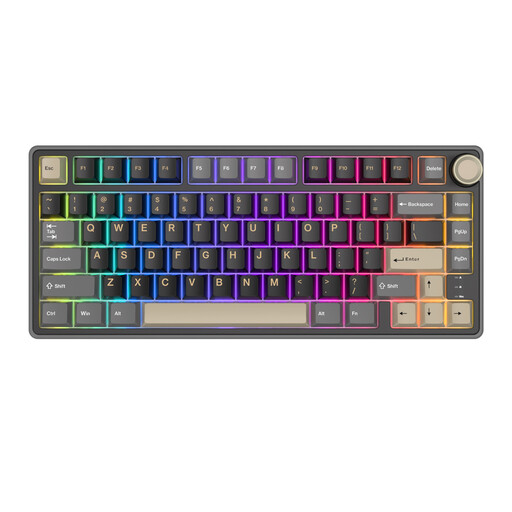
RK ROYAL KLUDGE R75 75% Wired Gaming Keyboard, K Silver Switch
A compact layout to consider if you want to leave room for your mouse on a small desk.
75% layout; wired; mechanical; hot-swappable version with K Silver Switch.
Joybuy
 No image available
AULA F75 75% Wireless Gaming Keyboard, QWERTY US Layout
A compact option to compare if you want to free up space on your desk.
75% layout; mechanical; three connection modes; US QWERTY layout.
Joybuy
 No image available
REDRAGON Wired 94-Key Full-Metal Mechanical Keyboard
A larger wired model to consider if you’re looking for a 94-key layout and a wrist rest.
94 keys; wired; mechanical; with phone holder and wrist rest.
Joybuy
 No image available
AJAZZ AK820 MAX 75% Wireless Mechanical Keyboard, US Layout QWERTY
A compact option to consider if you’re looking for a 75% layout and multiple connection options.
75% layout; mechanical; tri-mode connection; hot-swappable; US QWERTY layout.
Joybuy
 No image available
AJAZZ AK820 MAX Magnetic Axis Wired Mechanical Keyboard, 82-Key
A compact wired version to compare if you’re looking for an 82-key model.
82 keys; wired; mechanical; Magnetic Axis; hot-swappable.
Joybuy
Frequently asked questions
Do I need a programmable keyboard for UI design?
No, it isn’t essential. Figma has keyboard controls and shortcuts, but some actions require a mouse or trackpad. Key customisation is mainly useful if you want to change functions to suit your own workflow.
How do I connect a wireless keyboard?
It varies by model. According to Trust, the Ody II uses a USB receiver; Keychron lists Bluetooth and a wired connection for the K3 Max. Check which connections are available on the version you’ve chosen and whether your computer supports them.
Can a break indicator prevent discomfort?
A break indicator is not proof that a keyboard prevents discomfort. According to R-Go Tools, the Compact Break’s indicator works with the accompanying software to remind you to take breaks; Arboportaal also describes repetitive hand movements and static strain when working at a screen.
What are my rights if a keyboard I bought online doesn’t work properly?
In the Netherlands, a product must meet what you can reasonably expect of it, according to the Dutch government; if a product is faulty, contact the seller. Online purchases usually come with a 14-day cooling-off period, subject to legal exceptions. There is no fixed statutory warranty period for every product.
Does a wireless keyboard need a CE mark?
Radio equipment placed on the EU market must meet the applicable requirements; according to the Dutch Authority for Digital Infrastructure, the manufacturer affixes the CE mark when the product complies. This general rule does not confirm that a specific keyboard version has already been checked for compliance.
Do Dutch screen-work health and safety rules automatically apply to my study space?
No. The regulations referred to are aimed at employers and employees. The rule on using a separate screen or keyboard when working at a screen for more than two hours a day therefore doesn’t automatically apply as an obligation to every student.


