You don’t need a physically split keyboard to write with two editor panes open. The main thing is to choose a layout that gives you easy access to punctuation and navigation keys. For long writing sessions, your posture and breaks matter too. In a shared workspace, the noise made by the specific key switch variant can also be important. Before buying, check the key layout, connection and the keys used by your writing software.
Who is this guide for?
Writers with source material beside their draft
You switch between two editor panes as you write and want punctuation, arrow keys and shortcuts in familiar places. Literature & Latte explains how you can view two documents at once in Scrivener’s editor.
Writers who work in long sessions
You want to position your hands and arms comfortably, while taking your workspace and breaks into account. Arboportaal describes repetitive hand movements and static strain when working at a screen.
Writers in shared spaces
You want to consider keyboard noise without losing sight of the layout and feel you need. Noise can vary between models and, with mechanical keyboards, between switch variants.
What should you consider when choosing?
Start with the keys you use most for typing and navigation. Then compare how the keyboard suits your posture, how noisy it is and how it connects to your devices.
| What to consider |
What to look for |
Who might find this more important? |
| Writing and navigation |
Check that punctuation, arrow keys and function keys are easy to reach and work with your programme’s shortcuts. |
If I often switch between my draft and source material, I want to move easily through text and between panes. Around 31% of consumers prioritise navigation between editor panes. |
| Posture |
See whether you can adjust the position of your hands and arms, and consider the rest of your workspace and your breaks too. |
For long writing sessions, I want to position my hands and arms comfortably, without expecting a keyboard alone to solve every workspace issue. Around 31% of consumers give posture top priority. |
| Key noise and feel |
Compare the exact key switch variant; mechanical switches can differ in both sound and feel. |
In a shared space, I want to balance noise against the feel I prefer. Around 19% of consumers prioritise quieter keys. |
| Layout and connection |
Check the key legends, the correct Windows or Mac version, and the port or wireless connection you need. |
If I want to connect the keyboard to my computer without any surprises, I check the layout and connection beforehand. Around 19% of consumers prioritise compatibility. |
Common mistakes when choosing
-
Assuming a split editor means you need a split keyboard
Splitting the editor is a feature of writing software; separate keyboard halves are a different choice, designed to let you adjust the position of your hands.
First decide whether your main aim is to view two documents at once or to adjust your hand position.
-
Assuming every compact keyboard keeps the same keys
A smaller layout may leave out keys you use for navigation or place them somewhere different.
Compare the layout of the exact version with the arrow, function and punctuation keys you use while writing.
-
Assuming every mechanical keyboard is quiet
Key noise can vary by switch variant, so the product range alone won’t tell you how the version you choose will sound.
Check which switch variant you’re choosing and try it in the room where you write.
Keyboard brands to consider
Logitech
The MX Keys S is a low-profile keyboard with programmable functions; the MX Mechanical Mini is a compact mechanical model available with different switch variants.
- Logitech says the MX Keys S keys can be programmed. According to the manufacturer, the MX Mechanical Mini can switch between up to three devices.
- The feel and noise of the MX Mechanical Mini vary by switch variant. These features don’t necessarily apply to other Logitech models.
CHERRY
The KC 6000 SLIM is a wired Windows model with scissor-switch keys; the KC 6000 SLIM FOR MAC is a separate version.
- CHERRY specifies that the Windows version has a full-size layout and a USB-A connection.
- This version doesn’t have backlighting. Check the product number and layout to avoid mixing up the Windows and Mac versions.
R-Go Tools
The Split Break is designed for people who want to position the two keyboard halves separately.
- The Dutch manufacturer lists a wired QWERTY-US version with a software-controlled break indicator.
- An adjustable setup doesn’t, by itself, prove a physical benefit for every writer. Consider your workspace and breaks too.
Keychron
The Q6 Ultra 8K is a full-size mechanical keyboard with the option to remap keys.
- Keychron says the model has a numeric keypad, hot-swappable switches and several ways to connect.
- The full-size layout takes up desk space. The specifications don’t show that the high polling rate offers an advantage when writing prose.
Kinesis
The Freestyle2 is an alternative that lets you adjust the distance between the keyboard halves.
- Kinesis describes it as having membrane keys and a tenkeyless layout; several versions are available.
- Check the regional key layout and connection before buying. Don’t treat product claims about effectiveness as a guaranteed result for your situation.
Keyboards at Joybuy
These keyboards are suited to typing with two editor panes open. The selection includes full-size and more compact layouts, different connection options and keys with a range of feels.
 No image available
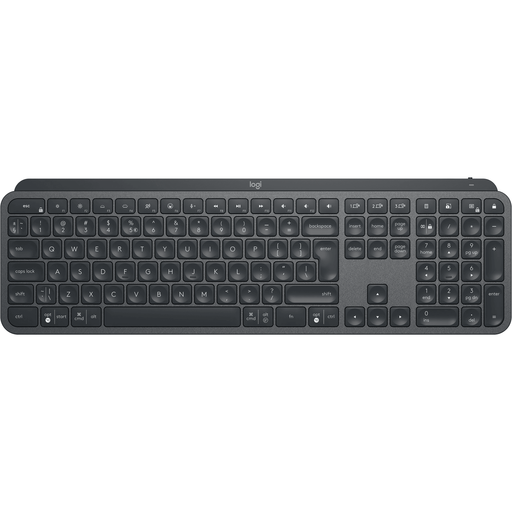
Logitech MX Keys for Business, QWERTY US
An option for anyone who wants to assign frequently repeated writing tasks to keys.
Full-size layout, customisable keys and a connection via Logi Bolt or Bluetooth; the product description says it can switch between up to three devices.
The QWERTY-US layout has different key legends from other regional layouts.
View at Joybuy
 No image available
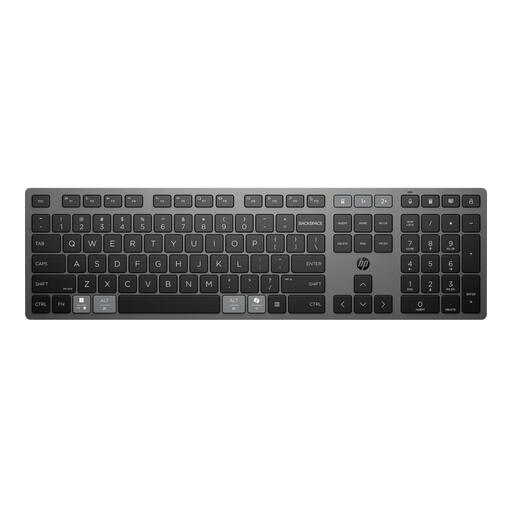
HP 725 Multi-Device Rechargeable Wireless Keyboard
A good fit if you want programmable keys and the ability to switch between devices.
The product description lists a full-size layout, programmable keys, and Bluetooth and 2.4GHz connections. It also mentions switching between up to three devices.
View at Joybuy
 No image available
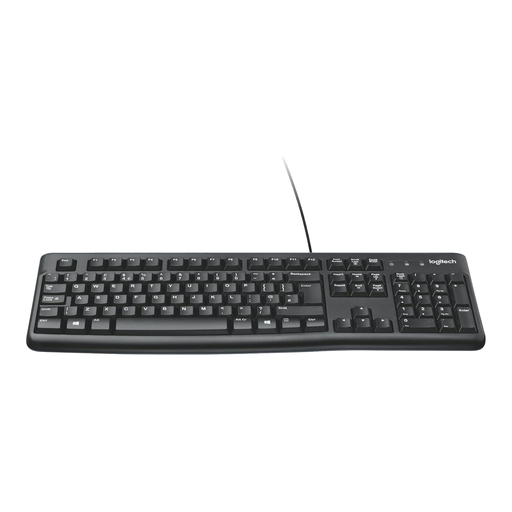
Logitech K120 wired keyboard, black
An option for anyone looking for a full-size layout with a numeric keypad and navigation keys for long writing sessions.
The product description lists low-profile keys, a wired USB connection and a QWERTY US International layout. It describes the keys as quiet.
View at Joybuy
 No image available
Trust Vaiya, full-size scissor-switch keyboard, QWERTY US
A good fit if you’re looking for scissor-switch keys and a full-size layout with a numeric keypad.
The product description lists a QWERTY-US layout, low-profile scissor-switch keys and connections to up to four devices.
Bear in mind that the key legends are QWERTY-US.
View at Joybuy
 No image available
Ajazz AK820 Pro 75%, mechanical, QWERTY US
A more compact layout to consider if you want to keep the arrow and function keys.
The product description lists an 82-key layout, three connection options and sound-dampening foam.
Check that the 75% layout and QWERTY-US key legends suit the way you work.
View at Joybuy
Frequently asked questions
Do I need a physically split keyboard for a split editor?
No, a split editor doesn’t require a physically split keyboard. Literature & Latte describes splitting the editor in Scrivener as a feature that lets you view two documents at once. Choose separate keyboard halves only if you want to adjust the position of your hands.
How do I set up two writing windows?
In Scrivener, you can choose a horizontal or vertical split via View > Editor Layout. For two windows in Windows, Microsoft explains how to arrange them using Snap. The available keyboard shortcuts depend on your programme and operating system.
How do I clean my keyboard?
For its devices, Logitech recommends using a slightly damp, lint-free cloth on the keys and warns against letting moisture seep into the device. For another model, check the manufacturer’s care instructions.
What are my rights if I’m unhappy with a keyboard bought online or it breaks too soon?
According to ACM ConsuWijzer, online consumer purchases usually come with a cooling-off period of up to 14 days after delivery, subject to legal exceptions. If a product breaks too soon under normal use, the seller is responsible for providing a solution under the statutory guarantee; in the Netherlands, this doesn’t simply mean a fixed two-year period.
Do the rules on display screen work apply to my writing setup too?
The obligations described by Arboportaal apply to employers and employees and don’t automatically cover every private novelist. For employees who work at a screen for more than two hours a day, Arboportaal explains, among other things, that the screen and keyboard must not be attached to each other, and that screen work must be alternated with other work or breaks.


