What should you look for when choosing?
First, work out how much table space you have and how much noise the people around you will find acceptable. Then compare the connection and key feel you want with your devices and the length of your writing sessions.
| What to consider |
What should you check? |
Who is this important to? |
| Key noise |
Check the description of the exact model and, if possible, try it out in a similar environment. Don’t treat a manufacturer’s claim as a sound measurement. |
When I’m writing alongside other people, I want to avoid disturbing them with repeated typing. Around 33% of consumers prioritise keeping key noise to a minimum. |
| Space and portability |
Check the dimensions and key size, and decide whether you need a numeric keypad. |
At a small shared workspace, I want to leave enough room and be able to take the keyboard with me. Around 27% of consumers give space and portability top priority. |
| Connection and devices |
Check whether your device supports Bluetooth or has a suitable USB port, and how many devices you can connect to the keyboard. |
When I’m working on my travel journal using both a laptop and a tablet, I want to be able to switch easily between my devices. Around 20% of consumers prioritise connectivity and switching between devices. |
| Typing feel during long sessions |
If possible, assess the key travel, responsiveness and hand position. Also check that the shape and height suit your workspace. |
For longer editing sessions, I want the keys and setup to feel comfortable. Around 20% of consumers give typing comfort over extended periods top priority. |
Joybuy products
This selection includes compact and larger keyboards for a shared writing table. When choosing, pay particular attention to the noise description, layout and connection.
 No image available
Corsair K55 CORE TKL, US QWERTY
The description says it has quiet membrane keys for typing at a shared table; this is not a sound measurement.
TKL layout without a numeric keypad; wired USB connection. Windows support is listed.
View at Joybuy
 No image available
AJAZZ AK820 MAX 75%, US QWERTY
The 75% layout is described as space-saving, while the different connection options may be useful if you use several devices.
The description lists Bluetooth, 2.4 GHz wireless and wired USB-C. Sound-dampening foam is mentioned, but there’s no measured or guaranteed noise level.
View at Joybuy
 No image available
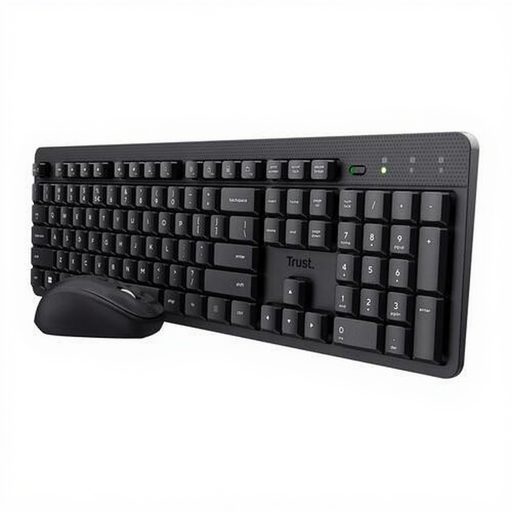
Trust Ody II, keyboard and mouse set, US QWERTY
The product description calls the keys quiet. If possible, try them out for yourself, as this description is not a comparative measurement.
A low-profile design, adjustable typing angle and stowable USB receiver are listed. The receiver requires a suitable USB port.
View at Joybuy
 No image available
Voxis B033 foldable Bluetooth keyboard
The foldable design and Bluetooth connectivity may suit you if you need to carry it around or work on a small table.
The description lists 63 keys and an integrated touchpad. Compatibility with tablets, smartphones and computers is mentioned; check that your device is supported.
View at Joybuy
 No image available
Trust Vaiya, full-size with numeric keypad, US QWERTY
The product description mentions quiet scissor keys. Its full-size layout with numeric keypad takes up more table space than a compact model.
The specifications list three Bluetooth channels, a USB receiver and a rechargeable battery. Check that the layout and connection are suitable for your devices.
View at Joybuy
Frequently asked questions
How do I connect a keyboard without a spare USB port?
Choose a Bluetooth model if your device supports Bluetooth, then pair it through the Bluetooth settings by following the instructions. A keyboard that only works with a USB receiver needs a suitable USB port.
Do I need to carry out any special maintenance on a wireless keyboard?
Before buying, check whether the version you’ve chosen is rechargeable or uses replaceable batteries. Keep any supplied receiver safe and follow the model’s instructions for batteries or charging.
Who can help if a keyboard bought online breaks too quickly during normal use?
When a consumer buys a product, the seller must put things right if it doesn’t meet reasonable expectations. ACM ConsuWijzer explains that a manufacturer’s warranty does not replace this legal right.
Can I return a keyboard bought online if I don’t like the layout or feel of the keys?
For many online purchases, you have a 14-day cooling-off period, as explained by the Dutch government. Check the terms and any exceptions that apply to your purchase; a private sale online is not automatically covered by the same distance-selling rules.
Am I legally required to use a separate keyboard when editing my travel journal?
Not just because you’re writing a travel journal. Arboportaal describes a workplace requirement for employees who work with a screen for more than 2 hours a day: the screen and keyboard must not be attached to each other, and when using a laptop, it must be possible to use a separate screen or keyboard. Whether this employment requirement applies depends on your work situation.


